Browse AI review: the no-code AI web scraper and website monitor. Prebuilt robots, features, real pricing, integrations, pros and cons, and who should use it.
Browse AI is a no-code platform that turns any website into a structured data source. Instead of writing scrapers or maintaining brittle scripts, you simply point and click on the parts of a page you care about, and Browse AI trains a "robot" to extract exactly that data on demand or on a schedule. It can also watch pages for changes and alert you the moment something moves — a price, a job listing, a competitor's headline.
The pitch is that data collection, which normally needs a developer, becomes something a marketer, analyst, or founder can set up in minutes. Robots run in the cloud, adapt when sites change layout, and feed their results straight into the tools you already use. Whether you need to track thousands of product prices or just keep an eye on a handful of pages, Browse AI is built to do it without you touching a line of code.
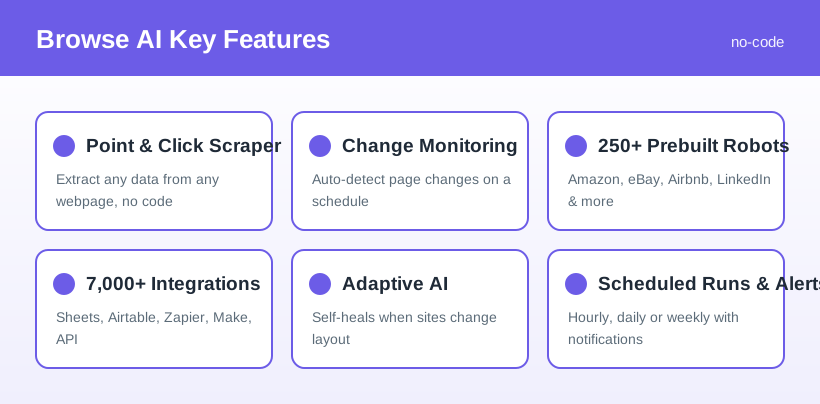
Browse AI's appeal comes down to removing the friction from web data:
The core of Browse AI is its visual recorder. You navigate to a page, click the elements you want — product names, prices, ratings, contact details — and the platform captures them as clean, structured columns. It can paginate, follow links, and log in behind forms, effectively turning any website into a live spreadsheet.
Beyond one-off scraping, Browse AI can keep watch over pages and notify you when they change. You choose how sensitive the alerts are and how often to check, making it useful for price drops, stock availability, policy updates, or competitor activity.
For common targets like Amazon, eBay, Airbnb, LinkedIn, and major job boards, Browse AI ships ready-made robots maintained by its team. You plug in a URL or search term and get structured results without building anything yourself.
Websites change constantly, and traditional scrapers break when they do. Browse AI's adaptive intelligence detects layout changes and adjusts robots automatically, dramatically reducing the maintenance that usually plagues web scraping.
Extracted data is only useful where you can act on it. Browse AI connects to Google Sheets, Airtable, Zapier, and Make, and exposes a REST API and webhooks so developers can wire results directly into their own applications.
Browse AI uses a credit-based model — each extracted row or monitored check consumes credits — layered on top of tiered plans. The headline figures below reflect annual billing; monthly billing costs more. Always confirm the current numbers on the pricing page before committing.
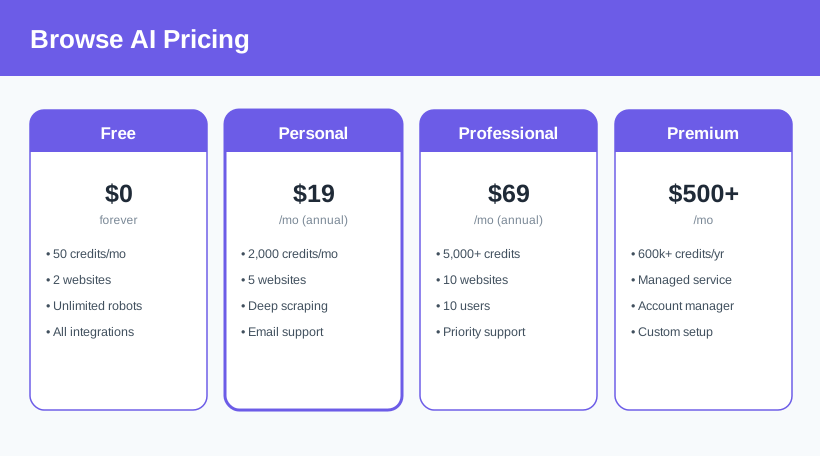
Credits, limits, and plan details change over time and depend on annual vs monthly billing — check the latest Browse AI pricing here before you subscribe.
Competitive pricing: online sellers use Browse AI to track rival prices and stock across marketplaces, feeding a live sheet that powers repricing decisions without manual checking.
Building lists: sales and recruiting teams extract contact details, company data, or job postings from directories and boards, turning scattered web pages into a clean, exportable database.
Staying informed: analysts and marketers monitor competitor pages, news, reviews, and brand mentions, getting alerted to changes instead of refreshing tabs all day.
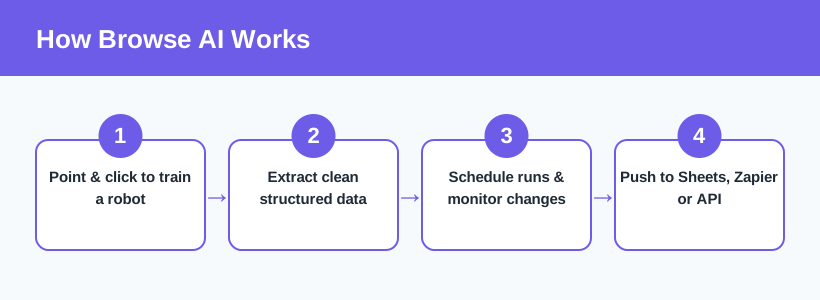
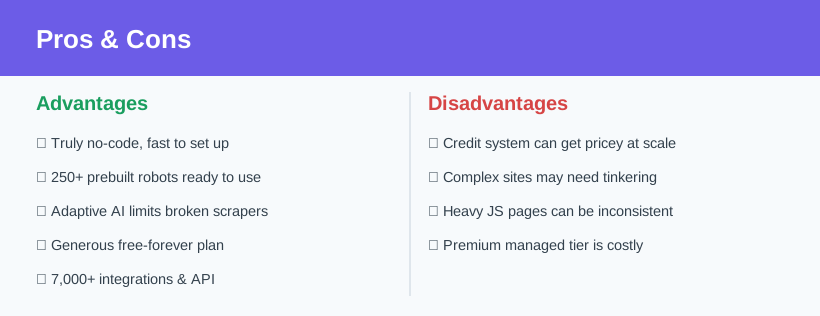
Browse AI is one of the most approachable ways to get structured data out of the web without hiring a developer. The point-and-click training, prebuilt robots, and adaptive AI genuinely deliver on the no-code promise, and the ability to monitor pages for changes turns it into more than just a scraper — it becomes an alerting system for anything that matters to your business. The free plan makes it easy to prove the value before spending a cent.
The main things to weigh are the credit-based pricing at scale and the occasional friction with complex, JavaScript-heavy sites. But for marketers, analysts, e-commerce sellers, and founders who need reliable web data and change monitoring without engineering overhead, Browse AI is a standout choice. If you have ever copy-pasted data from a website into a spreadsheet, this is the tool that automates it away.
Related reading: browse our other AI tools reviews to see how Browse AI fits alongside the rest of your stack.
Visit the official website to see the latest plans, pricing, and special offers.
Get Started - Browse AI* Affiliate link - we may earn a commission at no extra cost to you.