Cursor Review: The AI-First Code Editor Developers Are Switching To
Cursor review: the AI-first code editor with predictive Tab, an autonomous agent, and codebase-aware chat — features, pricing, pros and cons for developers.
Expert Review

What is Cursor?
Cursor is an AI-first code editor built by Anysphere that reimagines the developer environment around artificial intelligence. Rather than bolting an assistant onto an existing editor, Cursor is a fork of Visual Studio Code with AI woven into its core — so your extensions, themes, and keybindings feel familiar, but the AI is a first-class citizen rather than an add-on. It has become one of the fastest-growing developer tools, adopted by engineers at startups and major tech companies alike.
The pitch is simple: let you write, edit, and understand code mostly by describing what you want. Cursor predicts your next edit, chats about your entire codebase, and runs an agent that can implement features across many files on its own. It supports frontier models from OpenAI, Anthropic, and others, and is aimed at professional developers who want to move faster without leaving the comfort of a VS Code-style editor.

Benefits of Using Cursor
- Familiar but supercharged: as a VS Code fork, Cursor imports your extensions, themes, and settings in one click, so there is almost no learning curve to the editor itself.
- Whole-codebase awareness: Cursor indexes your project so its answers and edits are grounded in your real code, not generic snippets.
- Edit by describing: you can build features and refactor large chunks of code with natural-language instructions instead of typing everything by hand.
- Predictive editing: the Tab feature anticipates your next change across a file, turning multi-step edits into a series of quick keystrokes.
- Powerful agent: the built-in agent can implement tasks end to end — writing code, running commands, and fixing its own errors.
- Model flexibility: access to multiple top-tier AI models lets you pick the best one for reasoning-heavy or speed-sensitive work.
AI Features of Cursor
-
Tab Completion
Cursor's signature Tab feature goes far beyond ordinary autocomplete. It predicts your next edit — not just the next word — anticipating changes across a line or several lines and letting you apply them by pressing Tab. As you make one change, it suggests the related edits elsewhere, so refactors and repetitive updates fly by.
-
AI Agent
The Agent is Cursor's most powerful mode. Describe a task in plain language and it works across your whole project — editing multiple files, running terminal commands, reading documentation, and looping on errors until the task is complete. You review and approve its changes, keeping a human in the loop while offloading the heavy lifting.
-
Codebase Chat
Cursor's chat understands your entire codebase through semantic indexing. Using @ symbols, you can reference specific files, folders, docs, or symbols, and ask questions or request changes with full project context. It is like having a teammate who has already read every file in your repository.
-
Inline Edit (Cmd+K)
Select any code, press Cmd+K, and tell Cursor what to change. It rewrites, refactors, or fixes the selection in place and shows you a diff to review before you accept. It is the fastest way to make precise, targeted edits without switching to a chat panel.
-
Bugbot and Background Agents
On paid plans, Bugbot automatically reviews your pull requests for bugs and issues, while background agents run longer tasks remotely so you can keep working. Together they push Cursor from an in-editor assistant toward an always-on engineering teammate.
Pricing of Cursor
Cursor uses a freemium model with a free tier and paid plans for individuals and teams. Paid plans include a monthly allowance of AI model usage, and heavier tiers unlock far more capacity.
- Hobby: $0 — a free plan with limited agent requests and Tab completions, plus a two-week Pro trial. Good for casual use and trying Cursor out.
- Pro: $20/month — unlimited Tab completions, extended agent limits, background agents, and Bugbot code review. The standard plan for professional developers.
- Ultra: $200/month — around 20x the usage on frontier models, priority access, and maximum context for developers who lean on AI all day.
- Teams: $40/user/month — everything in Pro plus organization billing, admin controls, enforced privacy mode, and SSO for companies.
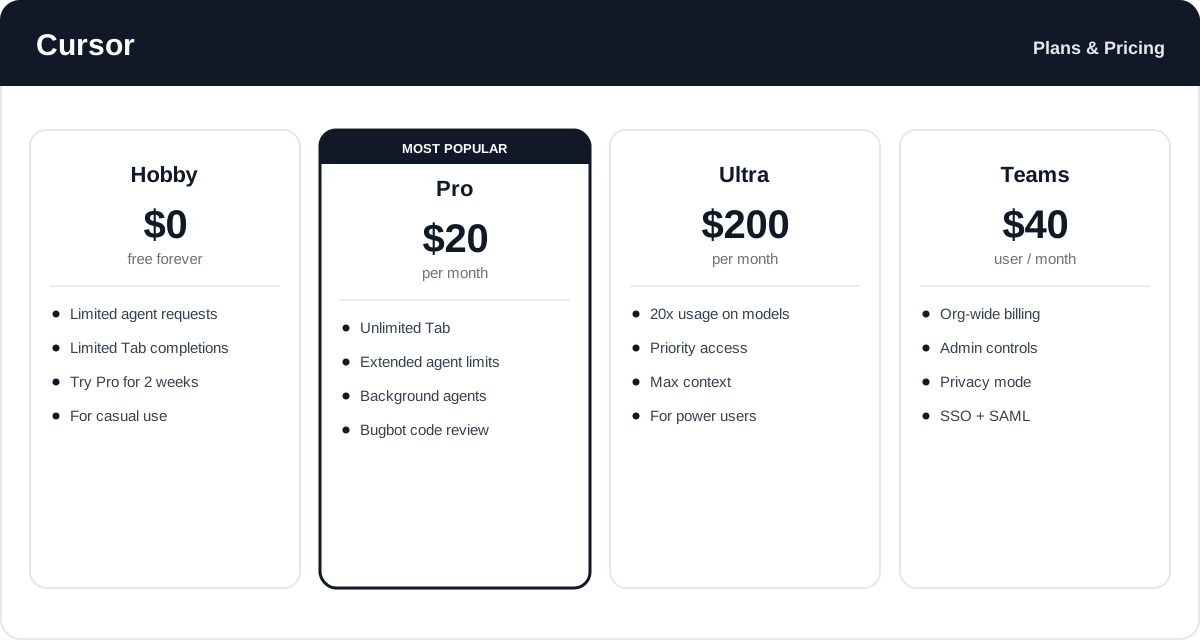
Pricing and usage limits change over time — check the official Cursor pricing page for the latest rates and exactly what each plan includes.
Real-World Use Case Analysis
-
Professional Software Engineers
Shipping features faster: engineers use the Agent to scaffold features across multiple files, then Tab and Cmd+K to refine the details, cutting the time from idea to working code. Codebase chat helps them navigate large, unfamiliar repositories quickly.
Refactoring at scale: Cursor's predictive edits make sweeping, repetitive refactors — renaming, restructuring, updating patterns — far less tedious than doing them by hand.
-
Startups and Rapid Prototyping
Moving at speed: small teams and founders use Cursor to build MVPs and prototypes quickly, leaning on the agent to turn plain-language specs into functional code and iterate fast under tight deadlines.
-
Learners and Career Switchers
Understanding real code: newer developers use codebase chat to ask how something works and inline edits to experiment safely, learning by doing while the AI explains and corrects along the way.
Pros and Cons of Cursor
-
Advantages of Using Cursor
Cursor offers real strengths, including:
- An AI-first design that makes its agent and predictive editing feel a step ahead of add-on assistants.
- Excellent whole-codebase understanding through semantic indexing and @ references.
- Familiar VS Code foundation, so your extensions and workflow carry straight over.
- A powerful agent that can implement multi-file tasks with a human reviewing the changes.
-
Disadvantages of Using Cursor
A few drawbacks to weigh:
- Heavy AI use can burn through model allowances, and costs climb quickly with the Ultra plan or extra usage.
- The agent can make sweeping changes that still require careful review to avoid subtle mistakes.
- Committing to Cursor means switching editors, and sending code to the cloud raises privacy considerations for some organizations.
Final Thoughts on Cursor
Cursor is the clearest example of what an AI-first editor can be, and for many developers it has become the tool that finally makes AI coding feel native rather than bolted on. Predictive Tab, a capable agent, and deep codebase awareness combine into a genuinely faster way to write and understand software — all inside a familiar VS Code shell. The trade-offs are cost at heavy usage, the need to review the agent's work, and the decision to switch editors and send code to the cloud. But if you code every day and want AI at the center of your workflow, Cursor is well worth the switch. Start on the free Hobby plan or the Pro trial to feel the difference before committing.
Related comparison: See how Cursor compares in Cursor vs Windsurf vs GitHub Copilot: Best AI Coding Tool? — or browse all comparisons & best-of guides.
Ready to try Cursor?
Visit the official website to see the latest plans, pricing, and special offers.
Get Started - Cursor* Affiliate link - we may earn a commission at no extra cost to you.