ClickUp Review: The All-in-One Work Management Platform
ClickUp review: the all-in-one work management platform with tasks, docs, dashboards, time tracking, and ClickUp Brain AI — features, pricing, pros and cons, and limits.
Expert Review

What is ClickUp?
ClickUp is an all-in-one work management platform that pulls tasks, documents, whiteboards, goals, dashboards, time tracking, and chat into a single workspace. Its pitch — "one app to replace them all" — is aimed squarely at teams tired of paying for and switching between a separate project manager, wiki, spreadsheet, and reporting tool. Instead of stitching those together, ClickUp tries to be the single place where work is planned, tracked, and shipped.
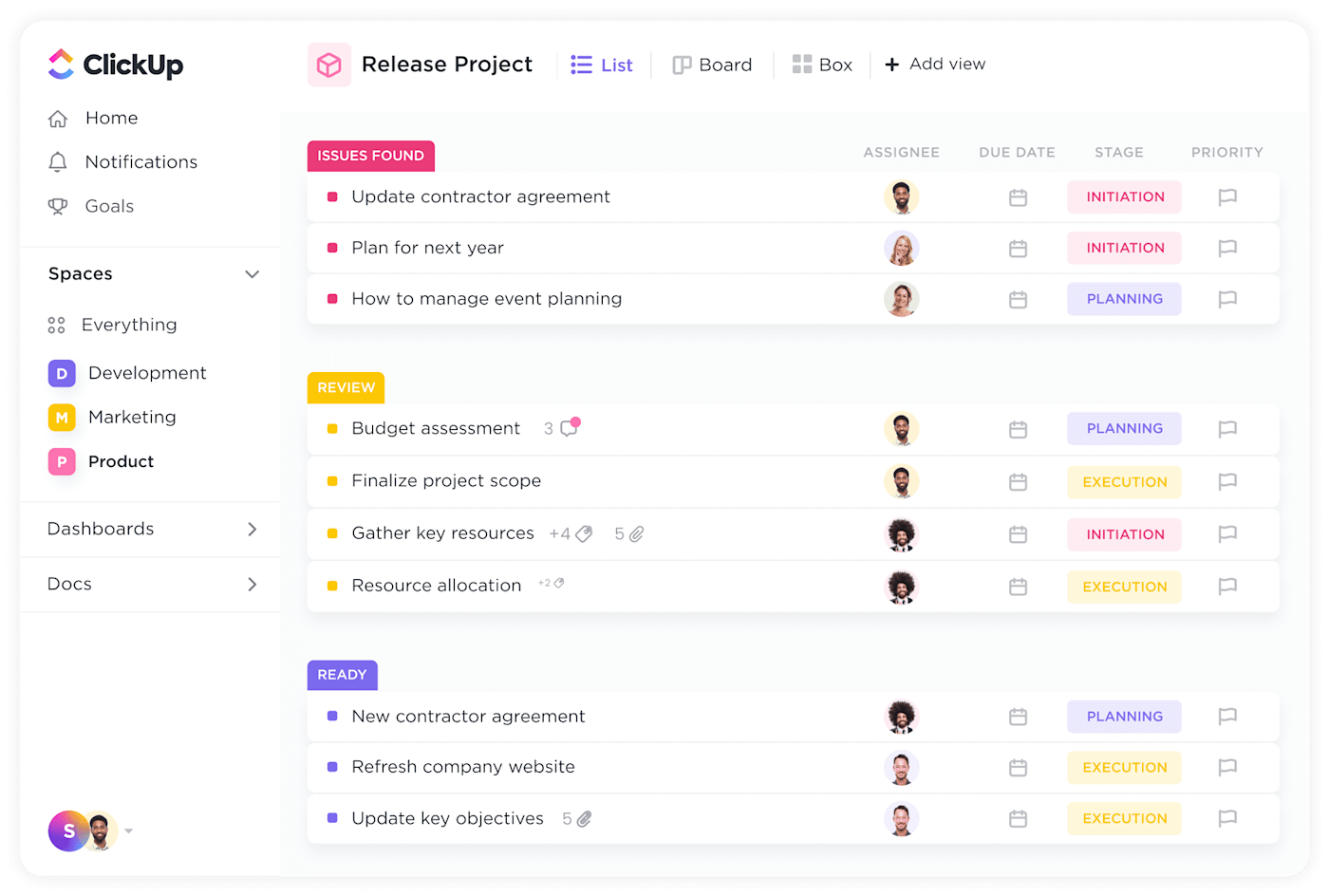
It serves a broad audience: solo freelancers and tiny startups on the generous free tier, all the way up to marketing, product, engineering, and operations teams inside large companies. The core building block is the task, but ClickUp layers a flexible hierarchy (Workspaces → Spaces → Folders → Lists) and more than a dozen views on top of it, so the same underlying data can be seen as a list, a Kanban board, a Gantt chart, a calendar, or a workload timeline. In recent years it has folded generative AI — branded ClickUp Brain — directly into that workspace.
Benefits of Using ClickUp
- Consolidates your tool stack: tasks, docs, goals, dashboards, and time tracking live in one place, which cuts subscription costs and the context-switching tax of jumping between apps.
- Extremely flexible views: the same work shows up as a list, board, Gantt, calendar, table, or workload view, so every team member can work the way they think without duplicating data.
- Deep customization: custom fields, custom task statuses, templates, and automations let you shape ClickUp around your process instead of forcing your process into a rigid tool.
- Strong free plan: the Free Forever tier includes unlimited tasks and members, making it genuinely usable for individuals and small teams before paying anything.
- Built-in AI: ClickUp Brain can summarize threads, generate updates, and answer questions using your own workspace data, reducing busywork like writing status reports.
- Wide integrations and platforms: it connects to Slack, Google Drive, GitHub, and hundreds of other tools, and runs on web, desktop, and mobile with offline support.
Key Features of ClickUp
-
Tasks and 15+ views
Everything in ClickUp is built on tasks with subtasks, checklists, dependencies, priorities, and custom fields. The power comes from viewing that data however suits the moment — List and Board for day-to-day execution, Gantt for timelines, Calendar for scheduling, and Table for spreadsheet-style bulk edits. You switch views without ever moving the underlying data.

-
Flexible hierarchy and Spaces
ClickUp organizes work into Workspaces, Spaces, Folders, and Lists, so a single account can cleanly separate Development, Marketing, and Product while still rolling everything up into one place. Each Space can carry its own statuses, custom fields, and permissions, which keeps large organizations tidy without spinning up separate tools per team.

-
ClickUp Brain (AI assistant)
ClickUp Brain is the platform's generative-AI layer, wired directly into your workspace data. It can summarize long task threads and documents, draft project updates and standups, generate subtasks from a description, and answer natural-language questions like "what's overdue in Marketing?" Because it reads your own tasks and docs, its output is grounded in real project context rather than generic text.

-
Workload and time tracking
The Workload and Timeline views show each person's committed hours against their capacity, making it obvious who is overbooked before deadlines slip. Native time tracking, time estimates, and timesheets are built in, so teams can plan realistic sprints and report billable hours without a separate tracker.

-
Docs, whiteboards, and dashboards
ClickUp Docs is a full document editor with slash commands, nested pages, and the ability to embed live tasks, so planning documents stay connected to the work they describe. Whiteboards handle brainstorming and mapping, while customizable Dashboards pull tasks, sprint velocity, time, and goals into real-time reporting widgets for stakeholders.

-
Automations and integrations
A no-code automation builder handles repetitive work — reassigning tasks, changing statuses, posting comments, or triggering actions when conditions are met. ClickUp also integrates with more than a thousand tools including Slack, Google Workspace, GitHub, Figma, and Zapier, and exposes a public API for custom workflows.
Pricing of ClickUp
ClickUp uses a per-member subscription with a genuinely useful free tier. Annual billing is cheaper than paying month to month, and the generative-AI features are sold as an add-on rather than baked into every plan.
- Free Forever: $0 — unlimited tasks and members, Kanban boards, calendar, and collaborative docs, with 60MB of storage. Best for individuals and small teams testing the platform.
- Unlimited: $7/member/month billed yearly ($10 billed monthly) — unlimited storage, Gantt charts, time tracking, custom fields, and integrations. Aimed at growing teams.
- Business: $12/member/month billed yearly ($19 billed monthly) — unlimited dashboards, advanced automations, workload management, and timesheets. This is the most popular tier for scaling teams.
- Enterprise: custom pricing — SAML single sign-on, advanced permissions and roles, audit logs, and dedicated support for larger organizations.
- ClickUp Brain (AI add-on): from around $9/member/month, added on top of any paid plan to unlock the full AI feature set.

Pricing changes over time — check the official ClickUp pricing page for the latest rates and what each plan includes.
Real-World Use Case Analysis
Agencies and Marketing Teams
Client and campaign management: agencies use Spaces to separate clients, custom statuses to mirror their approval pipeline, and time tracking to bill accurately. Dashboards give account managers a single, real-time view of every campaign's status without chasing updates in Slack.
Product and Engineering
Sprint planning and roadmaps: software teams run sprints with Board and Gantt views, track velocity on dashboards, and link tasks to GitHub commits and pull requests. Dependencies and the Workload view keep releases realistic by exposing bottlenecks and overbooked engineers early.
Operations and Small Businesses
Replacing a scattered tool stack: smaller teams lean on ClickUp to consolidate a spreadsheet-and-wiki mess into one system — SOPs live in Docs, recurring work runs on automations and templates, and goals tie daily tasks back to quarterly objectives, all within the free or Unlimited plan.
Pros and Cons of ClickUp
Advantages
- Genuinely all-in-one — tasks, docs, dashboards, goals, and time tracking replace several separate subscriptions.
- Exceptionally flexible, with 15+ views and deep customization through custom fields, statuses, and automations.
- One of the strongest free plans in the category, with unlimited tasks and members.
- ClickUp Brain grounds its AI output in your real workspace data, not generic text.
- Broad integrations, cross-platform apps, and an open API.
Disadvantages
- The sheer number of features and settings creates a steep learning curve, and the interface can feel cluttered for newcomers.
- Performance and occasional bugs have been common complaints, especially in very large workspaces.
- The best AI capabilities require the ClickUp Brain add-on on top of a paid plan, raising the real per-seat cost.
- The flexibility that makes ClickUp powerful can lead to over-engineered, hard-to-maintain setups without discipline.
Final Thoughts on ClickUp
ClickUp is one of the most capable and best-value work management platforms available, and for teams willing to invest in setting it up, it really can replace a stack of separate tools. Its flexibility, deep feature set, and unusually strong free plan make it easy to recommend to freelancers, agencies, and scaling companies alike. The trade-off is complexity: expect a learning curve, budget for the ClickUp Brain add-on if AI matters to you, and impose some structure so the customization doesn't turn into chaos. Start on the Free Forever plan to see whether its all-in-one approach fits how your team actually works — for most, it will be well worth the setup effort.