Keywords Everywhere Review: Keyword Planner Data in Your SERP, Billed by the Credit
Keywords Everywhere review: annual-only plans from $84, credits that expire after 12 months, a 54-credit Google search, and who should pick Ahrefs instead.
Expert Review

From free add-on to annual subscription
Keywords Everywhere has one good trick: it puts search volume, cost per click and advertiser competition next to the keywords you already see, on Google, YouTube, Amazon and about fifteen other sites. No dashboard, no project setup. You search, and the numbers are there.
What has changed is the bill. The extension, built in late 2015 and now published by Axeman Technology Solutions LLP of Mumbai, was free for four years. On 1 October 2019 it went paid, and the announcement promised "no monthly recurring plans" and a price of "just $1 for 10,000 keywords". Today every plan is annual. The cheapest, Bronze, is $84 billed once a year for 100,000 credits, checked on the pricing page on 15 October 2026. By our own arithmetic that is $0.84 per 1,000 keywords against $0.10 in 2019 - roughly eight times the rate, and today's credits expire.
That is not a reason to skip it. It is a reason to learn how credits get spent before you pay.
What it puts on the page
On a Google results page you get volume, CPC and competition under the search box, a trend chart, and three widgets down the side - Related Keywords, People Also Search For and Long-tail Keywords - each listing terms with their volumes. Under every organic result it adds Moz Domain Authority, referring domains and an estimated traffic figure. A trimmed version appears on YouTube, Amazon, eBay, Etsy, Bing, the Play Store, Pinterest, Reddit and Search Console, and inside ChatGPT, Claude and Gemini it adds prompt templates.
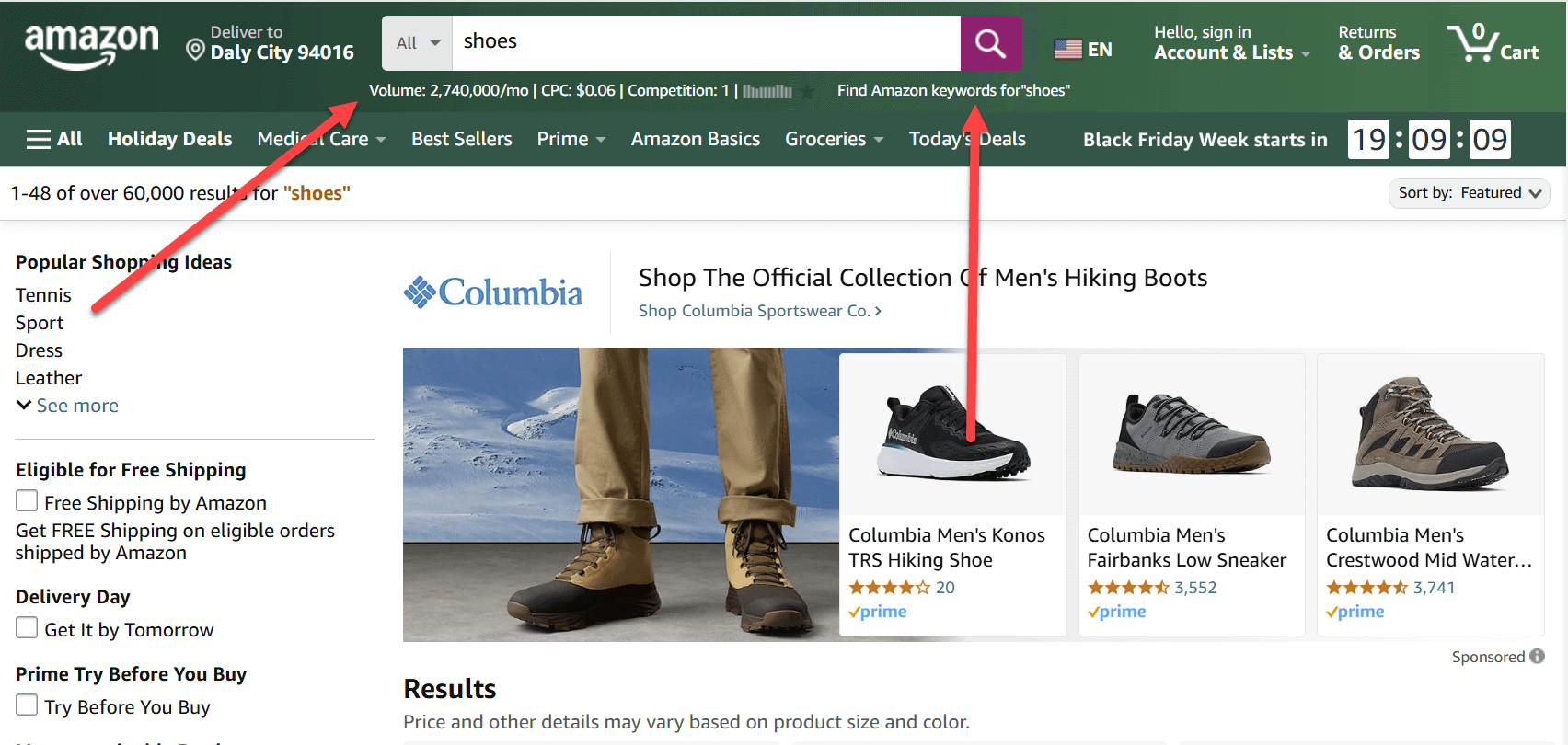
The numbers come from Google Keyword Planner. According to the API documentation you can ask for Keyword Planner data alone or a blend with clickstream data, competition is the Google Ads advertiser metric from 0 to 1, and the CPC shown is the lowest bid rather than the average. Treat it as a floor when you price a PPC campaign.
Two limits the store listing does not lead with. Location coverage is narrow: the FAQ lists Global, the United States, the United Kingdom, Canada, Australia, New Zealand, South Africa and India, and says only English is supported "extensively". Writing for German or Brazilian searchers? Your country is not there. And it runs on Chrome, Edge and Firefox only - "There is no Safari version or mobile app yet."
Pricing and plan limits
There are four self-serve plans, all billed annually. The monthly figures on the pricing page are equivalents, not something you can buy month to month; the FAQ says billing $7 a month "would cost more in payment fees than it is worth." Prices checked on 15 October 2026.
| Plan | Billed yearly | Monthly equivalent | Credits per year | Seats | Per-website cap | Per 1,000 credits* |
|---|---|---|---|---|---|---|
| Bronze | $84 | $7 | 100,000 | 1 | 1,000 | $0.84 |
| Silver | $168 | $14 | 400,000 | 3 | 2,000 | $0.42 |
| Gold | $480 | $40 | 2 million | 10 | 5,000 | $0.24 |
| Platinum | $1,440 | $120 | 8 million | 20 | 10,000 | $0.18 |
*Our arithmetic. The per-website cap is how many top keywords or backlinks you can pull when you research a domain or URL. Ordinary keyword lookups are "never capped" - they just use credits.
Every plan gets the full extension, the REST API and the MCP server. The extras are tier-gated. SEO Minion and the premium ChatGPT prompts start at Silver, Keyword Keg and the RapidLevelUp courses at Gold, and priority email support is Platinum only.
The rule that matters most sits in the terms: credits are valid for 12 months from purchase and "will not be carried over" when the subscription renews. Buy Silver for a busy quarter, use half, and the other 200,000 credits are gone. The one-time credit packs on the credits page are, oddly, cheaper per keyword than Bronze - 200,000 credits for 80, or 40 cents per 1,000 - though the page prints no currency symbol, and the same 12-month clock applies.
Refunds are where the vendor's own pages disagree. The terms, last updated in May 2023, allow a request within 48 hours and reserve the right to refuse it if "a large number of credits have been used up". The FAQ is kinder: email within a week of a forgotten renewal and "we will refund the full amount." Paddle is the merchant of record and adds sales tax in some countries.
Where the credits actually go
One credit buys the volume, CPC, competition and 12-month trend for one keyword. It is spent "irrespective of whether the keyword has any search volume", so a long-tail phrase that shows 0 still costs you.
The catch is that one search is never one keyword. The vendor's own example is a Google query showing 8 Related keywords, 20 People Also Search For and 25 Long-tail suggestions, which costs 1 + 8 + 20 + 25 = 54 credits. At that rate Bronze covers about 1,850 fully loaded searches a year. Five a day. Autocomplete drains them more quietly: switched on, it charges for every suggestion in the drop-down as you type. Opening Search Console with 500 queries on screen spends 500 credits, and Analyze Page Content charges for every keyword it finds on the page.
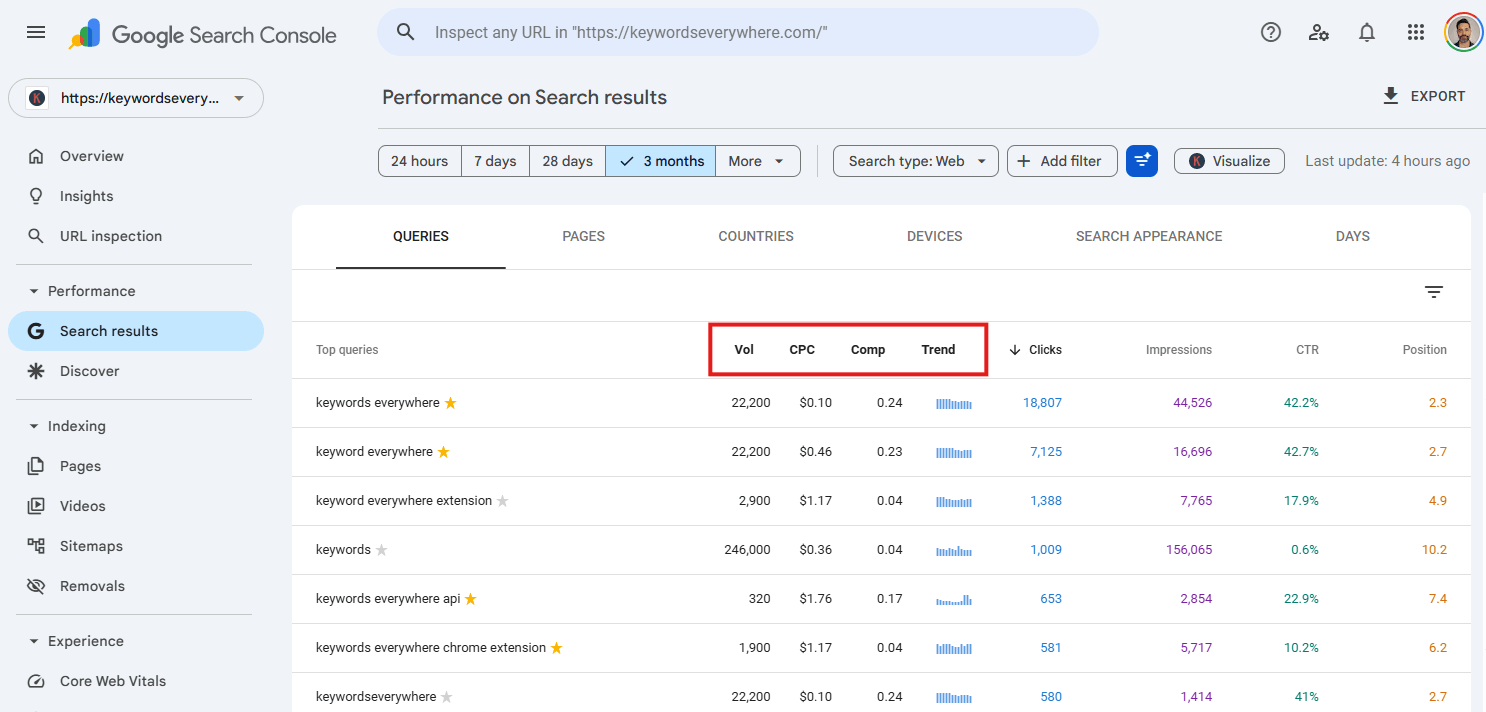
YouTube, Amazon and the other single-box sites are cheap by comparison - one keyword typed, one credit used - so the fix is all about Google. Turn autocomplete off in the extension settings on day one, then switch off whichever of the three Google widgets you never read. That takes a search from 54 credits back toward single digits, and turns Bronze from five searches a day into dozens.
Running dry does not lock the extension: the widgets keep listing keywords, just without volume, CPC or competition.
What the free version really includes
That depends on which of the vendor's pages you read. The free-features page lists the keyword widgets (without volumes), SEO Difficulty scores, Moz link metrics, website traffic, YouTube metrics, social media panels and more than 200 AI prompt templates. The SEO metrics page says of those same difficulty scores: "These are paid metrics, so they use credits, the same as search volume." The plan comparison names only the prompt templates and social panels as free.
Users notice the gap. A Chrome Web Store review from March 2026 reads: "The FREE version doesn't appear to exist and everything I tried said I had zero credits and needed to pay." The free tier is real but built around social media. For search volume on Google, plan on paying.
Traffic, backlinks, AI search and the API
Traffic totals and ranking-keyword counts under each Google result are free to view. Opening the keyword list behind them costs a credit per keyword shown, so the first 50 of a site's top 10,000 is 50 credits. The estimates come from the top 230 million keywords and a click-through curve, so they are rough, like every third-party traffic number.
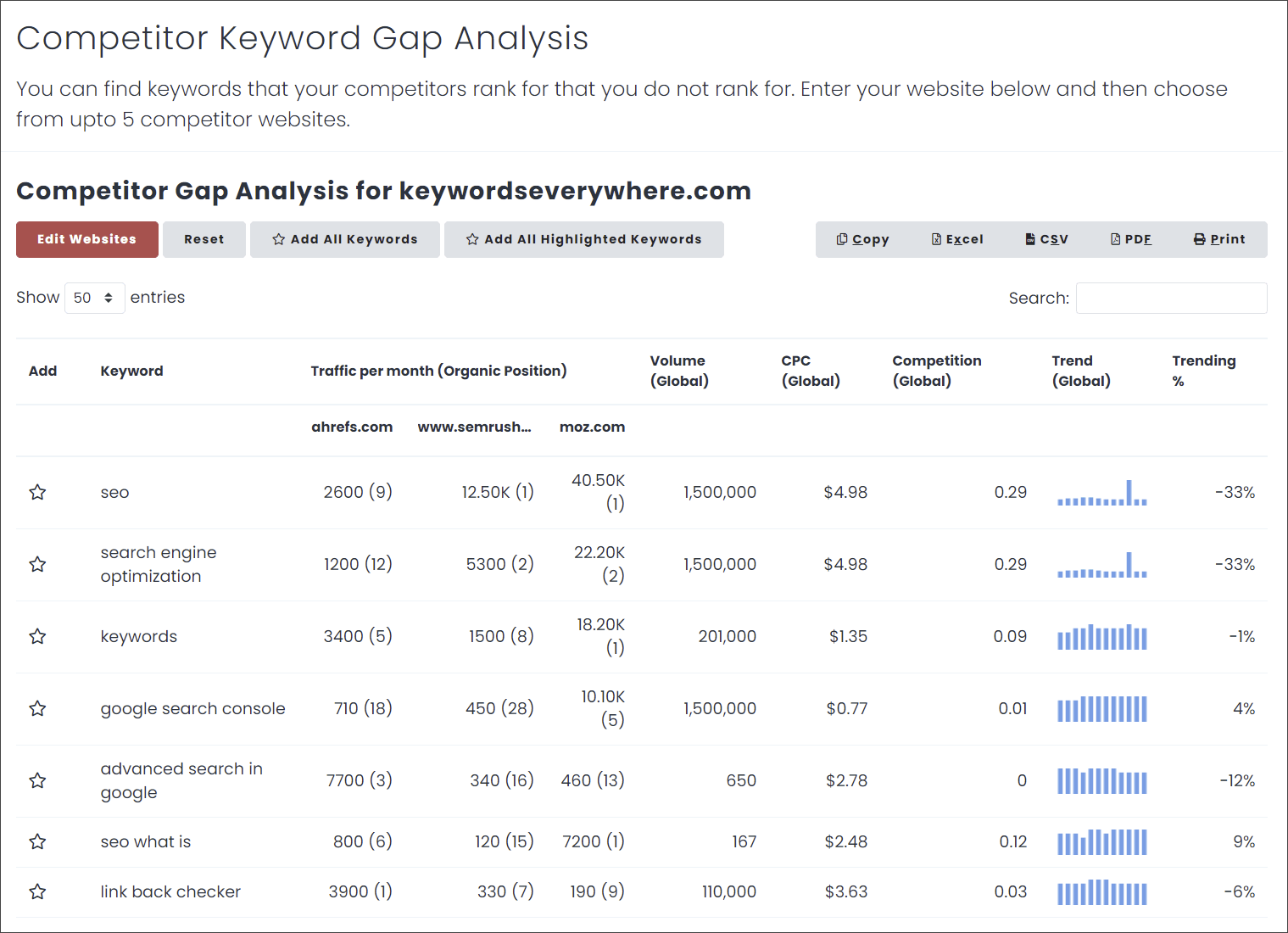
Competitor Gap Analysis, added in April 2025, compares the keywords two URLs rank for. Domain and page backlinks are there too, but no per-backlink credit price is published, and with Bronze capped at 1,000 rows per site it is a spot check rather than a link audit.
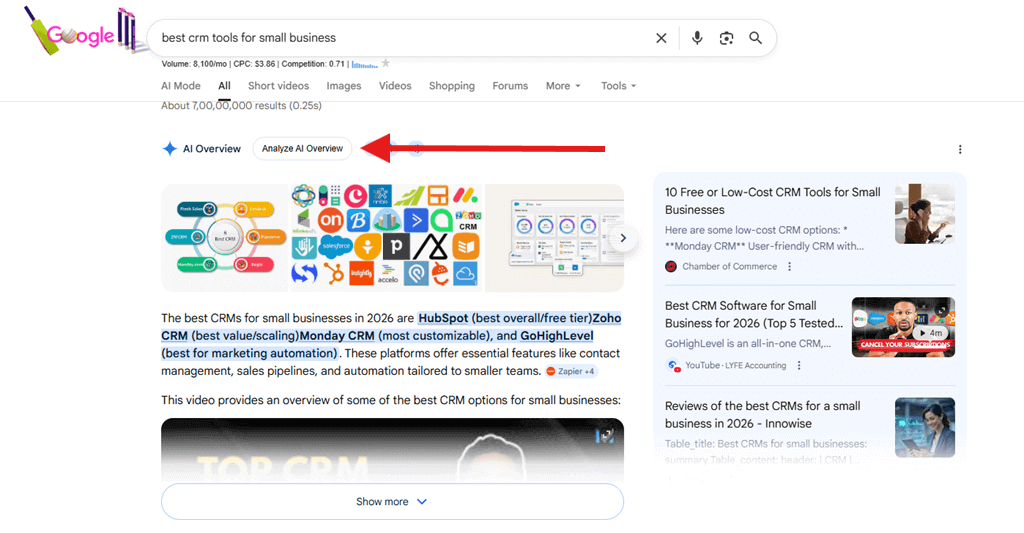
The newest additions are about AI search: ChatGPT query fan-out (August 2025), Gemini fan-out (January 2026), Analyze AI Overview (March 2026) and a Tech Stack panel (September 2026). Fan-out shows the searches an AI assistant runs behind a prompt.
The API is the quiet good deal. Since June 2025 every method works on every plan with no separate fee. Get Keyword Data takes up to 100 keywords per request at one credit each, and the MCP server shares the same pool, so an AI agent can pull volumes for a content plan without a second subscription.
What users complain about
The Chrome Web Store listing shows 1,000,000 users and a 3.3 out of 5 rating from 5.7K ratings (checked on 15 October 2026). Firefox's much smaller audience, about 7,000 daily users, rates it 4.36 from 408 ratings, and Trustpilot sits at around 4.7 from about 60 reviews.
The low Chrome scores cluster around four things. Accuracy comes first: one reviewer in March 2026 saw the tool "returning 0/mo for keywords that clearly have traffic in Google Keyword Planner" and got "zero response from support" after raising it four times. Then credit burn - a December 2025 review says the price "went up 8X on me" and warns "you'll BURN your credits FAST". That is one user's account, though our per-1,000 arithmetic above lands in the same range. Then the free tier confusion, and billing - on Trustpilot mostly people asking for a renewal to stop.
Verdict: who should buy it, who should skip it
Buy Bronze if you are a blogger, freelancer or small-shop marketer writing in English for one of the eight supported markets, and what you want is a Keyword Planner volume beside every Google, YouTube or Amazon search. At $84 a year it costs less than a single month of Ahrefs' or Semrush's entry plan, and with autocomplete and the unused widgets turned off, 100,000 credits go a long way.
Skip it if backlinks and competitor research are the job. A 1,000-row cap per site and Moz DA under each result are a glance, not a link index; Ahrefs or Semrush do that work, at many times the price. Skip it too if your market is outside those eight locations, or if you want a keyword tool with its own dashboard and saved projects - Keyword Revealer fits that better. For raw volumes by the million, DataForSEO is built for pipelines.
Keywords Everywhere is still a good tool. It is just a different deal from the one that made it popular: pay for a year, turn the credit-hungry settings off, and decide in month eleven if you used enough to renew.
Ready to try Keywords Everywhere?
Visit the official website to see the latest plans, pricing, and special offers.
Get Started - Keywords Everywhere* Affiliate link - we may earn a commission at no extra cost to you.