GitHub Review: The Developer Platform for Code and Collaboration
GitHub review: the Git-based developer platform for code hosting, pull requests, GitHub Actions CI/CD, Copilot AI, and security tooling — features, pricing, pros and cons.
Expert Review

What is GitHub?
GitHub is the world's largest platform for hosting and collaborating on code. Built on top of Git, the distributed version-control system created by Linus Torvalds, GitHub adds a web interface, social features, and a full workflow around the raw plumbing of Git. You store your project in a repository, track every change through commits and branches, propose changes with pull requests, and review each other's work line by line before it is merged. That model has become the default way software gets written and shipped.
Launched in 2008 and acquired by Microsoft in 2018, GitHub is now home to well over 100 million developers and hundreds of millions of repositories. It spans the whole spectrum of software work: a solo developer publishing an open-source library, a startup running its private codebase, and a Fortune 500 company coordinating thousands of engineers all live on the same platform. Over the years GitHub has grown far beyond simple code storage into continuous integration with GitHub Actions, project planning with Issues and Projects, cloud development environments through Codespaces, a deep security suite, and GitHub Copilot — its AI pair programmer.

Benefits of Using GitHub
- Industry-standard workflow: the pull request and code review model is understood by developers everywhere, so onboarding new team members and contributing to other projects feels immediately familiar.
- Everything in one place: code, issues, CI/CD pipelines, documentation, releases, and security scanning live together in a single repository instead of being scattered across separate tools.
- Massive ecosystem and community: the GitHub Marketplace, millions of open-source projects, and countless integrations mean most tools you already use connect to GitHub out of the box.
- Automation built in: GitHub Actions runs tests, builds, and deployments automatically on every push or pull request, so quality checks and shipping no longer depend on someone remembering to run them.
- AI that speeds up coding: GitHub Copilot suggests code as you type, answers questions in chat, and can take on multi-step tasks, cutting down the time spent on boilerplate and lookups.
- Scales from hobby to enterprise: the same platform serves a free personal account and a locked-down enterprise deployment with SSO, audit logs, and advanced security controls.
Key Features of GitHub
-
Git repositories and version control
At its heart GitHub hosts Git repositories — full histories of your project where every change is tracked. Developers create branches to work on features in isolation, open pull requests to propose merging that work back, and conduct code review with inline comments, suggestions, and required approvals. Combined with protected branches and status checks, this gives teams a reliable, auditable way to change code without stepping on each other.
-
GitHub Actions and CI/CD
GitHub Actions is GitHub's built-in automation and continuous integration engine. You define workflows in YAML that trigger on events — a push, a pull request, a release, or a schedule — to run tests, build artifacts, and deploy to production. Thousands of prebuilt actions in the Marketplace mean you rarely start from scratch. Because it lives next to your code, CI/CD becomes part of the repository rather than a separate system to maintain.
-
Issues and Projects
GitHub's planning tools keep work organized alongside the code. Issues track bugs, tasks, and feature requests with labels, assignees, and milestones, and they link directly to the pull requests that resolve them. Projects layers flexible boards, tables, and roadmaps on top of those issues, so a team can plan a sprint or a release and watch it progress without leaving GitHub.
-
GitHub Copilot — AI pair programmer
GitHub Copilot is an AI assistant embedded in the editor and across GitHub. It offers real-time code completion as you type, powers Copilot Chat for asking questions about your code and getting explanations, and includes an agent mode that can plan and make multi-file changes to complete a task. Trained on a huge body of code, it handles boilerplate, tests, and unfamiliar APIs, letting developers stay focused on the harder problems.
-
Security tooling and Codespaces
GitHub bakes security into the development flow. Dependabot flags and auto-updates vulnerable dependencies, code scanning with CodeQL finds vulnerabilities in your own code, and secret scanning catches credentials accidentally committed to a repo. Alongside security, Codespaces provides full cloud development environments that spin up in the browser or your editor in seconds — no local setup — so anyone can start contributing to a project instantly.
Pricing of GitHub
GitHub splits into two separate lines of pricing: the platform plans that cover repositories, Actions, and collaboration, and GitHub Copilot, which is billed on its own. It is easy to conflate the two, so it helps to think of them as distinct purchases — you can be on the free platform plan and still pay for Copilot, or run an Enterprise organization and add Copilot Business on top.
- Free: $0 — unlimited public and private repositories for individuals and organizations, with a monthly allowance of GitHub Actions minutes and Codespaces usage, plus Dependabot alerts and community support. Enough for many personal and small projects.
- Team: around $4/user/month — adds protected branches, code owners, draft pull requests, more included Actions and Codespaces usage, and organization-level access controls for collaborating teams.
- Enterprise: around $21/user/month — layers on SAML single sign-on, SCIM provisioning, audit logs, advanced policy controls, and the option to add GitHub Advanced Security for large organizations.
GitHub Copilot is priced separately from the platform plans above:
- Copilot Free: $0 — a limited monthly allotment of completions and chat messages for individuals who want to try it.
- Copilot Pro: around $10/month — unlimited completions and chat for individual developers, with access to more capable models.
- Copilot Business: around $19/user/month — Copilot for organizations with policy management and license control.
- Copilot Enterprise: around $39/user/month — adds deeper integration with your codebase and organization-wide knowledge for the largest teams.
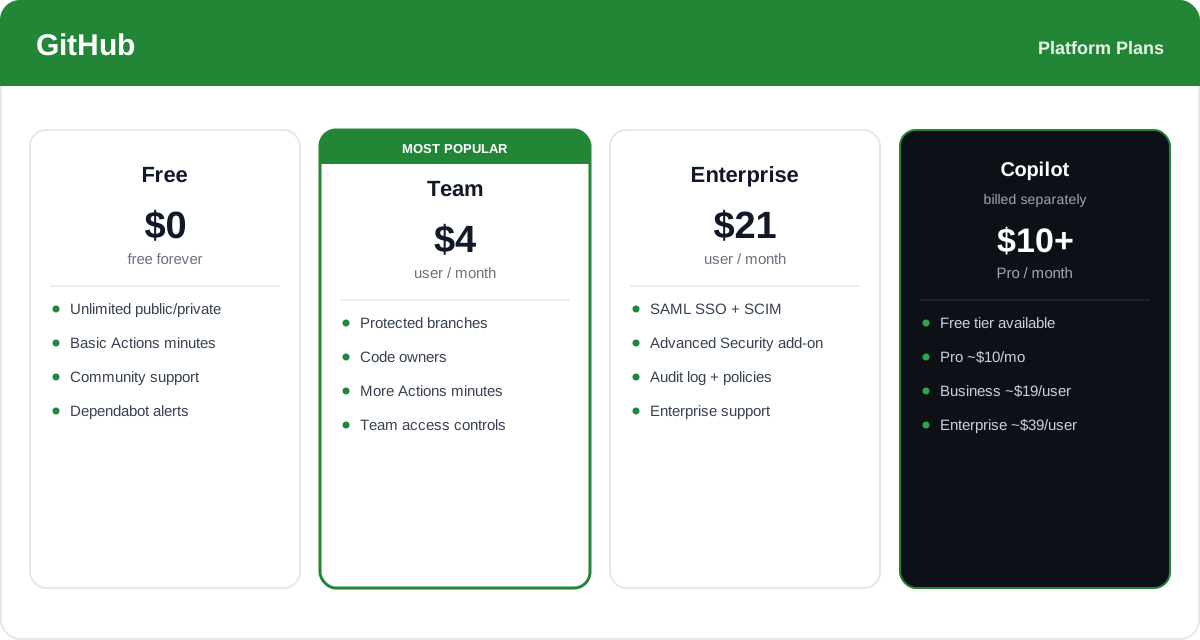
Prices, plan names, and included usage change over time and vary by region and billing period, and Copilot is billed separately from the platform plans — check the official GitHub pricing page for current rates and exactly what each plan includes.
Real-World Use Case Analysis
Open-Source Projects
Public collaboration at scale: maintainers host their project on a public repository where anyone can fork it, open issues, and submit pull requests. Free Actions minutes run the test suite on every contribution, Issues and Discussions organize the community, and releases distribute the built artifacts — all at no cost, which is why the vast majority of open source lives on GitHub.
Software Teams and CI/CD
Shipping with confidence: a product team keeps its codebase in private repositories with required reviews and protected branches. GitHub Actions builds and tests every pull request and deploys merged code automatically, while Copilot speeds up day-to-day coding. Issues and Projects tie the work to a roadmap, so planning, building, testing, and shipping all happen in one place.
Enterprise and Security
Governance across thousands of developers: a large organization runs GitHub Enterprise with SAML SSO, SCIM provisioning, and audit logs for compliance. GitHub Advanced Security adds code scanning with CodeQL, secret scanning, and Dependabot across every repo, giving security teams centralized visibility into risk without slowing developers down.
Pros and Cons of GitHub
Advantages
- The industry-standard platform for code hosting and review, so the workflow is familiar to developers everywhere.
- A massive ecosystem of integrations, Marketplace actions, and open-source projects to build on.
- Powerful built-in automation with GitHub Actions and AI assistance with GitHub Copilot.
- Strong security tooling — Dependabot, CodeQL code scanning, and secret scanning — integrated into the workflow.
- Scales smoothly from a free personal account to a governed enterprise deployment.
Disadvantages
- GitHub Actions and Codespaces usage is metered, and costs can climb quickly for heavy CI/CD or large teams once free minutes run out.
- GitHub Copilot is an additional cost on top of the platform plan rather than being included.
- The most advanced security features (GitHub Advanced Security) are gated to higher and Enterprise tiers.
- The breadth of features and Git itself can feel complex for non-developers or newcomers.
Final Thoughts on GitHub
GitHub has earned its place as the default home for software development, and it is hard to overstate how central it has become. The pull request workflow, the enormous ecosystem, and the tight integration of code, automation, planning, and security make it a platform teams can grow into rather than out of — and GitHub Copilot has pushed it further by weaving AI directly into how code gets written. The main trade-offs are cost and complexity: metered Actions and Codespaces usage can add up, Copilot and Advanced Security are separate purchases, and the full toolset is a lot to absorb for non-developers. But for anyone writing code — from a solo maintainer to an enterprise engineering org — GitHub remains the most complete and widely supported developer platform available, and its free tier makes it easy to start before scaling up.