Replit AI Review: Build & Deploy Apps with an AI Agent in the Browser
Replit AI review: an autonomous Agent, inline Assistant, cloud IDE, and one-click deploys that turn a prompt into a live app — features, pricing, pros and cons.
Expert Review
What is Replit AI?
Replit AI is the layer of artificial intelligence built into Replit, the browser-based software platform that lets you write, run, and host applications without installing anything locally. At its center is the Replit Agent, an autonomous system that takes a plain-language description of an app and builds it end to end — generating multiple files, setting up a database, installing dependencies, and deploying the result to a live URL. Around the Agent sits the Replit Assistant for inline edits and debugging, plus a full cloud IDE that spins up an instant development environment in your browser.
That combination is what makes Replit unusual: it is not just a code editor with an AI bolted on, and not just a "prompt to app" toy either. It is a complete environment where the AI, the editor, the database, hosting, and collaboration all live in one place. Replit is aimed at a wide range of builders — professional developers who want to move fast, founders shipping an MVP, students learning to code, and non-technical "vibe coders" who want to describe an idea and watch it come to life.
Benefits of Using Replit AI
Using Replit AI offers several clear advantages:
- Zero local setup: the editor, runtime, database, and hosting all run in the browser, so there is nothing to install or configure before you start building.
- Idea to live app fast: the Agent turns a prompt into a working, deployed application, collapsing hours of scaffolding into a single request.
- Everything in one place: code, AI, database, authentication, storage, and deployment live under one roof, so you are not stitching together five separate services.
- Accessible to non-developers: plain-language prompting and a guided workflow let people with little coding experience ship real software.
- Safe to experiment: checkpoints and rollback let you undo the Agent's changes, so a bad step never wrecks your project.
- Build from anywhere: because it is fully cloud-based, you can work from any machine with a browser — or from the Replit mobile app.
AI Features of Replit AI
-
Replit Agent
The Agent is Replit's flagship AI feature. Describe the app you want in plain language and it plans the work, writes code across multiple files, provisions a database, installs packages, and deploys the result — checking its own output and iterating as it goes. You stay in control by reviewing its progress and approving changes, while it handles the heavy lifting of turning an idea into a running application.
-
Replit Assistant
Where the Agent builds broadly, the Assistant works surgically. It sits beside your code to make targeted inline edits, explain what a snippet does, and help you debug errors as they appear. It is the right tool when you want to refine a specific piece of the project or understand existing code rather than generate a whole new feature.
-
Cloud IDE with Instant Environments
Every Replit project runs in a full cloud development environment that boots instantly in your browser — a real editor, terminal, and package manager supporting dozens of languages. Because the AI operates inside this live environment, it can run commands and see real output, and you can jump in at any moment to edit files by hand. No configuration, no dependency hell, no local machine required.
-
One-Click Deployments & Built-in Services
When your app is ready, Replit deploys it to a live URL with managed hosting in a single click — no separate infrastructure to set up. It also bundles the services most apps need: a built-in Replit Database, Auth for user login, and Object Storage for files. That means the Agent can build a genuinely full-stack app and ship it without you ever leaving the platform.
-
Checkpoints, Rollback & Collaboration
Replit keeps checkpoints as the Agent works, so you can roll back to an earlier state if a change goes wrong — a safety net that makes autonomous building far less risky. On top of that, real-time multiplayer collaboration lets teammates edit the same project together like a shared document, and the Replit mobile app lets you build and tweak projects from your phone.
Pricing of Replit AI
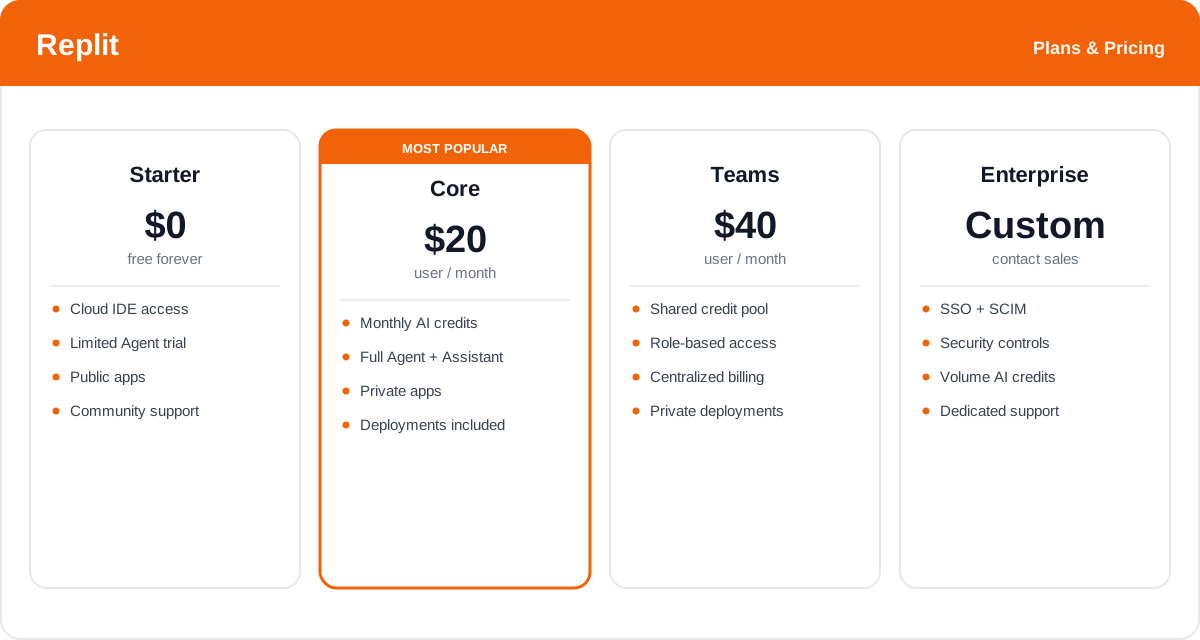
Replit uses a subscription model where the paid plans include a monthly allowance of AI credits. Agent and AI usage is credit- and effort-based: a larger, more complex request consumes more credits than a small one, so how far your allowance goes depends on what you build. There is a free tier to try the platform, and paid plans scale up the credits and unlock private apps and team features.
- Starter: Free — access to the cloud IDE and a limited trial of the Agent and AI features, with public apps. Good for exploring the platform and small experiments.
- Replit Core: around $20/month — the standard plan for individual builders, bundling a monthly pool of AI credits for the Agent and Assistant, private apps, and included deployments.
- Teams: around $40/user/month — a shared credit pool, role-based access, centralized billing, and collaboration controls for organizations building together.
- Enterprise: custom pricing — for larger organizations needing SSO, added security and governance, volume AI credits, and dedicated support.
Credit allowances and rates change over time — check the official Replit pricing page for the latest plans and exactly how many AI credits each one includes.
Real-World Use Case Analysis
-
Founders and MVPs
Idea to demo in a day: a founder can describe a product to the Agent, watch it build and deploy a working version to a live URL, and put it in front of investors or early users the same day — no engineering hire or infrastructure setup required.
Iterating on feedback: because everything is in one place, following up on user feedback is as simple as prompting the Agent for a change and redeploying, with checkpoints protecting against a bad edit.
-
Developers and Rapid Prototyping
Scaffolding at speed: developers use the Agent to stand up a full-stack prototype — database, backend, and UI — in minutes, then drop into the cloud IDE to refine the details by hand or with the Assistant.
Internal tools: the built-in database, auth, and hosting make Replit a fast way to ship small internal apps and dashboards without provisioning separate services for each one.
-
Learners and Non-Technical Builders
Learning by doing: students and career switchers use the zero-install environment and the Assistant's explanations to understand real code and experiment safely from any machine.
Vibe coding: non-technical builders describe what they want in plain language and let the Agent do the coding, turning ideas into working apps without first learning a programming language.
Pros and Cons of Replit AI
-
Advantages of Using Replit AI
Replit AI's strengths include:
- An autonomous Agent that builds and deploys full apps from a single prompt.
- A complete all-in-one platform — editor, AI, database, auth, storage, and hosting together.
- Zero local setup with an instant cloud IDE that runs in any browser.
- Checkpoints and rollback that make autonomous building safe to experiment with.
- Accessible to non-developers, plus real-time collaboration and a mobile app.
-
Disadvantages of Using Replit AI
Points to weigh before committing:
- Credit usage can climb fast on complex projects, since bigger requests cost more credits.
- The Agent can still make mistakes on intricate logic that need manual review and fixes.
- Being cloud-only means you depend on Replit's platform, which some teams may prefer to avoid.
- Sending code and prompts to the cloud raises privacy considerations for sensitive projects.
Final Thoughts on Replit AI
Replit AI is one of the most complete takes on AI-assisted building because of everything that sits behind the prompt: an autonomous Agent, an inline Assistant, a real cloud IDE, and built-in database, auth, and hosting — all in one browser tab. That means you can go from a plain-language idea to a deployed, full-stack app without touching a terminal or wiring up separate services, and checkpoints keep the process safe to experiment with. Budget for credit usage on bigger projects and expect to review the Agent's work on the hardest logic, but for founders shipping an MVP, developers prototyping fast, and newcomers learning by doing, Replit AI is a genuinely quick path from idea to live app. Start on the free Starter plan to see how far a few prompts get you before moving to Core.