Asana Review: A Complete Look at the Work Management Platform
Asana review: the work management platform with tasks, multiple project views, no-code Rules, Goals, Portfolios, and Asana AI — features, pricing, pros and cons.
Expert Review
What is Asana?
Asana is a work management platform that helps teams organize, track, and manage their work in one shared place. At its core you break work into tasks and subtasks, group them into projects, assign owners, set due dates, and follow everything to completion. Instead of chasing updates across email, chat, and spreadsheets, a team gets a single source of truth for who is doing what by when.
Co-founded by Dustin Moskovitz, one of Facebook's earliest builders, Asana was designed to solve the problem of coordination itself — the meetings, status pings, and lost context that slow teams down. Today it serves everyone from small teams running a content calendar to large enterprises coordinating cross-functional programs. Over the years it has grown well beyond simple to-do lists into multiple project views, no-code automation, company-wide goal tracking, portfolios, and a layer of built-in AI that helps draft, summarize, and organize work.
Benefits of Using Asana
- One place for all work: tasks, projects, files, comments, and deadlines live together, so teams stop switching between disconnected tools and lost email threads.
- Clear ownership and accountability: every task has a single assignee and due date, making it obvious who is responsible and what is on track or overdue.
- Flexible ways to view work: the same project can be seen as a list, a Kanban board, a timeline, or a calendar, so each person works the way that suits them.
- Less busywork through automation: Rules handle repetitive steps — assigning tasks, moving them between stages, and updating fields — without anyone lifting a finger.
- Alignment from goals to tasks: Goals and Portfolios connect day-to-day work to company objectives, so people can see how their tasks ladder up to the bigger picture.
- Scales with the team: from a two-person side project to an enterprise rollout, Asana adds structure, reporting, and controls as needs grow.
Key Features of Asana
-
Multiple project views
Asana lets you see the same set of tasks in whatever format fits the job. List is a clean, sortable checklist; Board is a Kanban view for moving cards between stages; Timeline is a Gantt-style plan showing dependencies and schedules; and Calendar lays work out by date. Switching views takes one click and no re-entry, so a manager can plan on a Timeline while the team executes on a Board.
-
Rules and no-code automation
Asana's Rules let you automate routine steps with a simple trigger-and-action model: when a task is marked complete, assign the next one; when a field changes, move the task to a new section and notify the owner. There is nothing to code — you pick a trigger and an action from menus. Automating handoffs and status changes keeps projects moving and removes the manual admin that eats into real work.
-
Goals, Portfolios, and Workload
For leaders, Asana connects execution to strategy. Goals capture company and team objectives and tie them to the projects that drive them. Portfolios roll many projects into one dashboard so you can monitor progress and health at a glance. Workload visualizes each person's capacity across projects, helping you spot who is overloaded and rebalance before things slip.
-
Asana AI and smart fields
Asana has layered AI across the platform through what it calls AI teammates and smart features. AI can summarize a project's status, surface risks and blockers, draft tasks and replies, and populate smart fields automatically to keep work categorized. Instead of manually chasing updates, managers get instant, written summaries and recommendations drawn from the work already tracked in Asana.
-
Custom fields, Forms, and 300+ integrations
Custom fields add structured data — priority, stage, cost, or any attribute you need — to every task, and Forms feed standardized intake requests straight into a project. With more than 300 integrations, Asana connects to the tools teams already run, including Slack, Microsoft Teams, Google Workspace, Zoom, Salesforce, and Adobe Creative Cloud, so work flows in and out without copy-paste.
Pricing of Asana
Asana is priced per user, and annual billing is cheaper than paying monthly. Plans step up from a free tier for individuals and small groups to paid tiers that add views, automation, reporting, and enterprise controls.
- Personal (Free): $0 — for individuals and teams of up to 10 users. Includes unlimited tasks and projects, plus List, Board, and Calendar views and basic collaboration. A solid starting point for light coordination.
- Starter: from about $10.99/user/month (billed annually) — adds the Timeline/Gantt view, Rules automation, custom fields, Forms, dashboards, and support for larger teams. The standard plan for most growing teams.
- Advanced: from about $24.99/user/month (billed annually) — adds Goals, Portfolios, Workload capacity planning, Asana AI features, and advanced reporting for teams managing many projects at once.
- Enterprise / Enterprise+: custom pricing — layers on SAML SSO, SCIM provisioning, advanced admin and security controls, and data governance for large organizations.
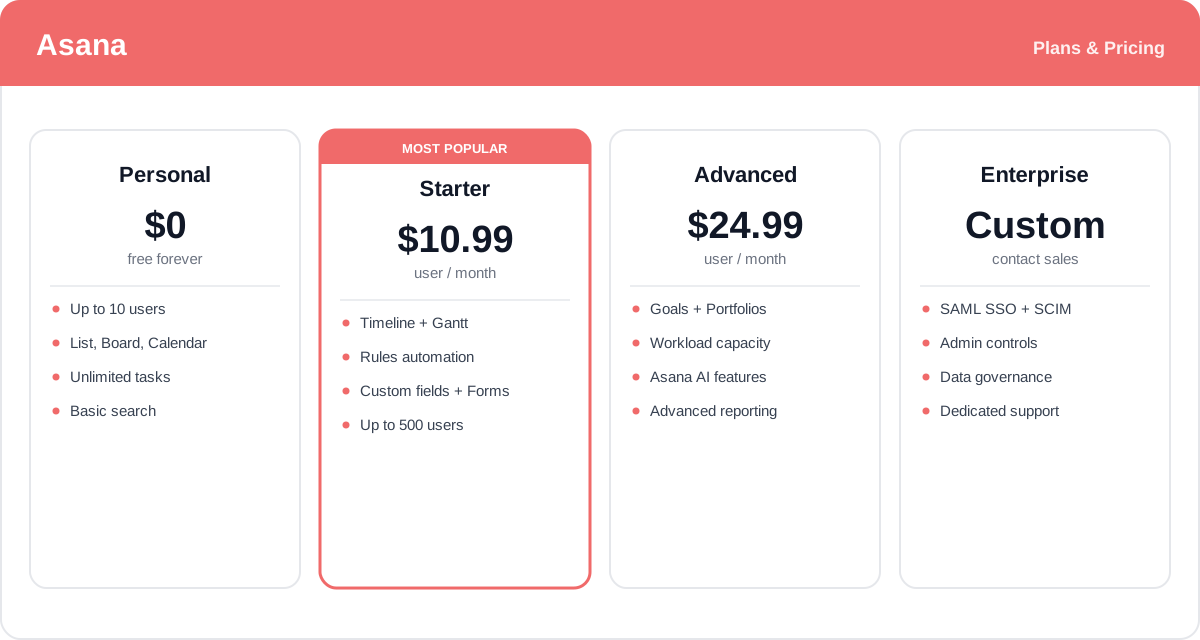
Prices and plan details change over time and vary by region and team size — check the official Asana pricing page for current rates and exactly what each plan includes.
Real-World Use Case Analysis
Marketing and Creative Teams
Campaign and content planning: teams use a Calendar or Timeline view to schedule a content pipeline, Forms to collect creative requests in a standard format, and Rules to route each brief to the right owner. Everyone can see what is in production, what is approved, and what ships this week.
Operations and Cross-Functional Programs
Coordinating complex work: operations teams run process-heavy projects — onboarding, launches, event planning — with dependencies mapped on a Timeline and Portfolios giving leaders a health check across every workstream, so nothing critical falls through the cracks.
Product and Engineering
Sprint and roadmap tracking: product teams manage backlogs and sprints on a Board, tie initiatives to company Goals, and use Workload to balance capacity across engineers, keeping delivery predictable without endless status meetings.
Pros and Cons of Asana
Advantages
- Flexible project views (List, Board, Timeline, Calendar) suit many working styles from one dataset.
- Clean, approachable interface that new team members can pick up quickly.
- Powerful no-code Rules automate routine handoffs and status changes.
- Goals, Portfolios, and Workload connect daily work to strategy and capacity.
- Built-in Asana AI summarizes status, drafts work, and fills smart fields.
- 300+ integrations plus custom fields and Forms fit into almost any stack.
Disadvantages
- Per-user pricing adds up quickly for larger teams, and key features sit behind higher tiers.
- The most valuable capabilities — Goals, Portfolios, Workload, AI — require the Advanced plan or above.
- The free plan lacks the Timeline view and automation, limiting how far small teams can go for free.
- The breadth of features can feel like a lot to configure for very simple use cases.
- Native time tracking and budgeting are lighter than in some dedicated project tools.
Final Thoughts on Asana
Asana is one of the most polished and capable work management platforms available, and it earns that reputation by making coordination feel effortless. Its combination of flexible views, no-code automation, and a genuine link from individual tasks up to company goals lets teams both execute and stay aligned — something few tools do well at the same time. The addition of Asana AI pushes it further, turning tracked work into instant summaries and drafts. The main trade-off is cost: the features that make Asana shine live on the paid tiers, and per-user pricing scales with headcount. But for any team tired of scattered tools and status-chasing, Asana brings order that pays off in clarity and saved time — and the free plan is a low-risk way to see if it fits before committing.