Docker Review: Containers, Docker Desktop & the Developer Platform
Docker review: OS-level containerization with images, Dockerfiles, Docker Desktop, Docker Hub, Compose, and Scout — how it works, pricing, pros and cons.
Expert Review
What is Docker?
Docker is a platform for building, shipping, and running applications inside containers. A container bundles your code together with everything it needs to run — the runtime, system libraries, and configuration — into a single, self-contained unit. Because that unit carries its own dependencies, it behaves the same whether it runs on a developer's laptop, a test server, or production in the cloud. This is the answer to the age-old complaint, "but it works on my machine": with Docker, the machine travels with the app.
Under the hood Docker uses OS-level virtualization. Unlike a virtual machine, which boots a full guest operating system on top of a hypervisor, a container shares the host's kernel and isolates only the process, filesystem, and network it needs. That makes containers far lighter and faster to start — seconds rather than minutes — and lets a single host run many of them side by side. First released in 2013, Docker turned containerization from an obscure Linux feature into an everyday developer tool, and today it underpins a huge share of modern software delivery. It suits everyone from a solo developer packaging a side project to platform teams standardizing how hundreds of services are built and deployed.
Benefits of Using Docker
- Consistency everywhere: a container runs identically on your laptop, in CI, and in production, eliminating the environment drift that causes "works on my machine" bugs.
- Lightweight and fast: because containers share the host kernel instead of booting a full OS, they start in seconds and use a fraction of the memory and disk of a virtual machine.
- Isolation without overhead: each container gets its own filesystem, processes, and network namespace, so apps and their dependencies stay neatly separated on one host.
- Reproducible builds: a Dockerfile describes the image as code, so anyone can rebuild the exact same environment from source — no hand-configured servers or undocumented steps.
- Portable across clouds: the same image runs on any host with a container runtime, from a Raspberry Pi to AWS, Azure, or Google Cloud, avoiding lock-in to one provider's setup.
- A massive ecosystem: Docker Hub offers ready-made official images for databases, languages, and tools, so you can stand up Postgres, Redis, or Node in a single command.
Key Features of Docker
-
Images and containers
The two core objects in Docker are images and containers. An image is a read-only template — your application plus its dependencies — built in layers from a Dockerfile, a plain-text recipe of instructions like which base image to start from, what to copy in, and what command to run. A container is a running instance of an image. You can start, stop, and destroy containers freely, spin up many from the same image, and know each one is isolated and reproducible. This build-once, run-anywhere model is the foundation everything else rests on.
-
Docker Desktop
Docker Desktop is the all-in-one application for Mac, Windows, and Linux that most people install to get started. It bundles the Docker Engine, the command-line client, Docker Compose, and a graphical dashboard for browsing images, containers, and volumes. On Mac and Windows it runs a lightweight Linux VM behind the scenes so containers behave just as they would on a Linux server. It also handles updates, resource limits, and extensions, giving developers a friendly on-ramp without wiring the pieces together by hand.
-
Docker Hub registry
Docker Hub is Docker's cloud registry — the default place to store and share images. It hosts a vast library of official and community images, so you can pull a trusted, ready-made Postgres, Nginx, or Python image with one command instead of building from scratch. You can also push your own images, keep them private, and pull them into CI pipelines or production hosts. Hub, together with the underlying registry format, is what makes images so easy to distribute across teams and machines.
-
Docker Compose
Real applications are rarely a single container — a web app might need a database, a cache, and a background worker. Docker Compose lets you define that entire multi-container stack in one declarative YAML file, describing each service, its image, ports, volumes, and how the services connect. A single
docker compose upthen starts everything together with the right networking wired in, and one command tears it all down. It turns a complex local environment into something you can version, share, and reproduce instantly.
-
Docker Build, Buildx, and Docker Scout
Modern Docker builds run on BuildKit, the engine behind docker build and the Buildx plugin, which adds fast caching, parallel stages, and multi-platform images so one build can target both x86 and ARM. Docker Scout layers on software supply-chain visibility: it analyzes your image contents, produces a software bill of materials, and flags known vulnerabilities in your dependencies with guidance on how to fix them. Alongside built-in volumes for persistent data and networking for container-to-container communication, these tools take Docker from local experiments to production-grade delivery — and integrate cleanly with Kubernetes and CI systems for orchestration at scale.
Pricing of Docker
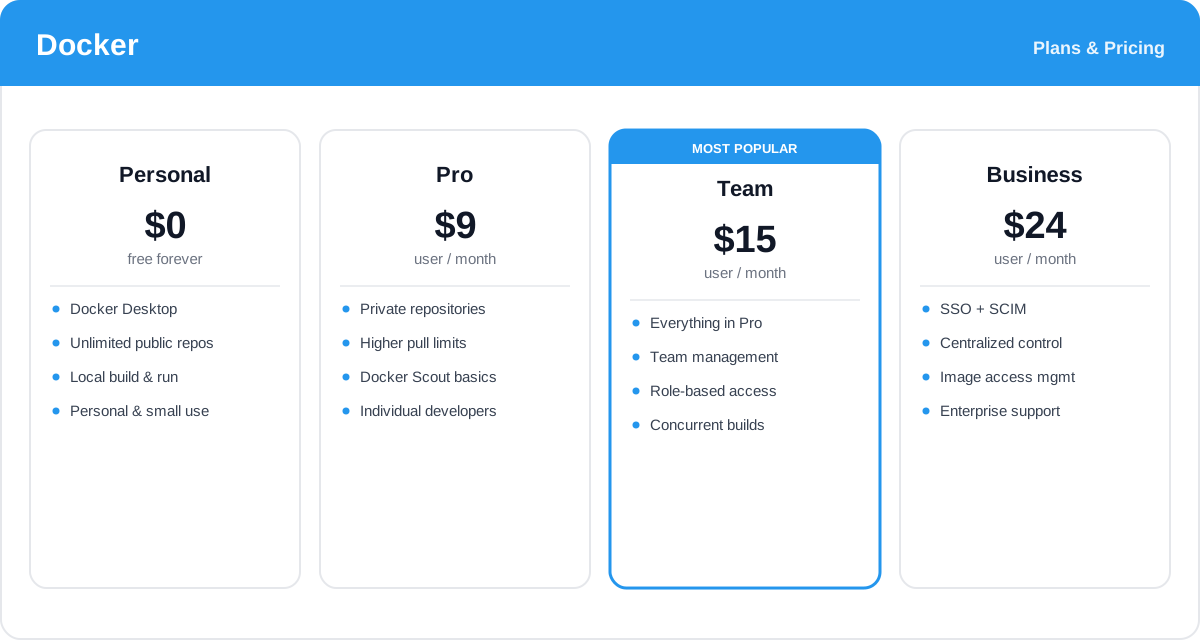
Docker itself — the engine, the CLI, images, and containers — is free and open source. What the paid subscriptions cover is the surrounding platform: Docker Desktop for organizations, private repositories on Docker Hub, higher pull rate limits, Docker Scout, and team administration. Plans are priced per user, and annual billing is cheaper than paying monthly. Note that Docker Desktop requires a paid subscription for larger companies — organizations with more than 250 employees or more than $10M in annual revenue must use a Pro, Team, or Business plan.
- Personal (Free): $0 — includes Docker Desktop for personal use, small businesses, education, and non-commercial open source, plus unlimited public repositories and local build and run. Everything an individual developer needs to learn and ship.
- Pro: from about $9/user/month (billed annually) — adds private repositories, higher image pull limits, and Docker Scout basics for individual professional developers who need more than the free tier.
- Team: from about $15/user/month (billed annually) and the most popular choice — everything in Pro plus team management, role-based access control, more concurrent builds, and audit logging for collaborating groups.
- Business: from about $24/user/month (billed annually) — layers on SSO and SCIM provisioning, centralized management, image access control, and enhanced support for larger organizations with security and compliance needs.
Prices, plan features, and the company-size threshold for Docker Desktop change over time — check the official Docker pricing page for current rates and exactly what each plan includes.
Real-World Use Case Analysis
Individual Developers
Consistent local environments: a developer can spin up an exact copy of production — the right database version, the right language runtime — with a single Compose file, then tear it down when done. No more polluting the host with conflicting dependencies, and onboarding a new project takes minutes instead of a day of setup.
DevOps and Platform Teams
Standardized build and deploy: teams bake their apps into images in CI, scan them with Docker Scout, push them to a registry, and deploy the same artifact to staging and production. Because the image is immutable and identical across environments, releases become predictable and rollbacks are as simple as running the previous tag.
Microservices and Kubernetes
The unit of orchestration: when an application is split into many small services, each one ships as its own container. Docker builds and packages those services, and an orchestrator like Kubernetes schedules, scales, and heals them across a cluster — with Docker images as the common currency that every node understands.
Pros and Cons of Docker
Advantages
- Containers guarantee the same environment from laptop to production, ending "works on my machine" failures.
- Far lighter and faster to start than virtual machines because they share the host kernel.
- Dockerfiles make environments reproducible and versionable as code.
- Docker Hub's huge library of official images lets you run common services in one command.
- Compose turns complex multi-service stacks into a single, shareable YAML file.
- The de facto industry standard, with deep integration into CI/CD and Kubernetes.
Disadvantages
- There is a real learning curve around images, layers, volumes, and networking for newcomers.
- Docker Desktop now requires a paid subscription for larger companies, which caught some teams off guard.
- Containers share the host kernel, so isolation is weaker than a full virtual machine for hostile workloads.
- Persisting stateful data with volumes takes care, since containers themselves are meant to be disposable.
- Docker alone does not orchestrate at scale — production clusters still need Kubernetes or a similar system.
Final Thoughts on Docker
Docker is one of those rare tools that genuinely changed how software is built and shipped, and more than a decade on it remains the default way developers package applications. Its core idea — a lightweight, portable container that runs the same everywhere — is simple to grasp yet solves a problem that used to cost teams countless hours. With Docker Desktop as an approachable on-ramp, Docker Hub for sharing images, Compose for multi-service stacks, and Scout for supply-chain security, the platform now covers the whole path from a first local experiment to production delivery. The trade-offs are a learning curve and the paid subscription that larger companies now need for Docker Desktop, plus the reality that scaling in production still calls for an orchestrator. But for anyone building modern applications, Docker is close to essential — and the free Personal tier means most developers can learn it and prove its value without spending a cent.