folk Review: Is It the Best AI-Powered CRM for Small Teams?
folk CRM review: a deep look at its AI assistants, LinkedIn folkX extension, one-click enrichment, pipelines, pricing, and whether it is the right CRM for small teams and agencies.
Expert Review

What is folk?
folk is a modern, AI-powered CRM designed for teams who find traditional CRMs bloated and painful to maintain. Instead of forcing you to manually log every interaction, folk quietly pulls in relationship context from the channels you already use — LinkedIn, Gmail, Outlook, WhatsApp, and your calendar — and keeps a single, up-to-date view of every contact and deal. The result is a CRM that feels lightweight and personal, closer to a shared address book with superpowers than a heavyweight enterprise system.
It is built primarily for small sales teams, agencies, startups, partnership teams, and venture capital firms — groups whose business runs on relationships rather than rigid processes. folk emphasizes fast setup, a clean interface, and AI assistants that handle the busywork of follow-ups, research, and note-taking. With SOC 2 certification, GDPR compliance, and more than 5,000 companies using it worldwide, folk positions itself as the CRM your team will actually keep up to date.
Benefits of Using folk
Adopting folk brings several concrete advantages for relationship-driven teams:
- Effortless Contact Capture: The folkX browser extension lets you import prospects from LinkedIn and other sites in one click, so building your database no longer means copy-pasting into spreadsheets.
- Always-Current Context: folk syncs email, calendar, and WhatsApp automatically, so every contact record shows the full interaction history without anyone logging it by hand.
- AI That Does the Busywork: Built-in AI assistants draft follow-ups, summarize relationships, and research companies, freeing your team to focus on actual conversations.
- One-Click Enrichment: Missing an email or company detail? folk enriches contacts on demand, filling in the gaps that usually stall outreach.
- Fast, Friendly Setup: folk is genuinely quick to adopt — teams get up and running in a day rather than a quarter, and the interface is clean enough that people actually use it.
- Deep Integrations: Native connections plus 5,000+ tools through Zapier and similar platforms keep folk wired into the rest of your stack.
Key Features of folk
-
folkX LinkedIn Extension
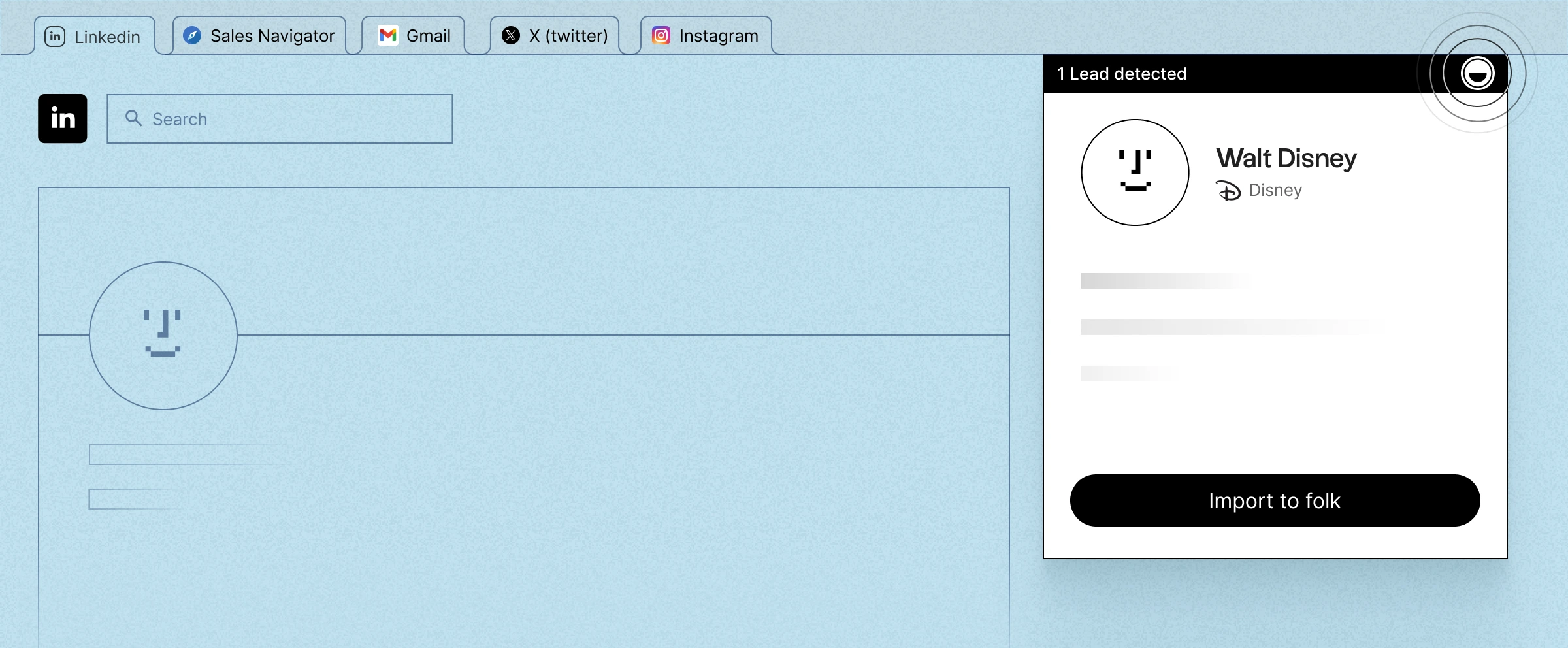
folkX is folk's Chrome extension for capturing leads directly from LinkedIn, company websites, and other pages. With one click you can add a prospect — complete with role, company, and available contact details — straight into the right folk group, replacing hours of manual list-building with a single action.
-
One-Click Enrichment
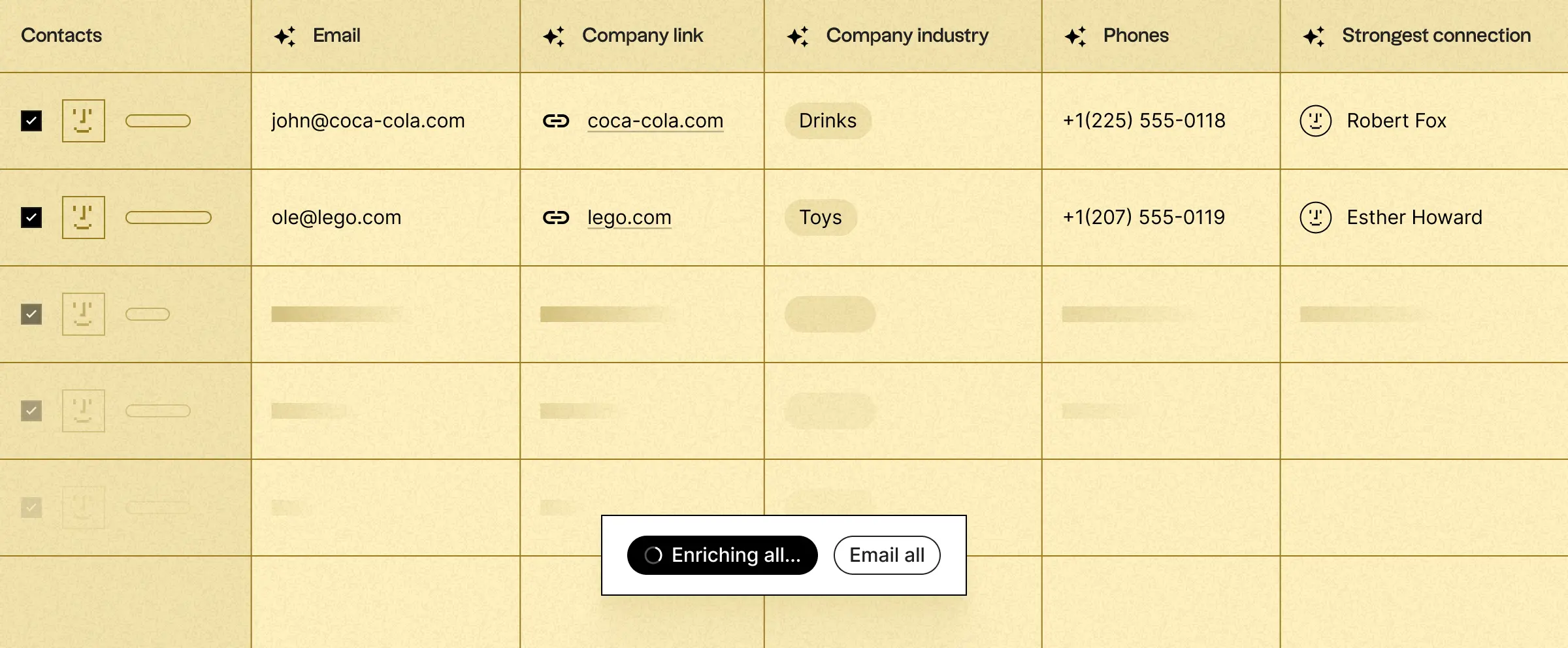
When a record is missing a verified email, phone number, or firmographic detail, folk's enrichment tool fills it in on demand. This keeps contact data complete and outreach-ready without paying for a separate data provider or chasing details manually.
-
AI Assistants
folk ships with four AI assistants that automate the repetitive parts of relationship management. The Follow-up Assistant scans your emails and WhatsApp to detect stalled conversations and nudges you to reconnect. The Recap Assistant generates concise summaries of a relationship's history and suggested next steps. The Research Assistant enriches company profiles and writes research notes automatically, while the Workflow Assistant sends personalized emails based on triggers you define.
-
Email Campaigns & Sequences
Send personalized email campaigns and multi-step sequences directly from folk, using contact fields to tailor each message at scale. Because sending is tied to your synced inbox, replies and engagement flow straight back into each contact's timeline — no separate outreach tool required.

-
Pipelines & Deal Management
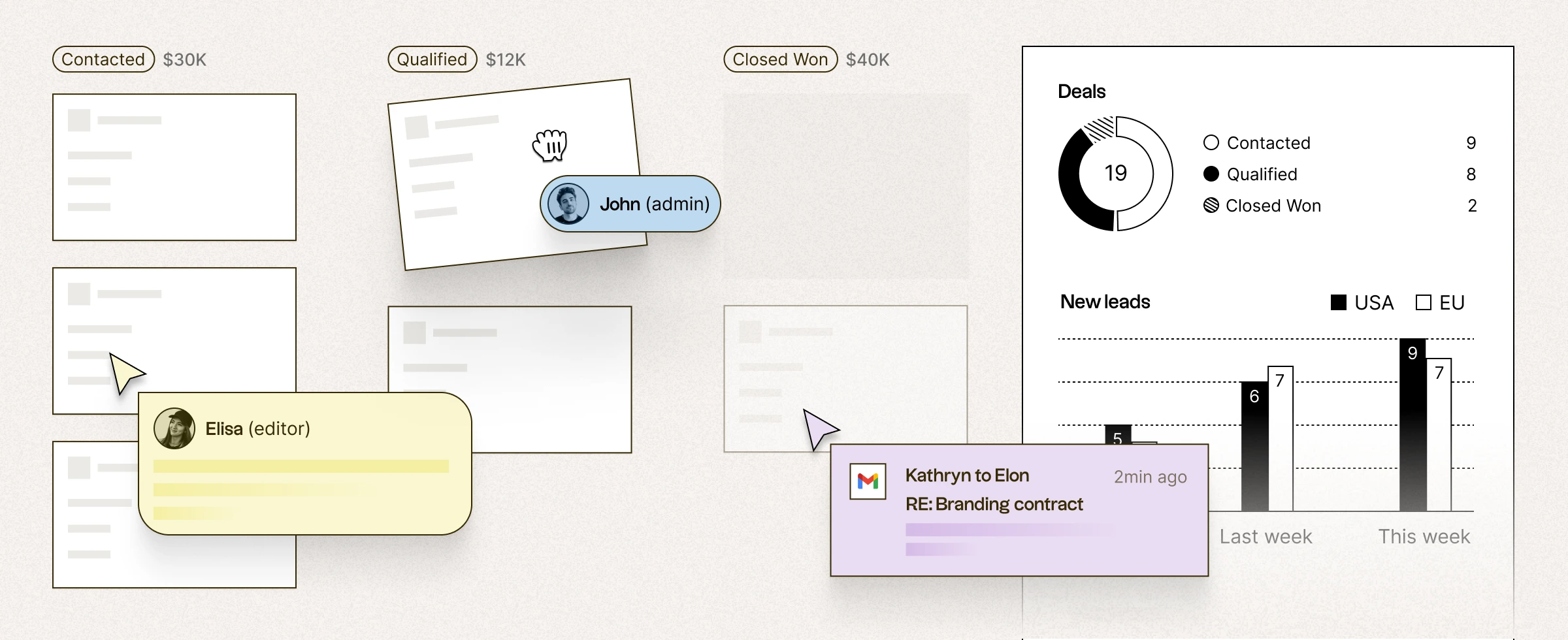
folk offers flexible, collaborative pipelines so teams can track deals through custom stages, assign owners, and see progress at a glance. Sales dashboards and analytics turn that activity into a clear picture of what is moving and what is stuck, keeping everyone aligned on the same view.
-
Unified Sync & Integrations
folk connects to Gmail, Outlook, WhatsApp, LinkedIn, and Google Calendar, plus more than 5,000 additional tools through Zapier and similar platforms. Everything a contact does across those channels lands in one place, and an API on higher tiers lets teams build custom connections.
-
Custom Objects & Data Model
Beyond standard contacts and companies, folk supports custom objects and fields so you can model your business the way it actually works — whether that means investors and portfolio companies, agencies and clients, or partners and referrals. This flexibility lets folk adapt to niche workflows without heavy configuration.


Pricing of folk
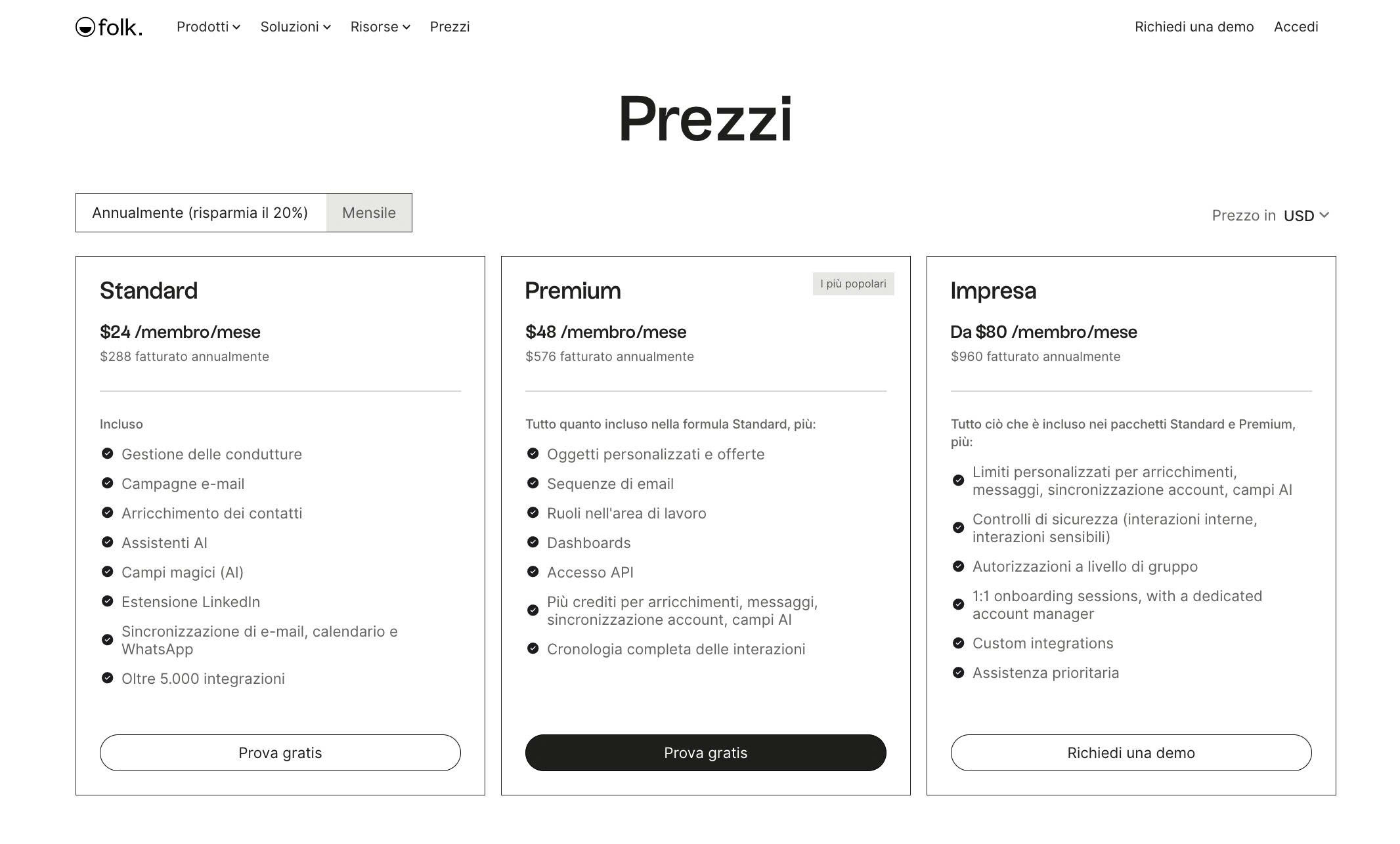
folk is priced per member, per month, with a discount for annual billing. Every plan includes unlimited members, and a 14-day free trial (no credit card required) unlocks premium features so you can test it properly. As of 2026, the tiers break down as follows (annual pricing shown; monthly billing costs more):
- Standard Plan: $24 per member/month billed annually ($288/year) or about $30 monthly — Pipeline management, email campaigns, contact enrichment, AI assistants, magic (AI) fields, the LinkedIn extension, email/calendar/WhatsApp sync, and 5,000+ integrations. Ideal for small teams getting started.
- Premium Plan: $48 per member/month billed annually ($576/year) or about $60 monthly — Everything in Standard, plus custom objects and deals, email sequences, workspace roles, dashboards, API access, more credits for enrichments and messages, and full interaction history. This is folk's most popular tier.
- Enterprise Plan: from $80 per member/month billed annually ($960/year) or about $100 monthly — Everything in Standard and Premium, plus custom limits for enrichments, messages, account sync and AI fields, advanced security controls, group-level permissions, 1:1 onboarding with a dedicated account manager, custom integrations, and priority support.
Full details at: https://www.folk.app/pricing
Real-World Use Case Analysis
-
Agencies & Consultancies
Managing client relationships: Agencies juggle dozens of ongoing clients and prospects across email and WhatsApp. folk keeps every conversation and next step in one shared view, so nothing falls through the cracks when work is passed between team members.
Nurturing a referral network: The Follow-up Assistant surfaces contacts who have gone quiet, helping agencies stay top-of-mind with past clients and partners who drive repeat business.
-
Startups & Founders
Bootstrapping outbound: Founders can use folkX to build a targeted prospect list from LinkedIn, enrich it in one click, and run personalized email campaigns — all without hiring a dedicated sales ops team.
Tracking fundraising: Custom objects let founders manage investor pipelines, logging every meeting and follow-up so a fundraise stays organized from first contact to term sheet.
-
Venture Capital & Partnerships
Mapping relationships: VC and partnership teams live on their networks. folk's flexible data model and automatic sync make it easy to track founders, co-investors, and portfolio companies without forcing every relationship into a rigid sales funnel.
-
Small Sales Teams
Replacing tool sprawl: Instead of paying for a data provider, a sequencing tool, and a heavy CRM, small teams get prospecting, enrichment, campaigns, and pipelines in one affordable subscription.
Keeping the CRM alive: Because folk logs interactions automatically and the interface is genuinely pleasant, reps actually keep it current — solving the biggest reason CRMs fail at smaller companies.
Pros and Cons of folk
-
Advantages of Using folk
folk delivers strong value for relationship-driven teams:
- Clean, lightweight interface that teams actually adopt and keep updated.
- Automatic email, calendar, and WhatsApp sync removes manual data entry.
- Practical AI assistants for follow-ups, recaps, research, and workflows.
- folkX extension and one-click enrichment make list-building genuinely fast.
- Flexible data model and 5,000+ integrations adapt to niche workflows.
-
Disadvantages of Using folk
There are some trade-offs to weigh:
- Not built for large enterprise sales orgs that need deep, rigid process automation.
- Enrichment and AI credits are metered, so heavy users may hit monthly limits.
- Reporting and dashboards are lighter than dedicated sales-analytics platforms.
- Advanced features like custom objects, sequences, and API access require the Premium tier or above.
Final Thoughts on folk
folk is one of the most refreshing CRMs available for small, relationship-driven teams. By pulling context automatically from the channels you already use, enriching contacts in one click, and layering practical AI assistants over the whole workflow, it solves the classic CRM problem: people not keeping it up to date. It is not designed to replace a heavyweight enterprise platform, and power users will bump into credit limits, but for agencies, startups, VCs, and small sales teams that value speed and simplicity, folk is an excellent fit. The 14-day free trial with full premium features makes it easy to test against your own workflow before committing — and for most relationship-first teams, it will quickly earn its place in the stack.
Ready to try folk?
Visit the official website to see the latest plans, pricing, and special offers.
Get Started - folk* Affiliate link - we may earn a commission at no extra cost to you.