Tawk.to Review: Free Live Chat, and What the Add-Ons Really Cost
Tawk.to review: what the free live chat includes, what Remove Branding, AI Assist credits and hired agents cost, where data is stored, how export works, and who should pick Crisp or LiveChat instead.
Expert Review

Why the chat itself costs nothing
Most live chat vendors put a price on every seat. Tawk.to gives the seat away and sells the person sitting in it. Its "why free" page argues that software is not the expensive part of live chat: "it is the cost of staffing to answer chats 24×7". So the company rents out hired agents by the hour and lets the free software act as the funnel. It has run on that model since it launched in October 2013, and says it is not VC funded.
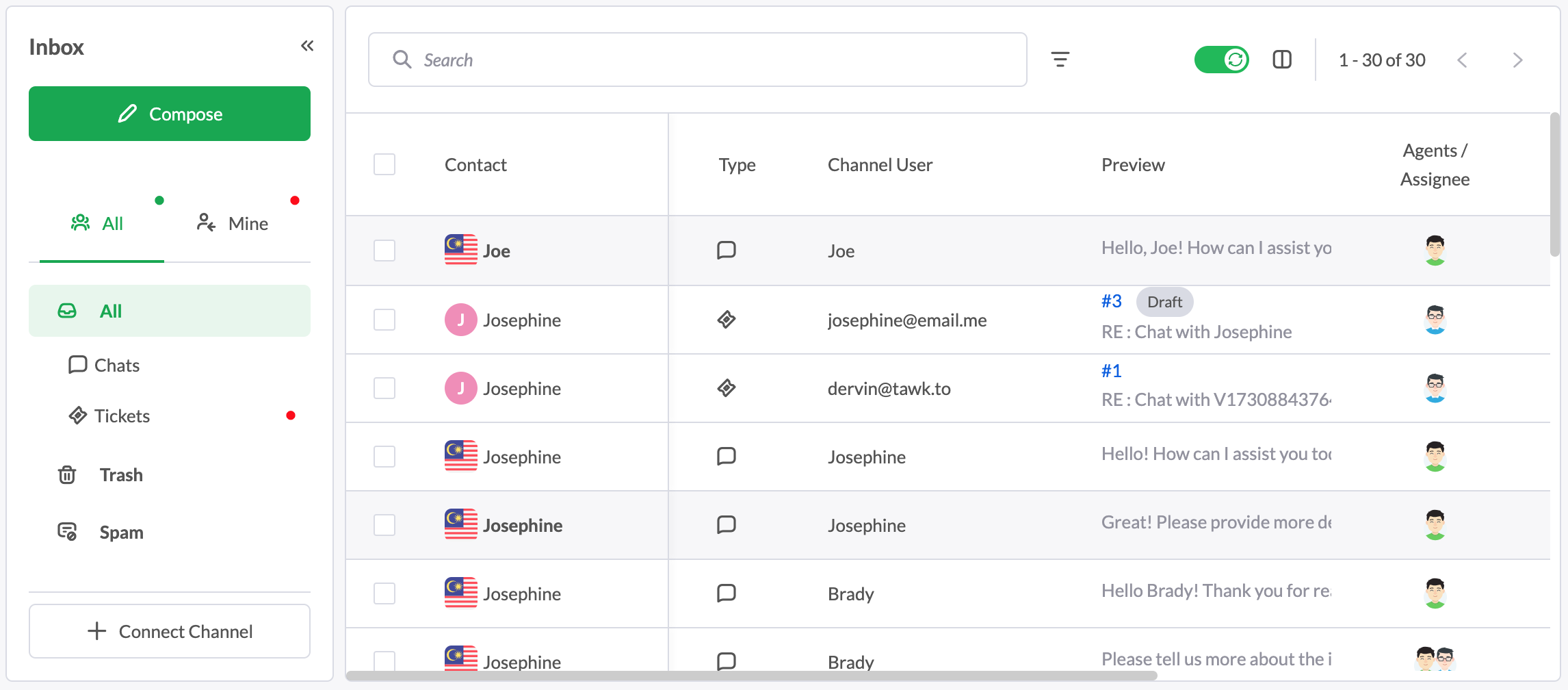
The free account is not a trial with the good parts removed. The homepage lists live chat, an omnichannel inbox, chat pages, a knowledge base, a CRM with a pipeline and activities, feedback forms, automation, and apps for iOS, Android, macOS and Windows. Tickets sit in the same list as chats, with a Compose Ticket button, so a chat that arrives while nobody is online can become an email thread without a second tool. Tawk.to's own widget demo goes further and promises "unlimited agents" on "unlimited sites". That is the vendor's claim, but nothing in the help centre we read puts a cap on either.
What the add-ons really cost
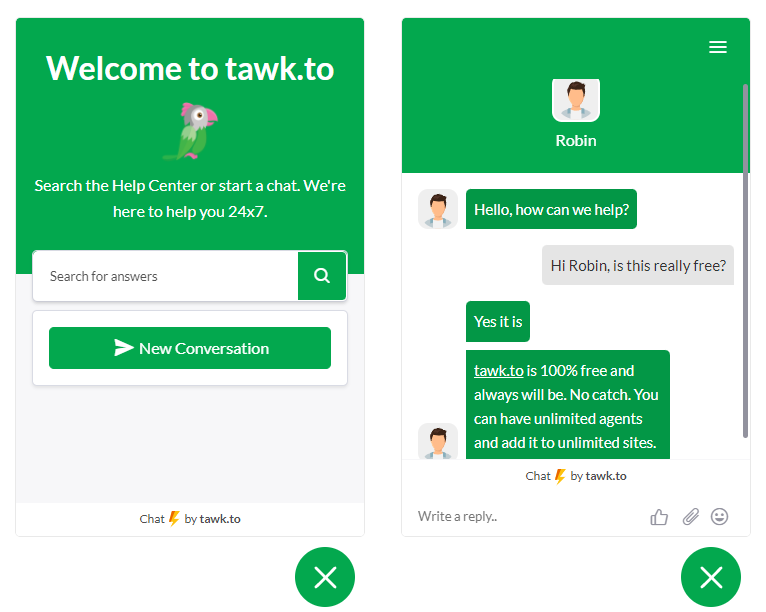
The free widget carries a tawk.to badge in its footer, and on some versions a link that reads "Add free live chat to your site". Hiding it is where most small businesses first pay, and the price is easy to misread. The pricing page shows Remove Branding at $29/month. The help centre, updated in March 2026, spells it out: $39 per month billed monthly, or $348 a year, and the $29 is that annual price divided by twelve. It is also billed per property - one website - and tawk.to states that "add-ons aren't shared across properties". An agency hiding the badge on three client sites pays $1,044 a year on annual billing, or $1,404 month to month.
| Add-on | Price | Note |
|---|---|---|
| Remove Branding | $39/month, or $348/year ($29/month equivalent) | Per property |
| Video + Voice + Screensharing | $49/month | Per property, like every add-on |
| AI Assist | Free Hobby tier; Growth from $29/month | Credits, see below |
| Data Enrichment | From $59/month | Billed per property |
| Hired agents | $1/hour (24/7, $728/month) to $3/hour (10 hours a week, $129/month) | A 40-hour week is $380/month |
| Virtual Assistants | From $7/hour |
Prices checked on tawk.to's pricing page, add-ons page and help centre on November 24, 2026. Add-ons bill monthly and can be cancelled at any time.
The hired-agent rates look tiny per hour and are not small per month. Round-the-clock cover is $728. That is still a fraction of a local hire, which is exactly the pitch, but it is the line item that turns "free" from a budget into a marketing word.
AI Assist and the credit math
AI Assist is tawk.to's answer bot. It crawls your site, answers routine questions, captures leads and, on paid plans, hands over to a human. Hobby is free with 100 messages, one AI agent and a 100-page crawl. Growth is $29 a month ($290 a year) for 1,000 messages, three agents, a 500-page crawl that re-runs daily, human takeover and a Shopify integration. Business is $99 for 5,000 messages. Enterprise, at $399, buys 20,000 and is the only tier with an uptime SLA (99%).
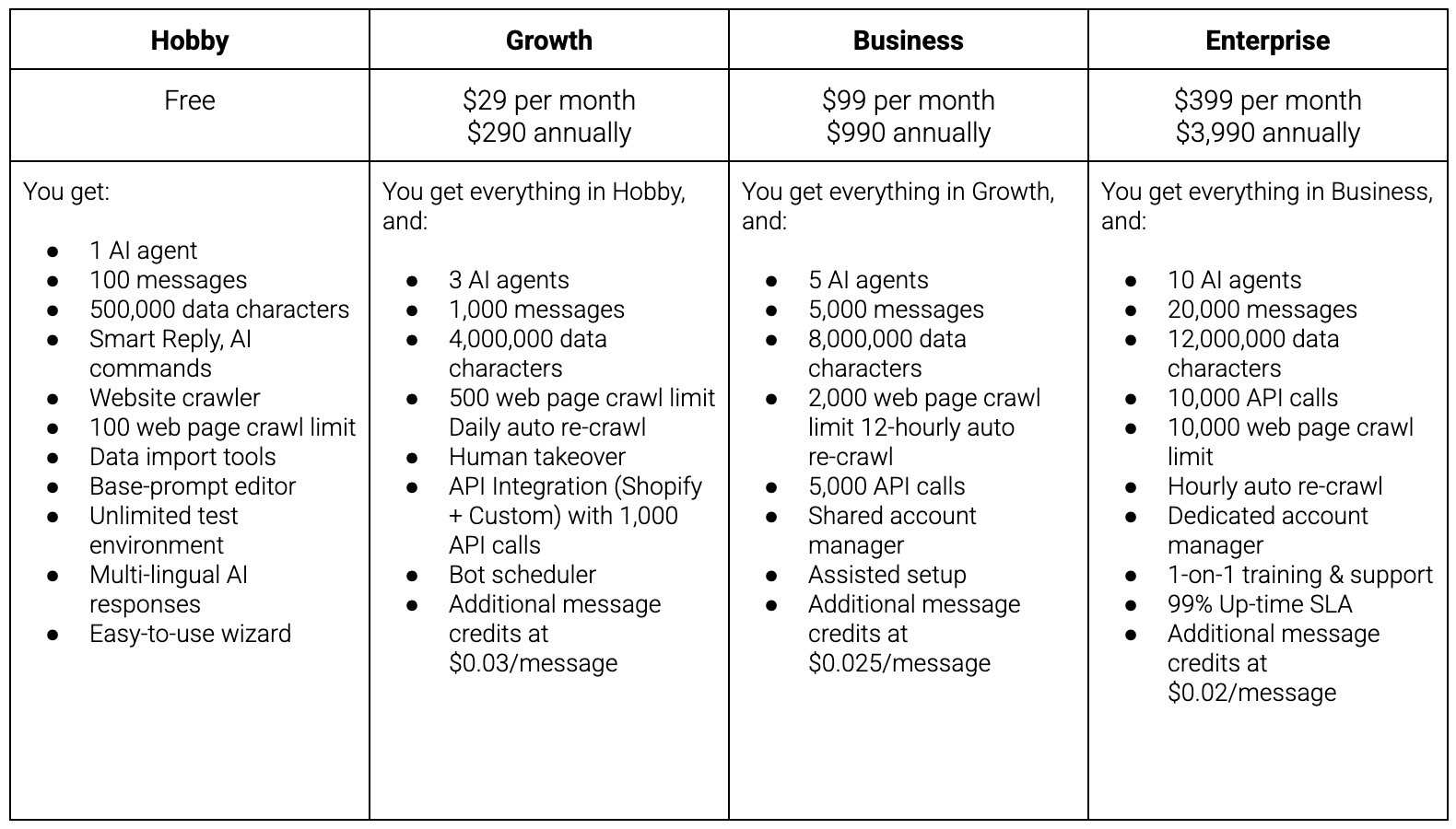
The catch is that a "message" is really a credit, and one reply can cost several. The default Auto model "uses 3 credits per reply". By our arithmetic, that turns Hobby's 100 credits into about 33 answers a month and Growth's 1,000 into about 333. Switch the model to Claude Haiku 4.5, GPT-4o mini or Gemini Flash, which tawk.to rates at 1 credit per reply, and the same plans stretch to 100 and 1,000 answers. Advanced models run "from 2 up to 10+ credits per reply". Voice messages count too: one credit per started minute, up to five per message.
Extra credits are sold only on paid plans, so a busy Hobby bot simply stops answering. Their price depends on which page you read. The credits article says $30 per 1,000; the plan table lists $0.03 per message on Growth, falling to $0.02 on Enterprise. Budget two to three cents a credit, and set the model to a 1-credit option on day one.
One question to put to tawk.to before feeding the bot customer data. Its AI data article says your training data is never shared "with any third party", yet the models it offers come from Anthropic, OpenAI and Google. Processing agreements may well cover that - its GDPR page says it has DPAs with its vendors - but the help centre does not reconcile the two statements.
Where your data lives, and how you leave
Everything is stored in Google Cloud data centres in the United States. There is no region choice; tawk.to files that under "in the future". Data is kept "indefinitely until you request deletion". For European visitors it relies on self-certification under the EU-U.S., UK-US and Swiss-U.S. Data Privacy Frameworks. We found no SOC 2 or ISO 27001 report mentioned on its site, and no SSO or SAML documentation. Two-factor login does exist, through an authenticator app.
The live visitor monitor shows why that matters. It lists each visitor's IP address, country, current page, referrer and browser as they browse - personal data that every site running the widget is now sending to a US processor, and that belongs in your privacy policy.
Leaving is possible but not tidy. An admin can export chat history, which arrives as an emailed link to a ZIP "containing the chats in JSON format". There is no CSV, so getting 2,000 conversations into a spreadsheet or another helpdesk means writing a conversion script first. The REST API can export transcripts and tickets in bulk, but it is "currently in alpha" with no SLA, and keys are "only available on request". Webhooks are the dependable route: up to 10 per property, firing on chat start, chat end, new ticket and new transcript. Point one at Zapier or Make on the first day and you keep your own copy as you go.
Setup, channels and page weight
Installation is a script snippet or a plugin. The WordPress plugin has more than 100,000 active installs and a 4.6 average from 142 ratings. It controls visibility per page type, takes include and exclude URL lists, offers a [tawkto] shortcode and has separate toggles for WooCommerce pages. The Shopify app carries the Built for Shopify mark. Beyond the website, the inbox pulls in Messenger, WhatsApp, Telegram, LINE and Twilio SMS, and visitors can send files up to 50 MB.
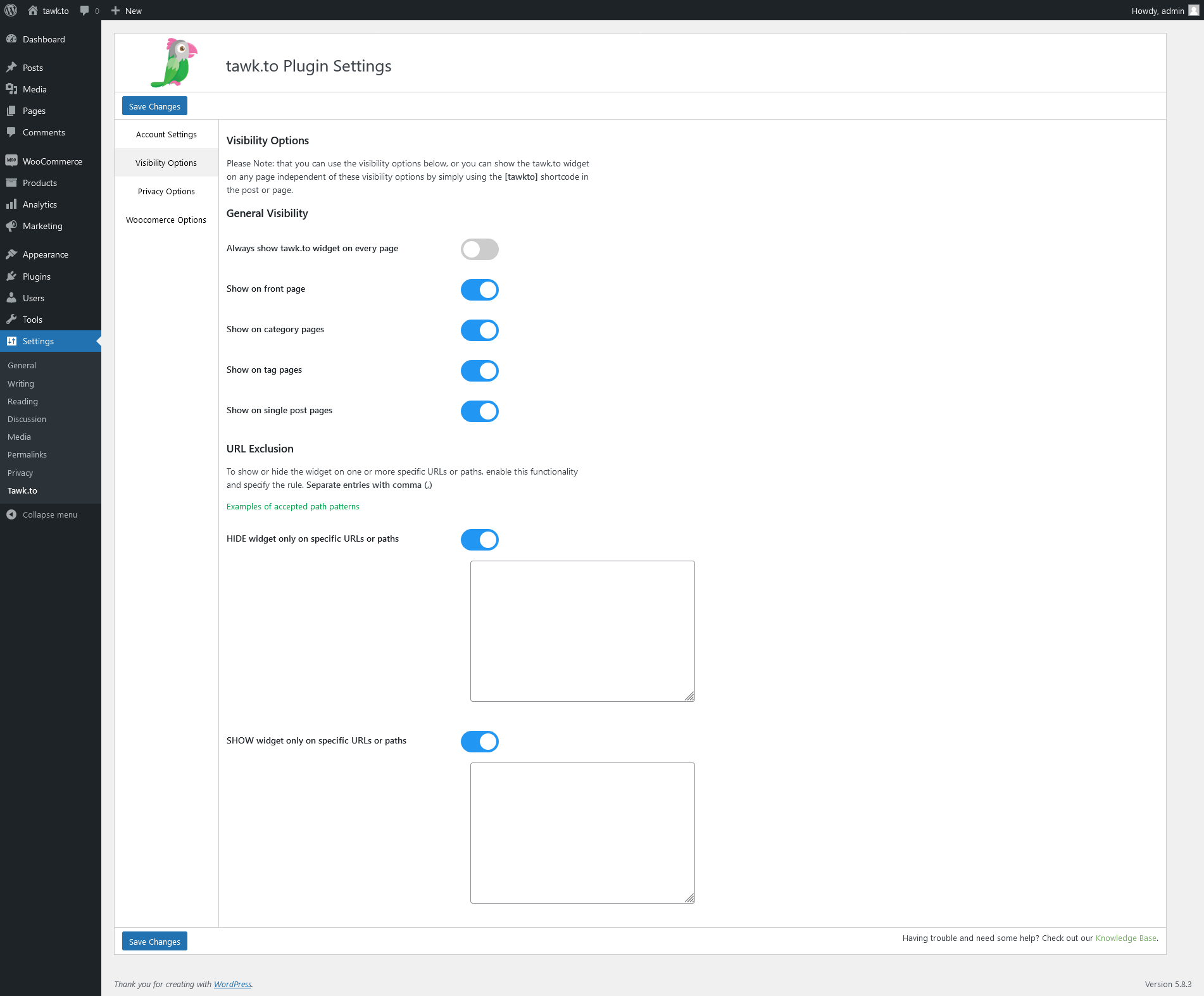
Tawk.to says the widget "will not slow down your site" and, in the same answer, puts it at "typically ~300 KB". Read that the other way round. Every visitor downloads 300 KB whether they chat or not, which is more than many whole landing pages. If Core Web Vitals matter to you, load the widget only where people actually ask questions - pricing, checkout, support - which the plugin's URL rules make a two-minute job.
What users complain about
The rating depends on where you look. G2 shows about 4.5 out of 5 from roughly 200 reviews and Capterra about 4.6 from roughly 340. The Shopify App Store is harsher: 3.7 from 90 reviews. Its split is the telling part - 71% five-star, 21% one-star, almost nothing in between. People either install it and forget it, or it fails them at the moment that counts.
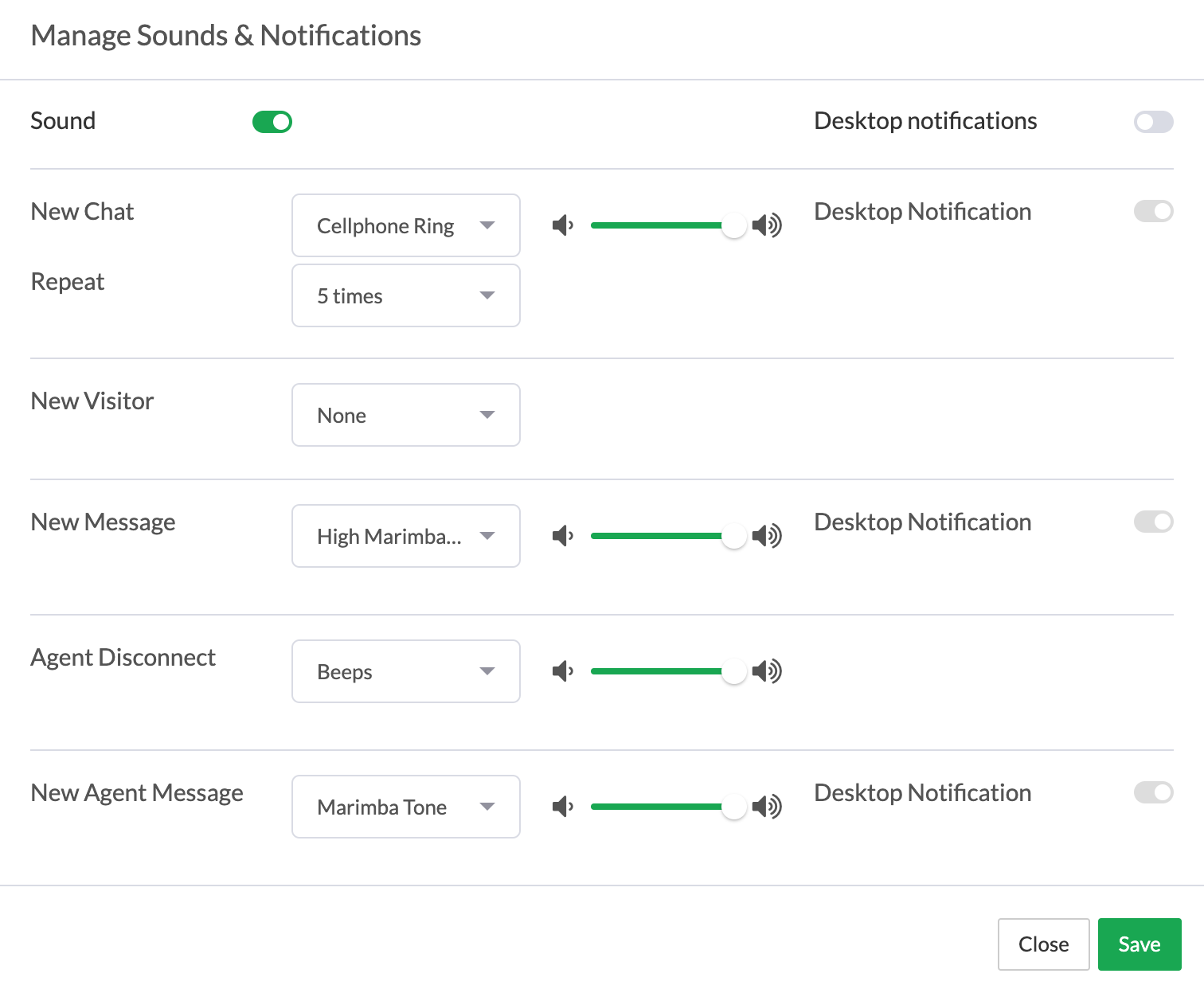
That moment is usually a notification. A G2 reviewer says of the mobile app, "sometimes it feels a bit slow. Also, notifications could be more consistent at times." Capterra reviewers mention slowness, missed alerts and being logged out. Shopify's one-star reviews put it more bluntly - "I've missed several chats because it failed to notify me" - though those date from 2018 and 2019, so treat them as history rather than the current state. Still, test alerts on your own phones before you trust tawk.to with sales chats. In the agent app, desktop notifications are switched on per event - new chat, new message, new agent message - and the master toggle ships off in tawk.to's own screenshot, so check each one.
Verdict
Tawk.to is the right pick for a small site or Shopify store that wants a human answering chats for $0, has a handful of agents and can live with the badge. Nothing else in this category gives away unlimited seats along with ticketing, a knowledge base and a basic CRM. Pay for Remove Branding only on the sites where the badge actually hurts, and keep AI Assist on a 1-credit model.
Skip it if you need data stored in the EU, SSO, a CSV export or an AI bill you can forecast. Those are tawk.to's gaps, and none is small. A team with procurement checklists should look at Crisp or HelpCrunch, which put a price on the seat and document more of what you get for it, or at LiveChat if per-seat pricing fits the budget and the agent app is what your team lives in all day.
Ready to try Tawk.to?
Visit the official website to see the latest plans, pricing, and special offers.
Get Started - Tawk.to* Affiliate link - we may earn a commission at no extra cost to you.