HubSpot Review: A Complete Look at the CRM and Inbound Marketing Platform
HubSpot review: the all-in-one Customer Platform with a free Smart CRM, Marketing, Sales, and Service Hubs, plus Breeze AI — features, pricing, pros and cons.
Expert Review

What is HubSpot?
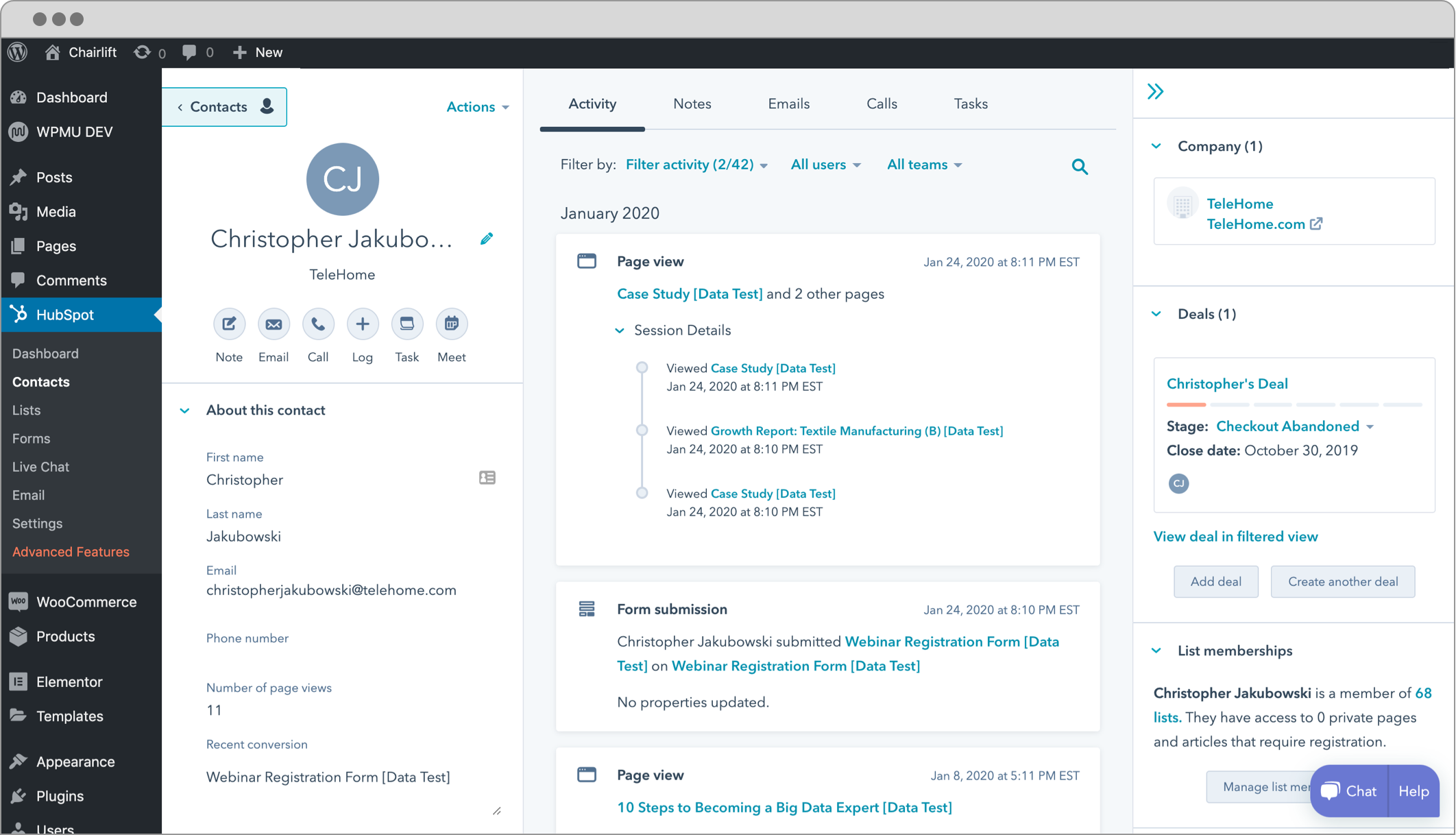
HubSpot is a customer platform that brings marketing, sales, and customer service together on top of a single, shared CRM. At its core sits a free contact database that stores every lead, company, deal, and interaction in one record, and around that core HubSpot layers a set of connected products it calls Hubs — Marketing, Sales, Service, Content, Operations, and Commerce. Because everything runs on the same data, a marketer, a sales rep, and a support agent all see the same customer history instead of stitching it together from separate tools.
Founded in 2006 by Brian Halligan and Dharmesh Shah, HubSpot popularized the idea of inbound marketing — attracting customers with helpful content rather than interrupting them with ads. Over the years it grew from a marketing tool into a full front-office suite used by everyone from solo founders on the free tier to large enterprises coordinating global campaigns. Today HubSpot also folds in Breeze, its AI layer, adding a content assistant, task-doing AI agents, and conversational insights across the platform.
Benefits of Using HubSpot
- One platform for the whole customer journey: marketing, sales, and service work from the same Smart CRM, so a lead captured by a campaign flows straight into a sales pipeline and later into support without data ever leaving the system.
- A genuinely useful free tier: the free Smart CRM includes contact management, forms, live chat, email marketing, and a deal pipeline for unlimited users — a rare starting point that costs nothing to try.
- Powerful no-code automation: visual workflows handle lead nurturing, task assignment, internal notifications, and follow-ups, letting small teams run processes that would otherwise need a dedicated ops person.
- Polished, approachable interface: HubSpot is known for a clean, well-designed UX that non-technical marketers and reps can learn quickly, which shortens rollout and boosts adoption.
- Deep reporting and dashboards: because every touchpoint is tracked in one place, HubSpot can tie marketing spend to closed deals and show funnel health across the whole customer lifecycle.
- A large ecosystem: more than a thousand app integrations, an app marketplace, HubSpot Academy training, and a big partner network make it easy to extend and to hire for.
Key Features of HubSpot
-
Smart CRM
The foundation of HubSpot is its free Smart CRM, a unified database of contacts, companies, deals, and tickets. Every email, call, form submission, and page view is logged automatically on the timeline, giving anyone in the company a complete history of a relationship. It supports unlimited users and up to a million contacts for free, which is why so many teams adopt HubSpot here first and expand later as their needs grow.
-
Marketing Hub
Marketing Hub is where inbound marketing happens: email campaigns, drag-and-drop landing pages, blog and content tools, forms and pop-ups, ad management, and no-code workflow automation for nurturing leads. It also bundles SEO recommendations to help pages rank and analytics that connect campaigns to revenue. This is HubSpot's flagship product and, at the Professional level, its most expensive one.
-
Sales Hub
Sales Hub gives reps a visual deal pipeline, automated email sequences for follow-up, a meeting scheduler that syncs to a calendar, quotes, and call tracking. Because it sits on the Smart CRM, reps see the marketing activity that preceded a deal and can prioritize the warmest leads. Forecasting and playbooks on higher tiers help sales managers run a predictable pipeline.
-
Service Hub
Service Hub turns HubSpot into a support desk with a ticketing system, a shared inbox, live chat, SLAs, a customer portal, and a searchable knowledge base for self-service. Support conversations attach to the same contact record marketing and sales use, so an agent always has full context — and feedback surveys feed customer sentiment back into the platform.
-
Breeze AI
HubSpot's AI layer, Breeze, runs across every Hub. A content assistant drafts emails, blog posts, and landing-page copy; Breeze agents automate real work such as prospecting, customer support, and content generation; and ChatSpot lets you query and update the CRM in plain language. Because Breeze is grounded in your own CRM data, its suggestions and summaries reflect the actual customers and deals in your account rather than generic output.
Pricing of HubSpot
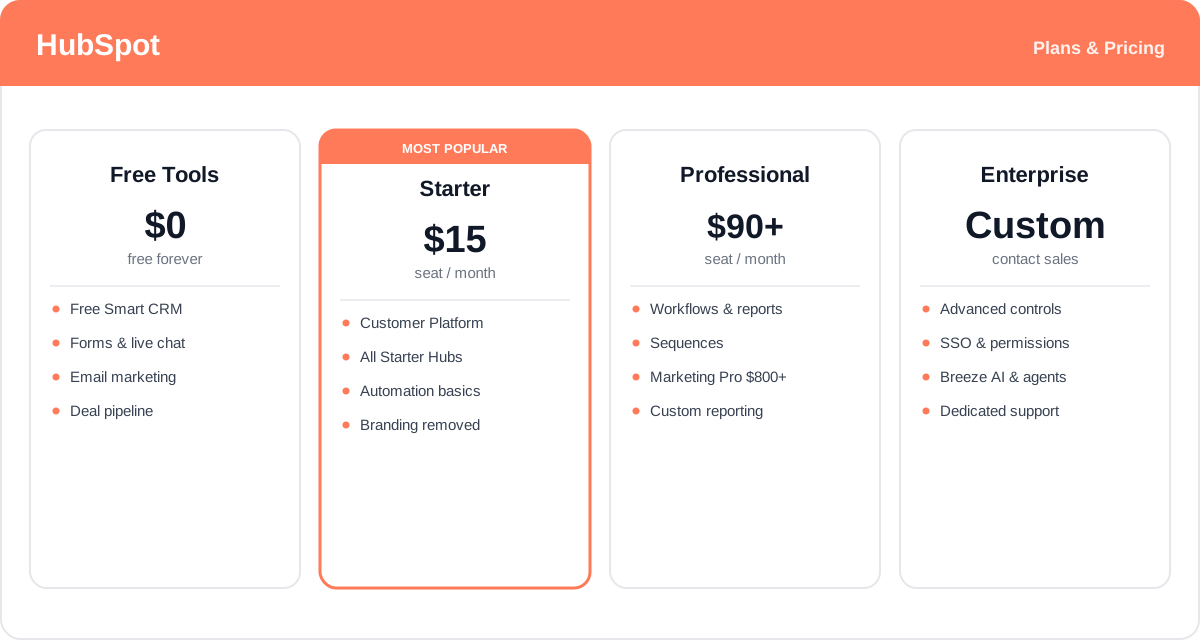
HubSpot pricing can be confusing because you can buy individual Hubs or bundle them into the Customer Platform, and each product comes in Free, Starter, Professional, and Enterprise editions. Paid plans are priced per seat and are cheaper billed annually. The key thing to know: Marketing Hub Professional carries a much higher entry price than Sales or Service Hub Professional, because marketing includes a large block of contacts and features.
- Free Tools: $0 — the Smart CRM plus starter versions of marketing, sales, service, and content tools for unlimited users. Includes forms, live chat, email marketing, and a deal pipeline, with HubSpot branding on assets.
- Starter Customer Platform: from about $15 per seat/month billed annually (roughly $20 month-to-month) — bundles the Starter edition of every Hub, removes HubSpot branding, and adds basic automation and simple reporting. The best-value entry point for small businesses.
- Professional: Sales Hub and Service Hub Professional start from about $90 per seat/month, while Marketing Hub Professional starts from roughly $800+/month (which includes a set number of seats and marketing contacts). Professional unlocks omnichannel workflows, custom reporting, sequences, and forecasting.
- Enterprise: custom, high-end pricing — the most advanced tier, with granular permissions, advanced admin and security controls, sandboxes, custom objects, and the fullest set of Breeze AI capabilities for large organizations.
Prices vary by Hub, edition, seat count, and marketing-contact tier, and they change over time — check the official HubSpot pricing page for current rates and exactly what each plan includes.
Real-World Use Case Analysis
Marketing Teams
Inbound campaigns and lead nurturing: marketing teams use Marketing Hub to build landing pages and forms that capture leads straight into the CRM, then run automated email workflows that nurture those leads based on behavior. SEO tools and analytics tie content to pipeline, so marketers can prove which campaigns actually generate revenue rather than just clicks.
Sales Teams
Pipeline management and follow-up at scale: sales teams work a visual deal pipeline, fire off automated sequences so no prospect goes cold, and let leads book time through the meeting scheduler. Because Sales Hub shares the CRM with marketing, reps inherit the full history of every lead and can focus their time on the deals most likely to close.
Growing SMBs
One system instead of a patchwork of tools: a growing small business can start on the free Smart CRM, add the Starter Customer Platform as it scales, and consolidate marketing, sales, and support onto one platform. That avoids the cost and data silos of stitching together separate point solutions, and everyone works from a single view of the customer.
Pros and Cons of HubSpot
Advantages
- A genuinely generous free tier — the Smart CRM, forms, chat, and email marketing cost nothing for unlimited users.
- Truly all-in-one: marketing, sales, and service share one database, eliminating silos and duplicate data entry.
- Polished, intuitive interface that non-technical teams adopt quickly, backed by excellent HubSpot Academy training.
- Powerful no-code automation and deep, lifecycle-wide reporting in one place.
- Large ecosystem of 1,000+ integrations, an app marketplace, and a big partner network.
- Breeze AI adds content drafting, task-doing agents, and plain-language CRM queries grounded in your own data.
Disadvantages
- Costs escalate fast: the jump from Starter to Professional is steep, and Marketing Hub Pro's entry price is especially high.
- Pricing scales with your contact and seat count, so bills climb as your database and team grow — sometimes unpredictably.
- Some advanced features (custom reporting, forecasting, sandboxes, the fullest AI) are gated behind Professional and Enterprise.
- Buying multiple Hubs at Professional or Enterprise can become very expensive for smaller businesses.
- The breadth of the platform means there is a real learning curve to configure it well and use every capability.
Final Thoughts on HubSpot
HubSpot is one of the most complete customer platforms on the market, and its great strength is unification: putting marketing, sales, and service on a single Smart CRM removes the silos that quietly slow most growing companies down. The free tier is genuinely useful, the interface is a pleasure to use, and Breeze AI adds real leverage on top of data you already own. The trade-off is cost — the platform is easy to start on but gets expensive quickly at the Professional and Enterprise levels, and pricing that scales with contacts and seats means the bill grows with your success. For teams that want one connected system for the whole customer journey and are prepared to invest as they scale, HubSpot is hard to beat; the free CRM makes it a low-risk place to begin before committing to a paid Hub.