Lex Review: The AI Writing Editor That Stopped Taking New Users
Lex review: AI Checks, Ask Lex and model choice, the last published price ($24.99/mo), the end-of-2026 wind-down, how to export your documents and which alternative fits.
Expert Review

Lex is closed to new customers
The first thing lex.page shows you now is a banner, not a sign-up button: "Lex is no longer accepting new customers. Existing accounts will keep working as usual." We checked on 2026-10-24, and the same line sits on the pricing page, where the plans have been replaced by "Pricing information for existing users only." We could not open a new account to test it. That closed door is the most useful finding in this review.
The reason came from Lex's founder, Nathan Baschez, in a LinkedIn post around 24 September 2026: "I've joined Notion! ... Lex will be winding down by the end of the year, while Roughdraft will continue on as an independent open source project." In a reply he added that Lex "will offer refunds and a graceful offramp / export / etc", and that Notion "has kindly offered a discount to lex users." As of 2026-10-24, the exact shutdown date, the export tooling and the size of that discount had not been announced.
So this is a review written at the end. It covers what Lex did well, which matters when you choose a replacement, what it cost, and what to do with your documents before December runs out.
What Lex did well
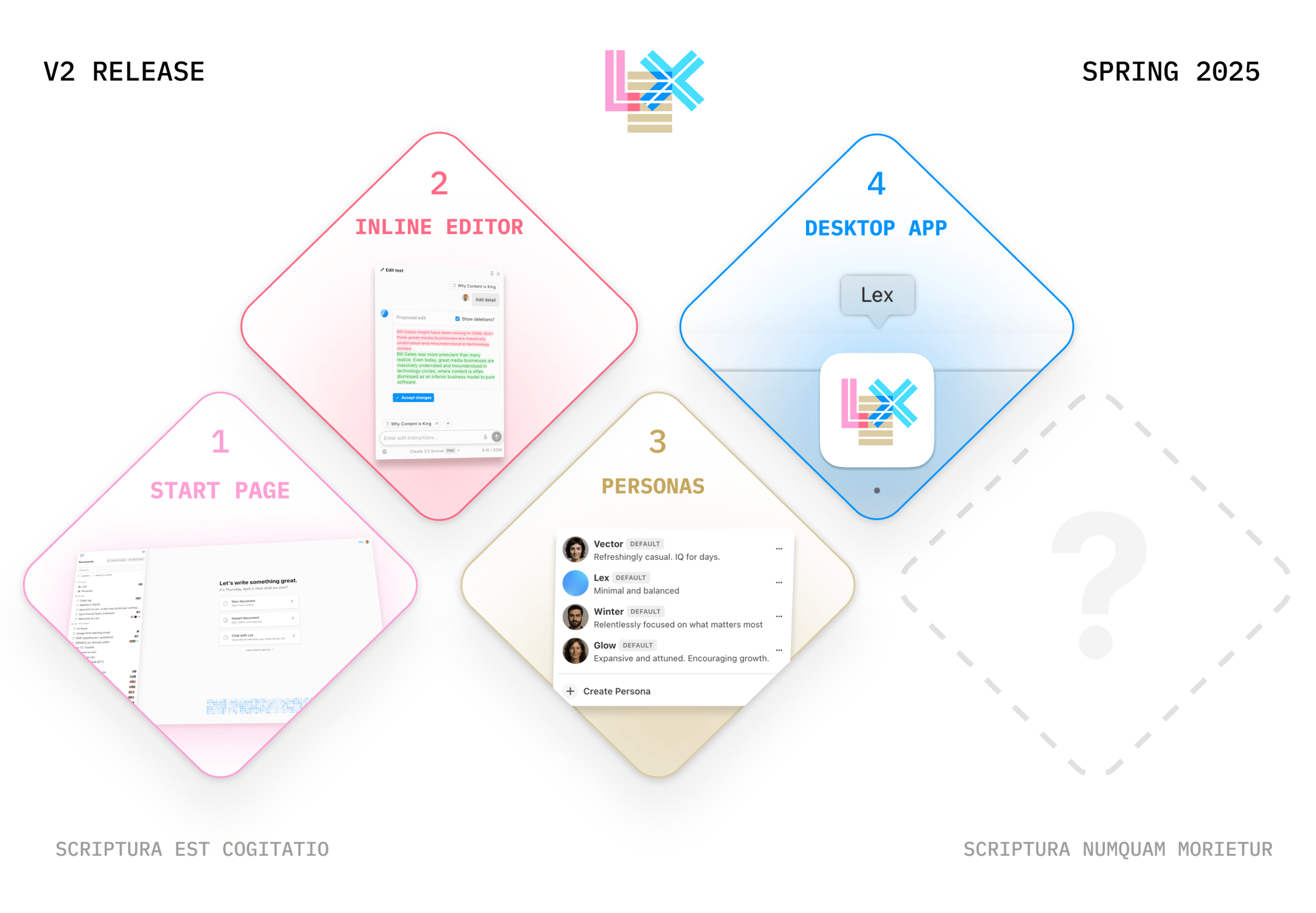
Lex started in the fall of 2022 as a nights-and-weekends project inside the newsletter company Every. About 25,000 people joined its waitlist overnight. It became its own company in 2023 with a $2.75M seed round led by True Ventures. The pitch never changed much: a plain, Google-Docs-like page with the AI kept off to the side until you call it.
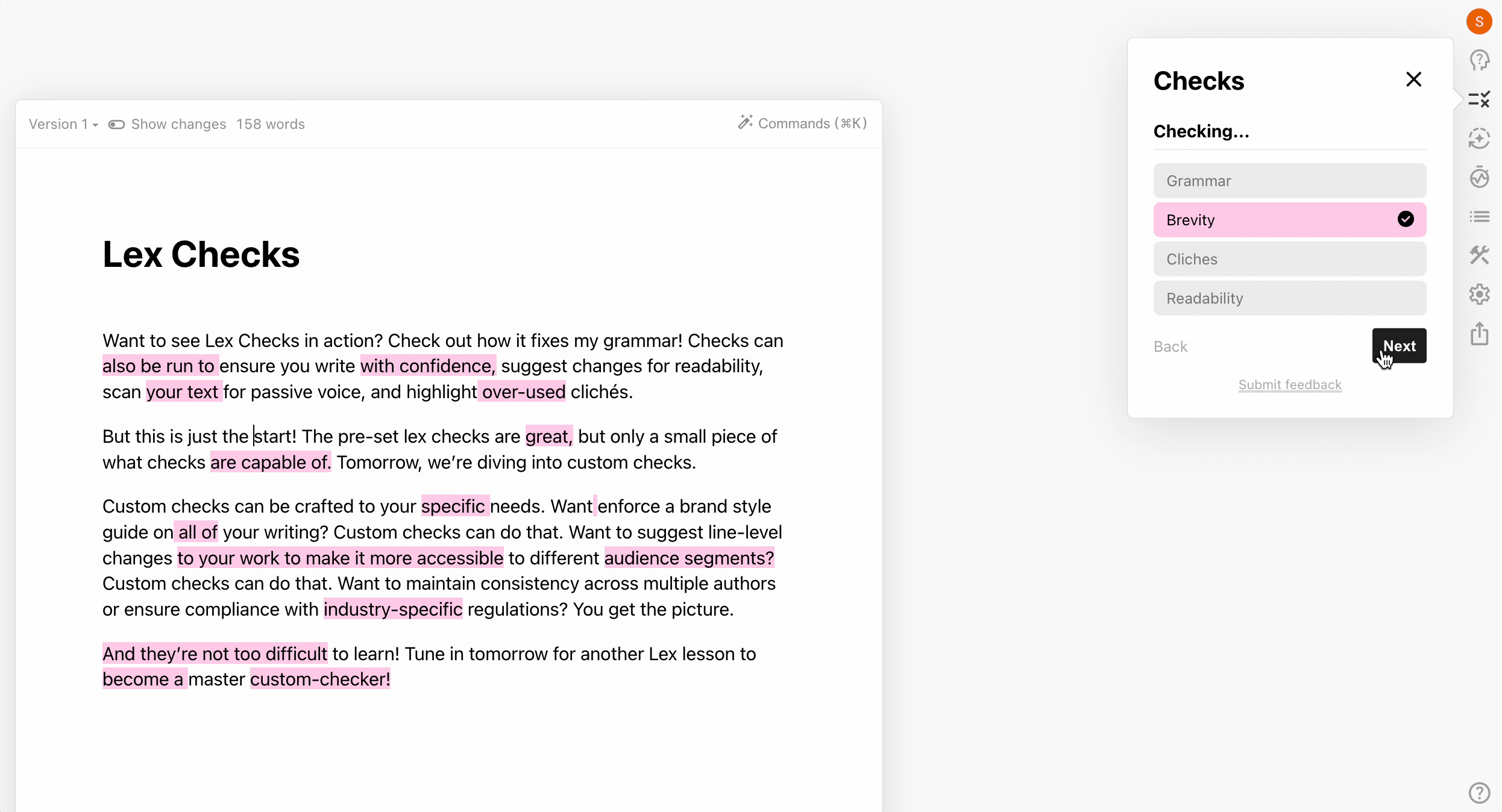
The feature that set it apart was Checks. You run line edits for brevity, grammar, readability and similar goals, and suggestions appear as pink highlights in your own draft. Hit the "?" on any of them and Lex explains its reasoning. That small habit made it a teacher as well as an editor. A Product Hunt reviewer called Lex "a sidekick to writing rather than some others which feel like it replaces it", and Craig Van Slyke at AI Goes to College called it "a great combination of low-distraction writing and useful AI feedback." Both get at the same design choice.
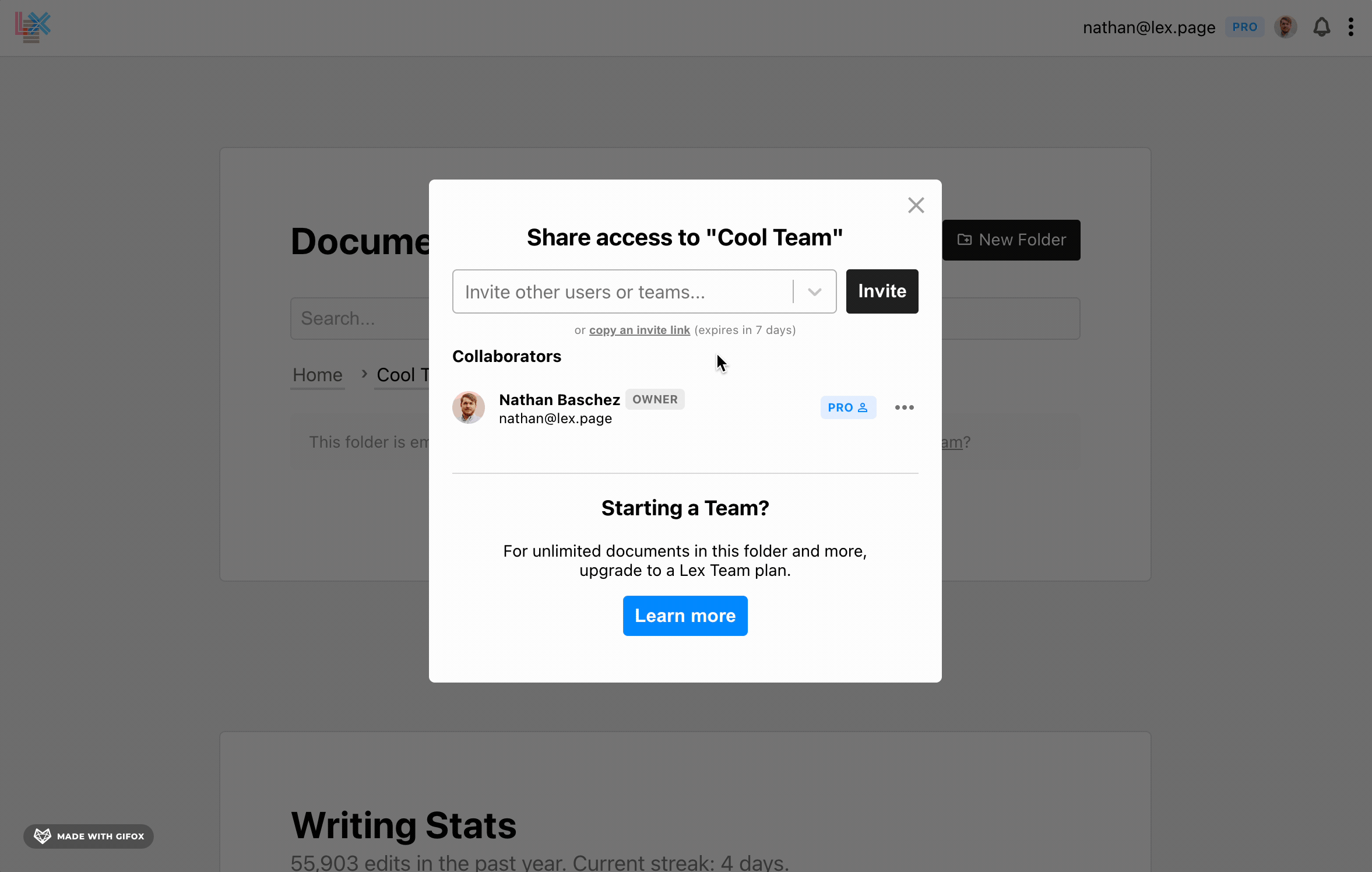
Around that sat Ask Lex, a chat about the draft in front of you, plus reusable custom prompts a team could share. Style Guides trained it on your voice, Knowledge Bases held shared reference material, and a Kit integration let newsletter writers feed it their back issues. Rewind let you scrub through the edit history and restore any moment. Versions gave you named save points. Sharing worked through a link, with no app to install.
Not everything landed. "Track Changes" is still marked "Coming soon" on the home page. A Mac app shipped in May 2025 with offline mode promised rather than delivered, and the Windows version it teased never appeared. The last dated release in the newsletter archive is GPT-5 support on 7 August 2025. Aggregated reviews this year complained of stalled updates and missing newer models, and the archive backs that up.
Models, rate limits and your data
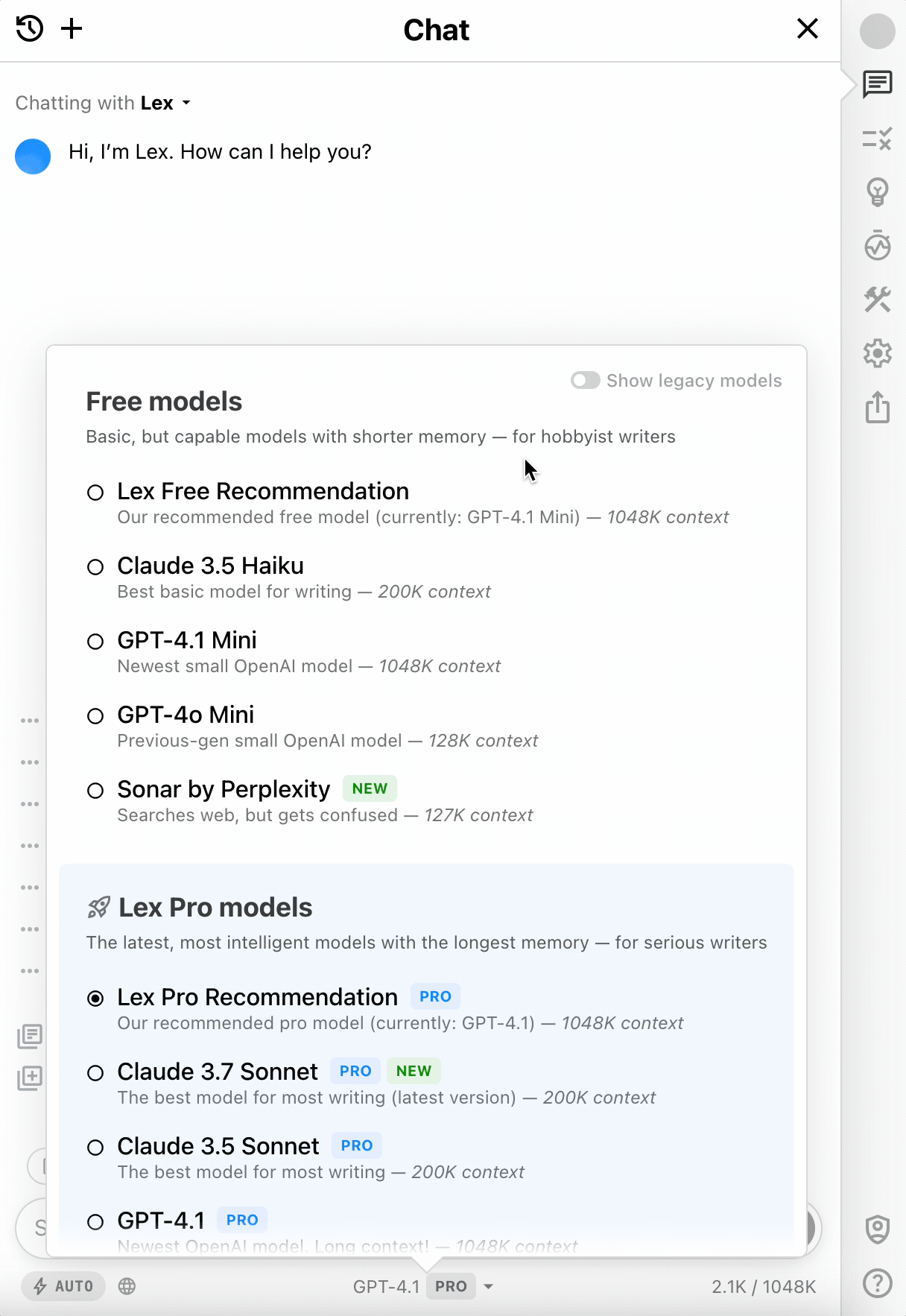
Lex never ran its own model. It routed your text to other people's. The model guide, last updated in April 2025, set GPT-4.1 as the Pro default and GPT-4.1 mini for free users, and offered a long menu on Pro: Claude 3.5 and 3.7 Sonnet, o3, o4 mini, Gemini 2.5 Pro, Perplexity's Sonar Pro, Deepseek R1, Llama 3.1 405B and more. GPT-5 and GPT-5-mini were added to Pro in August 2025, with GPT-5-nano on the free tier. The pricing page today names "GPT 4.1 and Claude 4 Opus & Sonnet". Nothing newer is listed.
The free plan's limits were specific: 30 Ask Lex messages a day, 5 runs of saved prompts a month, 30 Checks a month and a "low daily AI processing budget", after which you wait for tomorrow. Pro was sold as unlimited until April 2025, when Lex V2 added caps it called "super high". Fewer than 3.5% of active Pro users hit them in the month before, and past the cap you paid the raw AI cost with no markup. The cap itself was never published.
On training, the answer is clear. Lex says it does not train models on your writing and uses OpenAI, Anthropic and Together.ai through their enterprise APIs. Its terms claim no ownership of your content and leave you "all right, title and interest" in the output. The gap is the vendor list. Lex offered Gemini, Perplexity and Deepseek models, but no privacy or security page we found names Google or Perplexity as recipients of your text. The privacy notice was last updated in June 2023, and it sets no fixed retention period.
Pricing and refunds
There is nothing to buy now, but the numbers matter for refunds. The last published price, from July 2025, was $24.99 a month or $179.88 a year ($14.99 a month). That rise took effect on 18 July 2025, up from $18 monthly and $144 yearly. Lex blamed AI costs: "we send a lot more data to AI models." Anyone already subscribed kept their old rate. Lex Teams, the add-on for unlimited shared folders, never had a public price. Lex also advertised discounts for nonprofits, students and academics without saying how much.
Refunds are where the documents disagree. The terms, last updated in September 2024, give a full refund within ten days of first purchase, after which "your purchase is final." The pricing page is more generous: "If you don't love Lex after a month, reach out and we'd be happy to send you a refund." The founder's wind-down post promises refunds on top of both. If you paid for a year recently, email Lex rather than waiting for the details. Cancellation is also by email, and it takes effect at the end of the current period.
How to get your documents out
This is the part that has a deadline. Lex exports one document at a time, in five formats: Word, PDF, Markdown, HTML and LaTeX. Since April 2025 it can also send a document to Google Drive. A whole-account export is not documented, so with 300 drafts you either do 300 exports or use the developer API.
- Few documents: export each one as Markdown if you are moving to Notion or a Markdown tool, or as Word if you are moving to Google Docs. Markdown keeps headings and links, and Notion imports it cleanly.
- Many documents: create an API key and call the List Documents endpoint at
https://lex.page/api/v1. That gives you an inventory to work through, and it is the closest thing to a bulk route that exists today. - Do not count on the extras: comments, Rewind history, style guides and saved prompts live in Lex. Copy your style guide and favourite prompts into a plain text file by hand.
Baschez promised an "offramp / export" tool. If it arrives it may make step 2 unnecessary. Until it does, assume you have only what you saved yourself.
Where Lex users should go
Pick by what you actually used Lex for. No single product copies it.
The closest landing spot is Notion, with Notion AI. The founder now works there and Notion has promised Lex users a discount. You lose the quiet page, since Notion is a workspace first and an editor second, and its AI rewrites more readily than it critiques.
If Checks was the reason, use Grammarly or ProWritingAid. Both do line edits inside the document. Grammarly works in more apps; ProWritingAid goes deeper on style reports. For rewrites and tone changes on a single sentence, Wordtune is the lighter tool.
If you already draft in Markdown with Claude Code or Codex, try Roughdraft. It is the Lex team's free, MIT-licensed, local-first tool that adds comments, threaded replies and suggested edits to Markdown files. It is what continues after Lex, and it does the track changes Lex itself never shipped. Install it with npm i -g roughdraft. For a wider list, see our best AI writing tools roundup.
Verdict
Lex was one of the few AI writing tools that respected the writer. The editor stayed quiet, the feedback explained itself, and the model menu let you pick who read your draft. Its weak points were real but minor: a monthly price that rose about 39% in July 2025, a cap Lex never published, a privacy page older than half its model list, and a roadmap that stopped in August 2025.
None of that matters now, because you cannot buy it. If you are a new reader, skip Lex: Grammarly or ProWritingAid for line edits, Notion if you want the Lex founder's next home. If you are an existing user, keep writing in it, but export everything you care about now, ask for your refund if you paid annually, and do not wait for the official offramp to tell you the date.
Ready to try Lex?
Visit the official website to see the latest plans, pricing, and special offers.
Get Started - Lex* Affiliate link - we may earn a commission at no extra cost to you.