Mailchimp Review: The All-in-One Email Marketing Platform
Mailchimp review 2026: email campaigns, Customer Journey automation, audience CRM, and AI creative tools — features, pricing, pros and cons, and who it suits.
Expert Review
What is Mailchimp?
Mailchimp is one of the best-known email marketing platforms in the world, used by everyone from solo newsletter writers to large ecommerce brands. At its core it lets you build a contact list, design and send email campaigns with a drag-and-drop editor, and measure the results — but over the years it has grown into a broader marketing platform that also covers automation, landing pages, forms, sign-up pop-ups, social posting, and even basic websites.
Founded in 2001 and acquired by Intuit in 2021, Mailchimp now sits alongside QuickBooks in Intuit's small-business suite and leans heavily on data and AI to help marketers work faster. Its reputation rests on being approachable: a friendly interface, a genuinely free starter tier, and templates that make it easy for non-designers to send professional-looking email. For many small businesses, Mailchimp is the first marketing tool they ever adopt.
Benefits of Using Mailchimp
- Easy for beginners: the drag-and-drop email builder and large template library let anyone create polished campaigns without design or coding skills.
- A free tier to start: the Free plan supports up to 500 contacts and basic sending, so small businesses can launch email marketing at no cost.
- Automation that saves time: the Customer Journey Builder runs welcome series, abandoned-cart emails, and re-engagement flows on autopilot once set up.
- Data and AI built in: generative content tools, send-time optimization, and predictive insights help improve results without a data team.
- All-in-one marketing: beyond email you get landing pages, forms, social posts, and basic sites, keeping more of your marketing in one place.
- Strong integrations: deep connections with Shopify, WooCommerce, and hundreds of other apps make it easy to sync customers and trigger campaigns.
Key Features of Mailchimp
-
Email Campaigns
Mailchimp's drag-and-drop email builder is its headline feature, with hundreds of templates, reusable content blocks, and a preview that checks how emails look across devices. A mature deliverability engine, subject-line helper, and A/B testing help your campaigns actually reach the inbox and improve over time. This is where most users spend their time, and it remains one of the easiest email editors on the market.
-
Customer Journey Builder
The Customer Journey Builder is Mailchimp's visual marketing automation. On a drag-and-drop canvas you chain triggers, conditions, delays, and actions to send the right message at the right moment — a welcome series for new subscribers, a cart-recovery flow for shoppers, or a win-back sequence for lapsed customers. It brings behavior-based automation, which used to be an enterprise feature, within reach of small teams.
-
Audience & Marketing CRM
Every contact lives in Mailchimp's audience, where tags, segments, and behavioral data turn a plain list into a lightweight marketing CRM. You can group people by purchase history, engagement, location, or custom fields, then target each segment with tailored campaigns. Contact profiles show activity and predicted attributes, helping you focus on the subscribers most likely to convert.
-
AI Creative Assistant
Mailchimp's AI tools, part of Intuit Assist, draft email copy, suggest subject lines, and generate on-brand designs from your logo and colors. Combined with send-time optimization and predictive analytics, they take some of the guesswork out of campaigns, letting small teams produce more content and make smarter decisions without hiring specialists.

Pricing of Mailchimp
Mailchimp pricing is based mainly on your number of contacts, with four tiers that add features as you move up. The listed prices are entry points for the smallest contact count and rise as your audience grows, so it is important to project costs at the list size you expect — not just today's.
- Free: $0 — up to 500 contacts and around 1,000 sends per month, a single audience, basic templates, and the Mailchimp brand on emails. A solid way to start.
- Essentials: from about $13/month — removes Mailchimp branding, unlocks A/B testing, more templates, scheduling, and 24/7 support. Priced by contact count.
- Standard: from about $20/month — adds the full Customer Journey Builder, retargeting ads, send-time optimization, and predictive tools. This is the most popular tier for growing businesses.
- Premium: from about $350/month — advanced segmentation, multivariate testing, unlimited seats, and phone support, aimed at high-volume senders and larger teams.
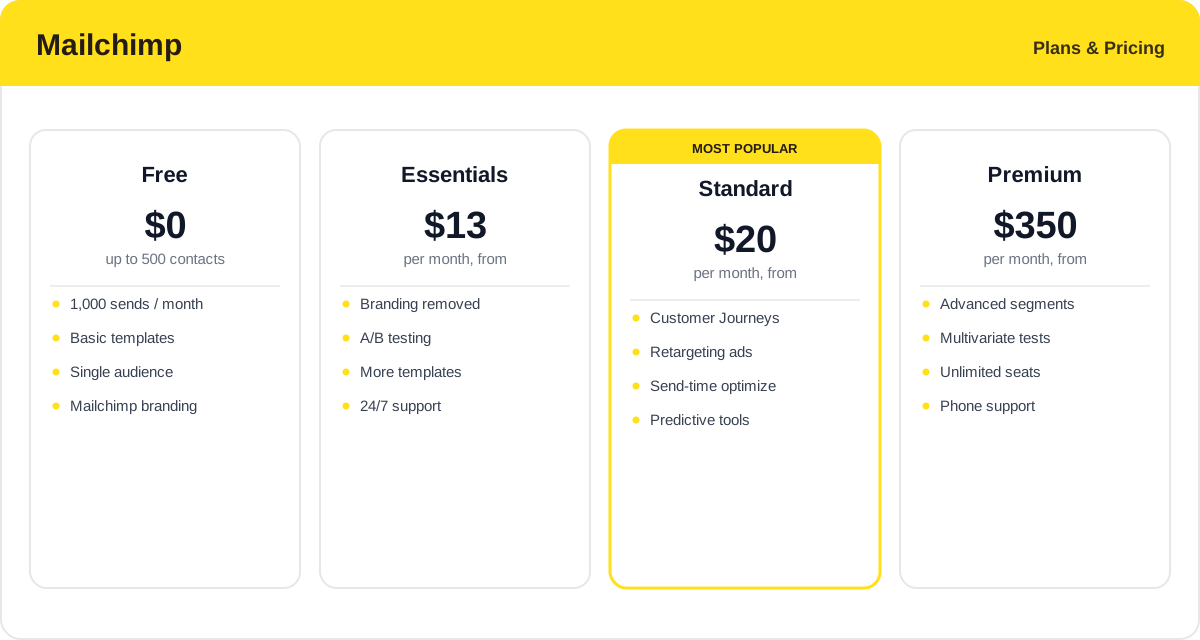
Prices scale with your contact count and Mailchimp bills for unsubscribed and duplicate contacts, so most accounts pay more than the entry price — check the official Mailchimp pricing page for current rates.
Real-World Use Case Analysis
Small Businesses & Creators
Newsletters and simple campaigns: solo creators, local shops, and small teams use Mailchimp to grow a list with sign-up forms, then send regular newsletters and promotions using the template library. The free tier and gentle learning curve make it the natural first step into email marketing, with room to add automation as the business grows.
Ecommerce Stores
Automated revenue on autopilot: connected to Shopify or WooCommerce, Mailchimp syncs customers and orders and runs abandoned-cart, post-purchase, and win-back journeys that recover sales automatically. Product retargeting and segmentation by purchase history let stores send relevant offers, turning email into a reliable sales channel rather than a one-off broadcast.
Growing Marketing Teams
One hub for multi-channel marketing: as a team matures, it can use Mailchimp for landing pages, forms, social posts, and A/B-tested campaigns from a single dashboard, with reporting that ties activity to results. AI content tools and predictive insights help a lean team punch above its weight without adding headcount.
Pros and Cons of Mailchimp
Advantages
- One of the easiest email builders available, with a huge template library for non-designers.
- A genuinely free starter tier that lets small businesses begin at no cost.
- Visual Customer Journey automation brings behavior-based flows to small teams.
- AI creative tools and predictive analytics improve copy, design, and timing.
- All-in-one marketing with landing pages, forms, social, and strong ecommerce integrations.
Disadvantages
- Contact-based pricing gets expensive quickly as your list grows.
- Billing for unsubscribed and duplicate contacts means you often pay more than the sticker price.
- Advanced automation and segmentation are gated behind the pricier Standard and Premium tiers.
- Competitors offer more generous free plans and cheaper volume-based pricing.
- The CRM and sales features are lighter than dedicated platforms like HubSpot.
Final Thoughts on Mailchimp
Mailchimp remains one of the most approachable ways to start and scale email marketing. Its strengths are ease of use, a polished editor, a free tier, and an all-in-one feature set that now includes solid automation and AI creative tools. The main trade-off is cost: contact-based pricing that includes unsubscribed and duplicate contacts means bills can climb faster than you expect, and heavy senders sometimes find better value elsewhere. But for small businesses, creators, and ecommerce stores that want a friendly, capable platform with room to grow — and deep integrations with the tools they already use — Mailchimp is still a strong and sensible choice, and the free plan makes it easy to try before you commit.