Make Review: Visual No-Code Automation That Handles Complex Workflows
Make review: the visual no-code automation platform (formerly Integromat) with a drag-and-drop scenario builder, 2,000+ integrations, and operations pricing.
Expert Review

What is Make?
Make is a visual, no-code automation platform that lets you connect the apps and services you already use so they work together without manual effort. Instead of a plain list of steps, Make gives you a canvas: you drop "modules" onto it, wire them together with lines, and watch data flow from one app to the next. Each module represents an action in an app — read a new email, create a spreadsheet row, post a message, call an API — and the connections between them describe exactly how your process should run. The result is called a "scenario," and it is the beating heart of everything Make does.
Make was originally launched as Integromat and rebranded to Make in 2022; it is now owned by process-mining company Celonis. Its reputation is built on being more visual, more flexible, and more affordable than many rivals when it comes to complex, multi-step logic. Where a simple linear tool starts to strain, Make's canvas keeps things legible — branching, looping, transforming, and error-handling all laid out where you can see them. It suits solo makers automating their first task, marketing and operations teams removing busywork, and technical users who want deep control over data without writing a full application. Ready to try it yourself? Get started with Make free →
Benefits of Using Make
- You can see your automation: the drag-and-drop canvas shows every module and connection at a glance, so complex workflows stay understandable instead of hiding inside a rigid list of steps.
- Built for complexity: routers, filters, iterators, and aggregators let you branch, loop, and reshape data, so Make handles genuinely intricate processes that trip up simpler tools.
- Strong value for money: operations-based pricing and generous volumes mean you often get far more automation per dollar than task-based competitors, especially on heavy workflows.
- No code, but no ceiling: non-technical users build with visual blocks, while power users drop in HTTP, JSON, and custom API modules to reach almost anything.
- Real-time and scheduled: instant webhook triggers fire the moment something happens, or you can run scenarios on a fixed schedule down to the minute.
- Reliable at scale: execution history, error handlers, and automatic retries make automations dependable enough to trust with business-critical work.
Key Features of Make
-
Visual scenario builder
The core of Make is its canvas. You add modules — each one a trigger or action inside an app — and connect them with lines to define the flow. Because the whole scenario is visible, you can trace exactly how a piece of data travels, spot where logic branches, and adjust a step without unpicking everything around it. It is what makes building and maintaining complex automations approachable.
-
2,000+ app integrations and custom APIs
Make connects to over 2,000 apps out of the box — Google Workspace, Slack, Notion, HubSpot, Airtable, Stripe, OpenAI, and thousands more. When a native module does not exist, the generic HTTP, JSON, and custom API modules let you talk to any service with a public API. That combination means you are rarely blocked: if it has an endpoint, Make can usually reach it.
-
Routers, filters, and data mapping
This is where Make pulls ahead for complex logic. Routers split a scenario into multiple paths, filters stop data unless it meets your conditions, and iterators and aggregators loop over lists and bundle results back together. A rich set of built-in functions transforms text, numbers, and dates as data moves, so you can map and reshape everything precisely between apps rather than settling for a crude one-to-one link.
-
Make AI Agents and instant triggers
Make has grown beyond simple integration. AI Agents and AI modules let you add language-model reasoning inside a scenario — classifying, summarizing, or drafting content on the fly. Instant webhook triggers react in real time the moment an event occurs, while custom API calls and error handlers give technical users precise control. Together they turn Make into a flexible automation engine rather than a fixed set of recipes.
-
Templates, scheduling, and execution history
A large library of pre-built templates gets common scenarios running in a couple of clicks, and you can save your own as reusable blueprints. Flexible scheduling runs scenarios on an interval or at set times, while the execution history logs every run bundle by bundle — so when something misbehaves, you can open the exact operation, see the data that passed through, and fix it fast.
Pricing of Make
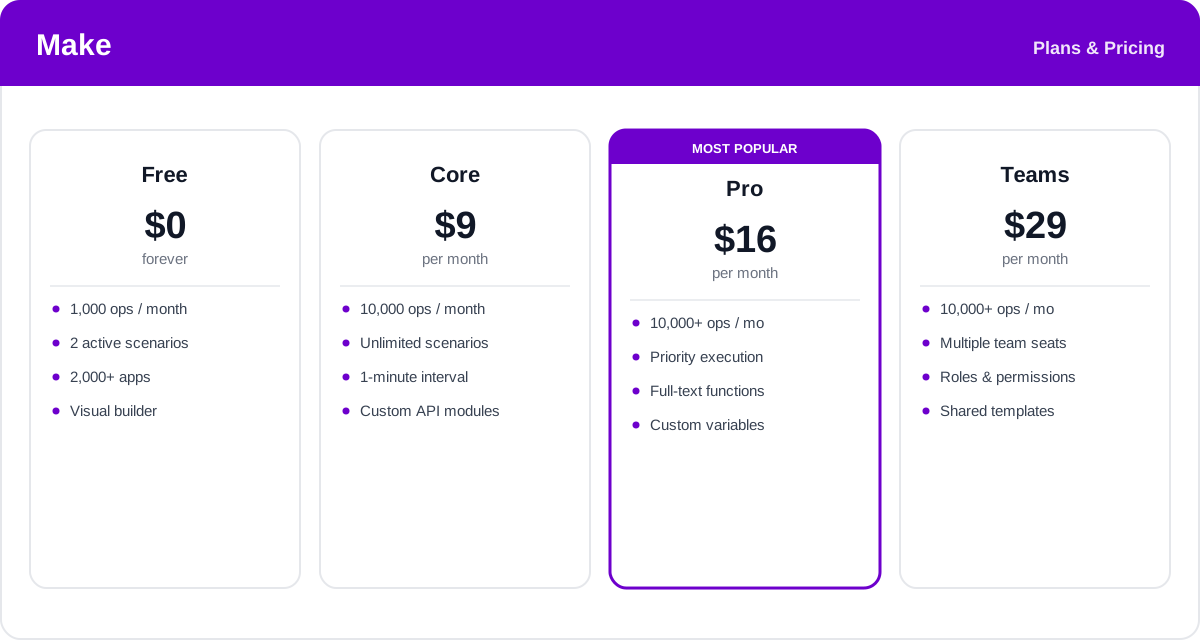
Make prices by "operations." Every time a module runs and processes a bundle of data, that counts as one operation, so plans are measured in operations per month rather than whole workflows. Higher tiers add more operations, faster scheduling, advanced features, and team controls, and annual billing is noticeably cheaper than paying monthly.
- Free: $0 — around 1,000 operations per month and up to 2 active scenarios, with access to the full app catalog and visual builder. Ideal for testing Make and running a couple of light automations.
- Core: from about $9/month (billed annually) for 10,000 operations — unlimited active scenarios, one-minute scheduling, and custom API modules. The natural starting point for individuals.
- Pro: from about $16/month (billed annually) and marked most popular — priority execution, more built-in functions, custom variables, and full-text sorting. The sweet spot for serious personal and freelance use.
- Teams: around $29/month (billed annually) — everything in Pro plus multiple seats, roles and permissions, and shared scenario templates for collaborating groups.
- Enterprise: custom pricing — advanced security, dedicated support, and higher limits for large organizations.
Operation allowances and prices change over time, and you can top up or scale operations as you grow — check the official Make pricing page for current rates and exactly what each plan includes.
Real-World Use Case Analysis
Marketing and E-commerce Teams
Lead and order routing: when a form is submitted or an order is placed, a Make scenario can enrich the data, branch with a router to the right list or fulfillment step, add the contact to a CRM, and send a personalized message — all in real time, so nothing waits on manual handling.
Operations and Data Teams
Syncing systems that do not talk: Make shines at moving and reshaping data between tools. Iterators loop through line items, functions clean and reformat values, and aggregators roll results into a single record — automating reconciliation and reporting that would otherwise eat hours of copy-paste each week.
Developers and Technical Founders
API glue without a backend: with HTTP, JSON, and custom API modules plus webhooks and error handlers, technical users stitch together services that have no native connector, prototyping integrations in minutes instead of standing up a server and writing code.
Pros and Cons of Make
Advantages
- The visual canvas makes even complex, multi-branch workflows easy to build and understand.
- Routers, filters, iterators, and functions handle serious logic that simpler tools cannot.
- Operations-based pricing usually delivers more automation per dollar than task-based rivals.
- HTTP, JSON, and custom API modules mean almost any service with an API can be connected.
- Instant webhook triggers, error handlers, and detailed execution history make it dependable.
Disadvantages
- The learning curve is steeper than the simplest one-click automation tools.
- Its app catalog, while large, is smaller than the biggest competitors' — the odd niche tool may be missing.
- Operations can add up quickly in scenarios that loop over large data sets.
- Debugging an intricate multi-router scenario takes patience, even with the history log.
Final Thoughts on Make
Make is the automation platform to reach for when your workflows outgrow simple triggers and actions. Its visual scenario builder turns complex, branching logic into something you can actually see and reason about, and the combination of routers, filters, functions, and custom API modules gives it a ceiling that few no-code rivals match — often at a lower cost thanks to operations-based pricing. There is a modest learning curve, and very loop-heavy scenarios can burn operations, so it pays to design efficiently. But for anyone building real, multi-step automation without wanting to write a full application, Make hits a rare balance of power, flexibility, and value. Start on the free plan, wire up one genuinely useful scenario, and it tends to prove itself quickly. Get started with Make free →
Ready to try Make?
Visit the official website to see the latest plans, pricing, and special offers.
Get Started - Make* Affiliate link - we may earn a commission at no extra cost to you.