Miro Review: The Online Whiteboard for Team Collaboration
Miro review: the online whiteboard for visual collaboration with an infinite canvas, templates, diagramming, and Miro AI — features, pricing, pros and cons.
Expert Review

What is Miro?
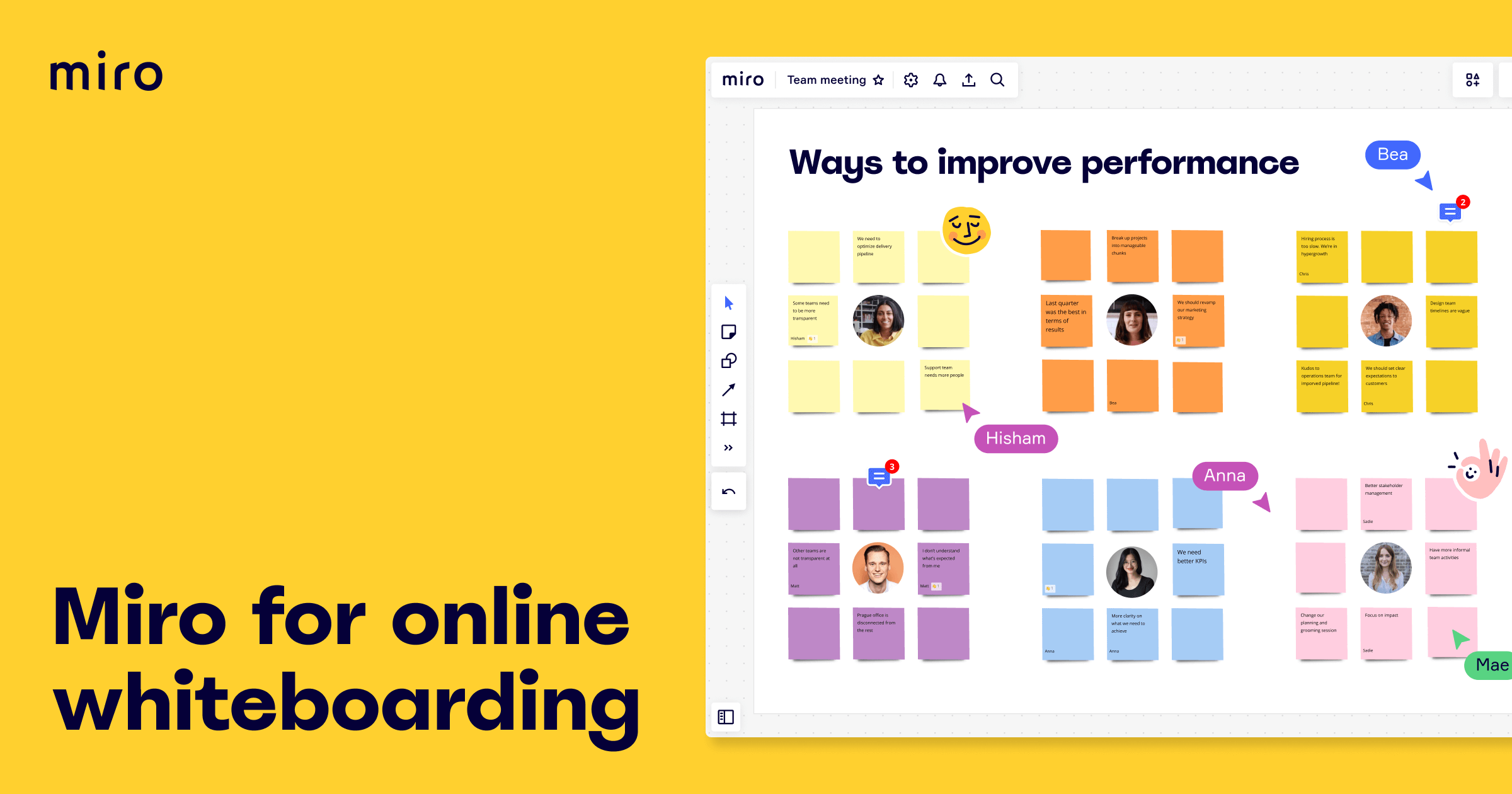
Miro is an online whiteboard built for visual collaboration. It gives teams an infinite canvas where they can drop sticky notes, draw diagrams, map processes, and think together in real time — whether they are in the same room or spread across time zones. Where a document forces ideas into a linear list, Miro lets a whole team spread out, cluster, and connect ideas the way they naturally form on a wall of sticky notes.
It is used across product, design, engineering, and leadership teams for brainstorming, planning, workshops, and diagramming. Remote and hybrid teams especially rely on it to recreate the energy of an in-person whiteboard session online. The canvas is backed by a large template library, real-time multiplayer editing, presentation and facilitation tools, and, more recently, an AI layer that can generate diagrams and organize ideas automatically.
Benefits of Using Miro
- Recreates the whiteboard: an infinite canvas lets teams brainstorm, map, and organize ideas visually instead of forcing everything into text.
- Real-time collaboration: many people can edit the same board at once, seeing each other's cursors and changes live, which makes remote workshops feel in-person.
- Templates for everything: thousands of ready-made frameworks for retros, mind maps, flowcharts, and roadmaps mean sessions start fast with proven structures.
- Great for facilitation: timers, voting, and presentation modes keep group sessions focused and productive rather than chaotic.
- Connects your tools: integrations with Jira, Slack, Figma, and Confluence let boards plug into the workflows teams already run.
- AI assistance: Miro AI can turn prompts into diagrams and summarize or cluster sticky notes, cutting the manual cleanup after a busy session.
Key Features of Miro
-
Infinite canvas and sticky notes
Miro's foundation is a zoomable, endless canvas where you place sticky notes, shapes, text, images, links, and freehand drawings anywhere. Teams can zoom out to see the big picture or into a single cluster of ideas, giving the flexibility of a giant physical wall without ever running out of room.
-
Templates library
Instead of starting from an empty board, teams choose from thousands of templates — brainstorming boards, mind maps, retrospectives, user story maps, flowcharts, Kanban boards, and workshop frameworks. Each provides a proven structure so a session begins with momentum rather than a blank canvas.
-
Miro AI
Miro AI brings generative tools onto the canvas. It can turn a text prompt into a diagram or mind map, summarize and cluster large groups of sticky notes into themes, generate images, and speed up the tedious post-workshop cleanup — helping teams get from raw ideas to organized output far faster.
-
Diagramming and integrations
Beyond freeform brainstorming, Miro is a capable diagramming tool for flowcharts, process maps, wireframes, and technical diagrams. It connects to the tools teams already use — creating Jira issues from sticky notes, embedding Figma frames, and syncing with Slack and Confluence — so a board becomes part of the real workflow, not an island.
-
Facilitation and presentation tools
For live sessions, Miro adds facilitation superpowers: timers to keep exercises on track, dot voting to prioritize ideas democratically, private mode so people brainstorm without bias, and a presentation mode that walks a board's frames like slides. These turn a static canvas into a structured, engaging workshop space.
Pricing of Miro
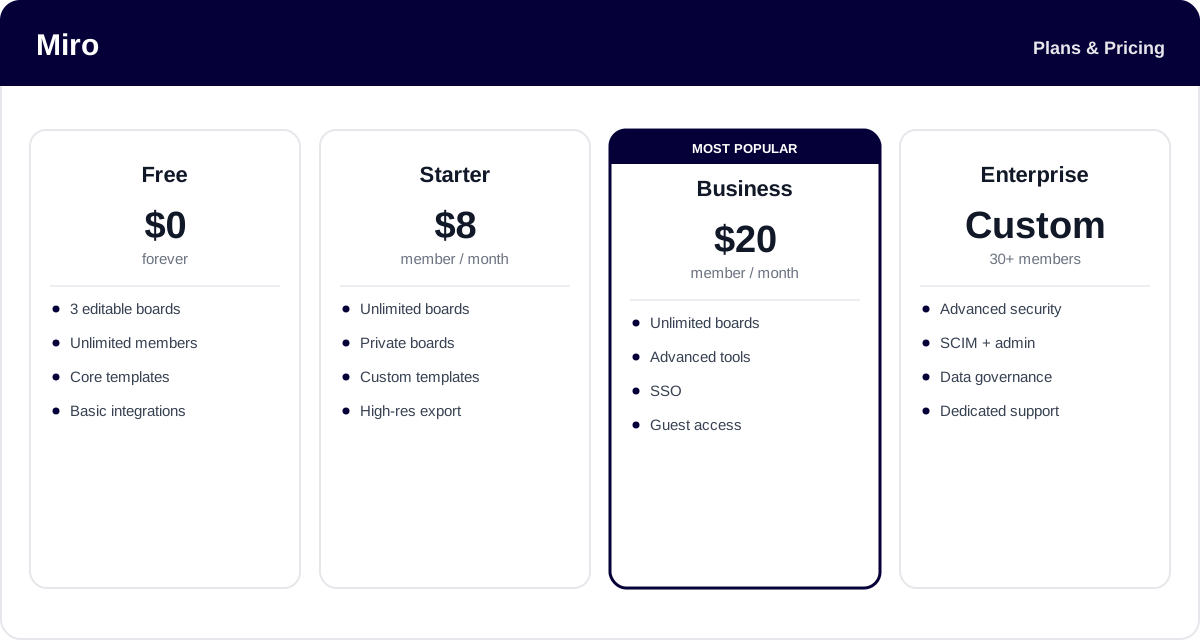
Miro uses a per-member subscription with a free tier that is popular for light use. Paid plans mainly unlock unlimited boards and more advanced collaboration, security, and admin features, and annual billing is cheaper than paying monthly.
- Free: $0 — unlimited team members but only 3 editable boards, with core templates and basic integrations. Fine for occasional or personal use.
- Starter: around $8/member/month billed annually — unlimited boards, private boards, custom templates, and high-resolution export.
- Business: around $20/member/month billed annually — everything in Starter plus advanced tools, single sign-on, and guest access. The most popular tier for growing teams.
- Enterprise: custom pricing (with a member minimum) — advanced security, SCIM provisioning, data governance, and dedicated support for large organizations.
Prices and plan limits change over time — check the official Miro pricing page for the latest rates and exactly what each plan includes.
Real-World Use Case Analysis
Product and Design Teams
Discovery and planning: teams run user story mapping, journey maps, and design critiques on shared boards, then push outcomes into Jira or Figma. The visual canvas keeps everyone aligned on the big picture in a way a backlog alone cannot.
Agile and Engineering
Ceremonies and diagrams: squads run sprint planning and retrospectives with templates, timers, and voting, and use Miro's diagramming for architecture and process maps — replacing the physical whiteboard that remote teams lost.
Workshops and Leadership
Facilitated sessions: facilitators run strategy workshops, brainstorms, and offsites with structured frameworks, capturing dozens of participants' input at once and using Miro AI to cluster and summarize the results into clear next steps.
Pros and Cons of Miro
Advantages
- One of the most polished infinite canvases, ideal for visual, non-linear thinking.
- Excellent real-time collaboration that makes remote workshops genuinely productive.
- A huge template library and strong facilitation tools like voting and timers.
- Miro AI speeds up diagram creation and post-session cleanup.
- Deep integrations with Jira, Figma, Slack, and Confluence.
Disadvantages
- The free plan's three-board limit is restrictive for any regular use.
- Big, crowded boards can become slow and hard to navigate, and lag on weaker hardware.
- Per-member pricing adds up quickly for larger teams that all need edit access.
- The open canvas can get messy without facilitation, and there is a learning curve to using it well.
Final Thoughts on Miro
Miro is the leading online whiteboard for a reason: it captures the free-form, collaborative energy of a physical whiteboard and makes it work for distributed teams, backed by a deep template library, strong facilitation tools, and a growing AI layer. It shines for product, design, and agile teams that think visually and run a lot of workshops. The trade-offs are a stingy free plan, performance dips on very large boards, and per-seat costs that climb with team size. But if your team brainstorms, maps, and plans together — especially remotely — Miro is well worth adopting; try the free plan or a Business trial to see how it fits your workflow before rolling it out widely.
Ready to try Miro?
Visit the official website to see the latest plans, pricing, and special offers.
Get Started - Miro* Affiliate link - we may earn a commission at no extra cost to you.