monday.com Review: A Flexible Work OS for Any Team
monday.com review: the customizable Work OS with visual boards, Kanban and Gantt views, no-code automations, dashboards, and integrations — features, pricing, pros and cons.
Expert Review

What is monday.com?
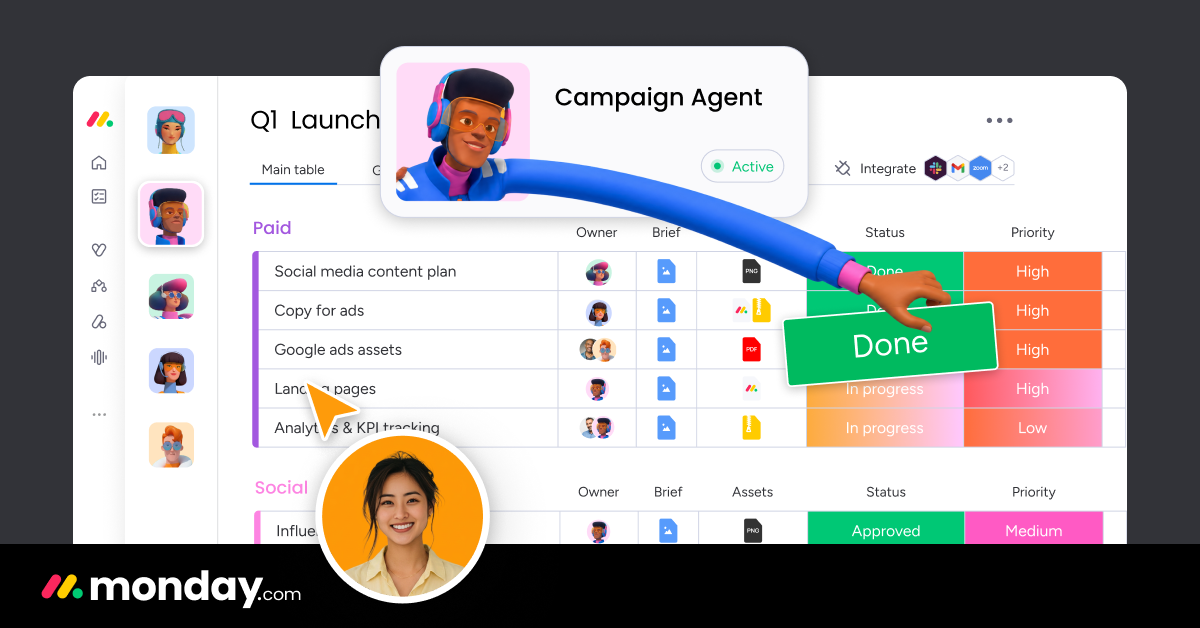
monday.com is a cloud-based "Work OS" — a platform for building the tools a team uses to run its work, rather than a single fixed app. At its core sits the board: a colorful, spreadsheet-like grid where each row is an item (a task, a lead, a bug, a campaign) and each column captures a piece of information about it, such as status, owner, dates, or a number. Because you decide which columns to add and what they mean, the same underlying system can become a project tracker one day and a sales pipeline the next.
That flexibility is the point. monday.com serves marketing teams planning campaigns, software teams shipping sprints, HR teams onboarding staff, and operations teams tracking requests — all on the same foundation. On top of the core Work Management product, the company has built dedicated products including monday CRM for sales, monday Dev for product and engineering teams, and monday Service for support and help-desk work, each pre-configured for its use case but built on the same boards, views, and automations.
Benefits of Using monday.com
- Visual and easy to grasp: color-coded status columns and clean boards make a project's state readable at a glance, so people actually keep it updated.
- Highly customizable without code: add columns, build boards, and shape workflows to match how your team really works, instead of bending your process to fit rigid software.
- One place for many jobs: projects, CRM, requests, and roadmaps can all live on the same platform, cutting down on scattered tools and duplicate data.
- Automations remove busywork: no-code recipes handle status changes, assignments, reminders, and notifications so nothing slips through the cracks.
- Dashboards for real oversight: managers roll data from several boards into live charts and progress widgets without exporting to a spreadsheet.
- Connects to your stack: integrations with Slack, Gmail, Outlook, Jira, Salesforce, and more keep monday.com in sync with the tools you already use.
Key Features of monday.com
-
Customizable boards and columns
Boards are the heart of monday.com. Every row is an item and every column adds context — status labels, timelines, people, numbers, formulas, dropdowns, files, and dependencies. You mix and match column types to model almost any process, and because it all works by drag-and-drop configuration rather than code, teams can adapt a board in minutes as their needs change.
-
Multiple views: Kanban, Gantt, calendar, and more
The same board data can be shown in whatever way suits the moment. Switch to a Kanban board to drag tasks between stages, a Gantt or timeline view to plan schedules and dependencies, a calendar to see deadlines by date, or a workload view to balance who is doing what. One data set, many perspectives, no re-entry.
-
No-code automations
monday.com's automation recipes follow a simple "when this happens, do that" pattern. When a status changes to Done, notify the owner; when a due date arrives, send a reminder; when an item is created, assign it and move it to a group. You pick from a large library of pre-built recipes or compose your own, eliminating the manual follow-ups that eat a team's time.
-
Dashboards and reporting
Dashboards pull information from one or many boards into a single high-level view. Add widgets for charts, numbers, workload, timelines, and progress, and stakeholders get an accurate picture without digging into individual boards. It turns the raw work happening in boards into the metrics managers actually need to report on.
-
Integrations, apps, and AI
monday.com connects with tools like Slack, Gmail, Outlook, Jira, Salesforce, and Zoom so updates flow both ways, and its marketplace adds hundreds of extra apps and views. Newer AI features help draft content, summarize items, and suggest automations, while dedicated products — monday CRM, monday Dev, and monday Service — package the platform for sales, engineering, and support teams.
Pricing of monday.com
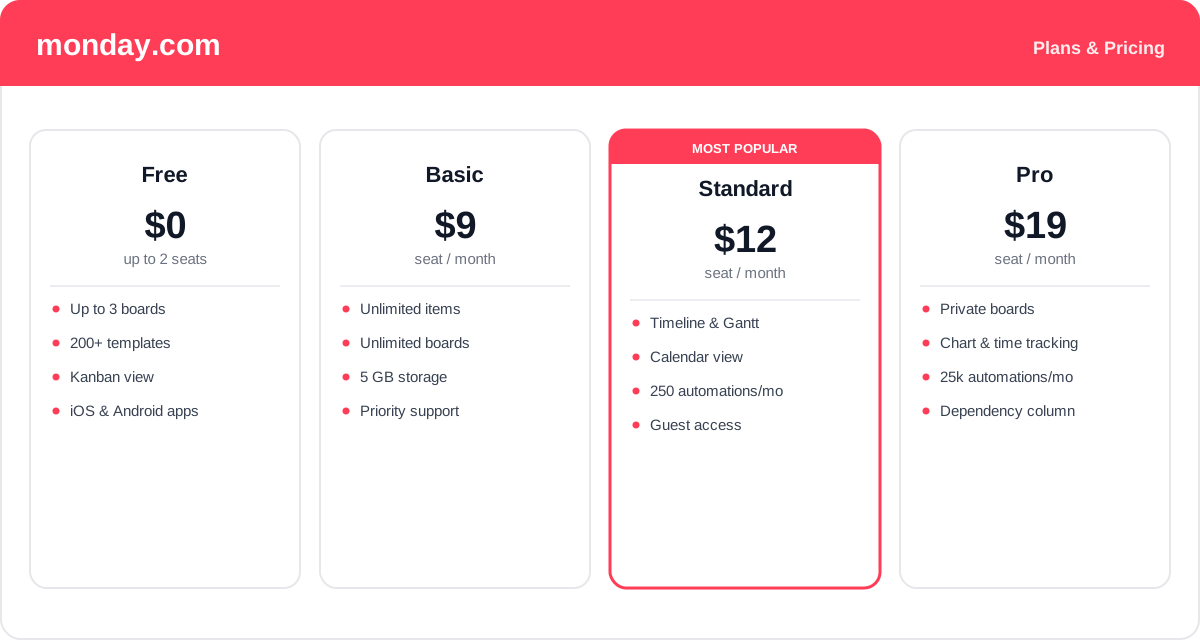
monday.com is priced per seat, and plans are sold in seat tiers (for example 3, 5, or 10 seats) rather than one at a time, so the seat count you choose affects the total. Billing annually is noticeably cheaper than paying monthly. The figures below are the annual per-seat rates.
- Free: $0 for up to 2 seats — up to 3 boards, 200+ templates, a Kanban view, and the mobile apps. A genuine starting point for individuals and very small teams.
- Basic: around $9/seat/month — unlimited items and boards, more storage, and priority support. Good for teams that just need a shared, organized workspace.
- Standard: around $12/seat/month — the most popular plan, adding timeline and Gantt views, the calendar view, guest access, and a monthly allowance of automation and integration actions.
- Pro: around $19/seat/month — private boards, time tracking, chart views, dependency columns, and far higher automation and integration limits for teams running serious workflows.
- Enterprise: custom pricing — advanced security, governance, analytics, and support for large organizations.
Seat minimums, action allowances, and prices change over time — check the official monday.com pricing page for current rates and exactly what each plan includes.
Real-World Use Case Analysis
Marketing and Creative Teams
Campaign planning: a marketing team runs a content calendar on a board, with status columns for each asset, owners assigned, and a timeline view for launch dates. Automations ping the designer when a brief is approved and alert the manager when anything falls behind, keeping a busy calendar on track.
Software and Product Teams
Sprint and roadmap tracking: using monday Dev, engineering teams manage backlogs and sprints with Kanban boards, connect to Jira or GitHub, and roll progress into dashboards. Product managers get a clear roadmap view while developers work in the board that fits their day.
Operations and Client Services
Request and pipeline management: operations teams turn scattered email requests into trackable items with owners and due dates, while sales teams run a pipeline in monday CRM — moving deals through stages, logging activity, and automating follow-up reminders so nothing is forgotten.
Pros and Cons of monday.com
Advantages
- Extremely flexible boards and column types adapt to almost any workflow.
- Colorful, visual interface is easy to learn and keeps teams engaged with it.
- Multiple views let everyone work the way they prefer from one data set.
- No-code automations and dashboards remove busywork and give managers oversight.
- Dedicated products (CRM, Dev, Service) and broad integrations extend it well beyond basic task lists.
Disadvantages
- Per-seat, seat-tier pricing adds up quickly for larger teams.
- Key features like timeline, Gantt, time tracking, and automation volume are gated behind higher plans.
- Automation and integration actions are capped by a monthly allowance rather than being unlimited.
- So much flexibility can feel overwhelming at first, and a poorly designed board gets messy fast.
Final Thoughts on monday.com
monday.com is one of the most flexible and approachable work platforms available, and its strength is that it molds to your process instead of forcing you into someone else's. The visual boards, easy-to-read status columns, and switchable views make work transparent, while no-code automations and dashboards handle the coordination and reporting that usually drain a manager's week. Its expansion into CRM, Dev, and Service products means one platform can cover a lot of ground. The trade-offs are cost and gating: per-seat pricing scales up with your headcount, and several of the most useful features live on the Standard and Pro tiers. Still, for teams that want a customizable, genuinely usable system to run their work, monday.com is an easy one to recommend trying — start free, build one real board, and see how much of the busywork it quietly takes off your plate.