QuickBooks Review: The Small-Business Accounting Standard
QuickBooks Online review: Intuit's cloud accounting software for invoicing, bank feeds, reporting, payroll, and AI — plus 2026 plans, real pricing, pros and cons.
Expert Review
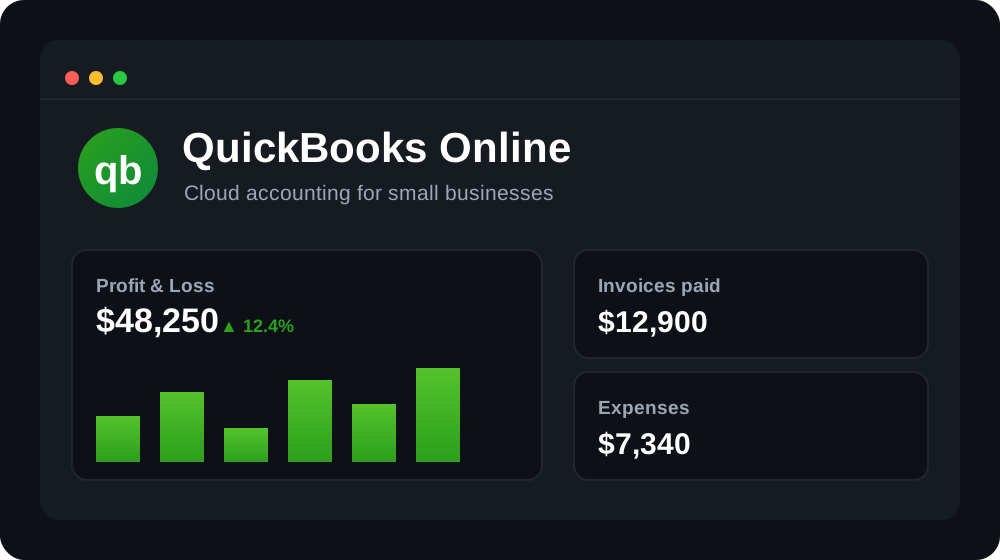
What is QuickBooks?
QuickBooks is cloud-based accounting software from Intuit, and it is the most widely used bookkeeping tool for small businesses in the United States. The modern product most people mean today is QuickBooks Online (QBO) — a browser-and-app service that connects to your bank, tracks income and expenses, sends invoices, and keeps your books ready for tax time. It sits alongside the older desktop editions, but Intuit has steadily pushed new customers toward the online version, where all the current development and AI work now lands.
The core promise is straightforward: link your bank and card accounts, and QuickBooks pulls in transactions automatically, sorts them into categories, and builds a real-time picture of profit, expenses, and cash flow. It is aimed at freelancers, sole traders, and small-to-medium businesses, as well as the bookkeepers and accountants who manage their clients' books inside it. That enormous professional network — millions of accountants who already work in QuickBooks daily — is a big part of why it remains the default choice.
Benefits of Using QuickBooks
- The industry default: most US accountants and bookkeepers already know QuickBooks, so finding professional help — or handing over clean books at tax time — is easier than with almost any rival.
- Everything in one ledger: invoicing, expenses, bank feeds, reports, sales tax, and optional payroll live in a single system, so your numbers stay consistent instead of scattered across spreadsheets.
- Real-time financial visibility: connected bank feeds keep the dashboard, profit-and-loss, and cash-flow views current, so you always know where the business stands.
- Scales with your business: you can start on Simple Start as a solo operator and step up to Essentials, Plus, or Advanced as you add users, inventory, and reporting needs — without changing software.
- Huge app ecosystem: with 750+ integrations, QuickBooks connects to payment processors, e-commerce platforms, CRMs, and time-tracking tools so data flows in automatically.
- Tax and compliance ready: built-in sales tax tracking, categorized expenses, and mileage logging make quarterly estimates and year-end filing far less painful.
Key Features of QuickBooks
-
Invoicing and QuickBooks Payments
Create branded, professional invoices, schedule recurring billing, and send automatic reminders for overdue accounts. With QuickBooks Payments enabled, customers can pay directly from the invoice by card, ACH bank transfer, or digital wallet, and the payment reconciles against the invoice automatically. Getting paid faster — and seeing exactly which invoices are outstanding — is one of the most tangible day-to-day wins for a small business.
-
Bank feeds and reconciliation
Connect your bank accounts and credit cards, and QuickBooks imports transactions automatically, usually every day. Bank rules and smart categorization suggest the right account for each transaction, and receipt capture lets you snap or forward a receipt so the app extracts the vendor, date, and amount. Monthly reconciliation — matching your books to the bank statement — takes a few clicks instead of hours, which keeps your accounts accurate and audit-ready.
-
Reporting and dashboards
QuickBooks generates the core financial statements every business needs — profit and loss, balance sheet, and cash-flow statements — plus dozens of built-in reports for accounts receivable, expenses by vendor, and sales by product. Reports update in real time as transactions flow in, can be filtered and customized, and export to PDF or Excel. Higher tiers unlock deeper custom reporting and budgeting, but even entry plans cover what most owners and their accountants review each month.
-
Intuit Assist AI
Intuit has woven generative AI across QuickBooks through Intuit Assist. It can draft invoices and reminder emails, summarize how the business is performing, flag anomalies in spending, predict cash-flow shortfalls, and answer plain-English questions about your numbers. The aim is to cut the manual admin of bookkeeping — chasing overdue invoices, categorizing transactions, and interpreting reports — so owners spend less time in the books and more time acting on what they find.
-
Payroll, sales tax, mileage, and 750+ integrations
Payroll is a separate paid add-on that runs full-service payroll — calculating, filing, and paying federal and state taxes automatically — and slots directly into your books. Beyond that, QuickBooks handles automated sales tax calculation, GPS mileage tracking in the mobile app, multi-currency for businesses that trade internationally, and inventory on higher tiers. An ecosystem of 750+ integrations — Shopify, PayPal, Stripe, Square, HubSpot, and more — plus a dedicated accountant portal for collaboration, rounds out the platform.
Pricing of QuickBooks
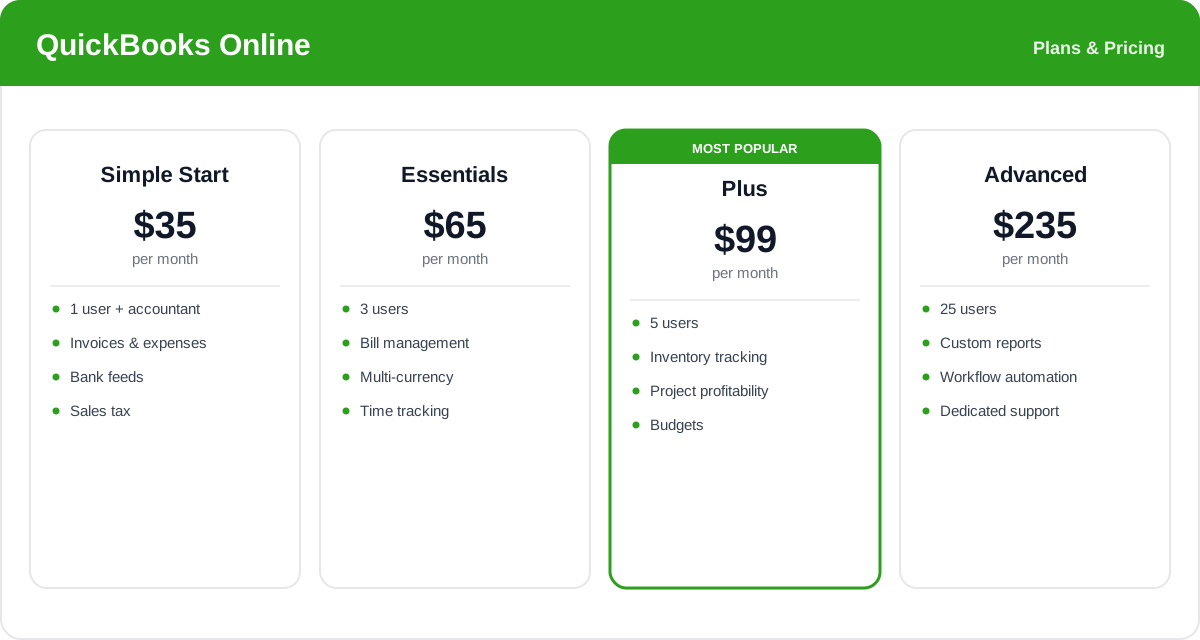
QuickBooks Online uses a four-tier structure billed per month for the whole company (not per user, unlike some rivals). Prices below are representative US list rates; Intuit runs frequent introductory discounts — often 50% off for the first three months — so the real first-year cost is usually lower. Payroll is always a separate add-on on top of these plans.
- Simple Start: around $35/month — one user plus your accountant. Covers invoicing, expense and income tracking, bank feeds, sales tax, and basic reports. Built for freelancers and solo businesses.
- Essentials: around $65/month — up to three users, adding bill management, time tracking, and multi-currency. The step up for a small business that pays suppliers and has a couple of team members.
- Plus: around $99/month — up to five users, adding inventory tracking, project profitability, and budgets. This is the most popular plan and the sweet spot for most growing product- or project-based businesses.
- Advanced: around $235/month — up to 25 users, with custom reporting, workflow automation, batch invoicing, employee expense management, and a dedicated support manager for larger or more complex operations.
Prices, plan limits, and promotions change often and vary by region — check the official QuickBooks pricing page for current rates and exactly what each plan and the payroll add-on include.
Real-World Use Case Analysis
Freelancers and Solo Businesses
Staying tax-ready without a bookkeeper: a solo consultant on Simple Start connects one bank account and one card, lets transactions auto-categorize, snaps receipts on the mobile app, and tracks mileage automatically. At quarter-end the profit-and-loss report and sales tax summary give the numbers needed for estimated taxes, with an accountant invited to review only when required.
Product and Retail Businesses
Inventory and margins: a small e-commerce or retail business on Plus syncs Shopify and Stripe, tracks inventory quantities and cost of goods, and uses project and product-level reporting to see which lines actually make money. Multi-channel sales flow into one ledger, and sales tax is calculated automatically across jurisdictions.
Growing Teams with Employees
Payroll and approvals at scale: a services firm on Advanced adds the Payroll module to run automated pay runs and tax filings, uses workflow automation to route expense approvals, and builds custom reports for management. With up to 25 users and a dedicated support manager, the finance function scales without switching platforms.
Pros and Cons of QuickBooks
Advantages
- The US small-business standard — most accountants and bookkeepers already use it, making help easy to find.
- Comprehensive accounting: invoicing, expenses, bank feeds, reporting, sales tax, and mileage in one system.
- Strong, customizable reporting including profit and loss, balance sheet, and cash flow.
- Deep ecosystem with 750+ integrations and a dedicated accountant collaboration portal.
- Intuit Assist AI automates invoicing, categorization, and cash-flow insights.
- Clear upgrade path from freelancer to 25-user business without changing software.
Disadvantages
- Pricing is higher than several rivals, and list prices jump sharply once introductory discounts end.
- Payroll is a separate paid add-on, so the true monthly cost is well above the headline plan price.
- User counts are capped per tier (1, 3, 5, then 25), so adding people can force a plan upgrade.
- The breadth of features and settings can feel overwhelming for very simple bookkeeping needs.
- Occasional bank-feed sync issues and support wait times are common complaints at busy periods.
Final Thoughts on QuickBooks
QuickBooks Online remains the benchmark that other small-business accounting software is measured against, and for good reason: it does nearly everything a growing business needs, from invoicing and bank reconciliation to inventory, payroll, and AI-assisted insights, all backed by an accountant network no rival can match. That ubiquity is its single biggest advantage — clean, familiar books that any US bookkeeper can pick up. The trade-offs are cost and complexity: list prices run higher than competitors like Xero, payroll adds to the bill, and the sheer depth of features can be more than a solo freelancer needs. But for most small and growing businesses that want one system to run their finances — and easy access to professional help — QuickBooks is a safe, capable, and future-proof choice.