Trello Review: The Simple Kanban Board for Teams
Trello review: the Atlassian Kanban tool with boards, lists, and cards, multiple views, Power-Ups, and Butler automation — features, pricing, pros and cons.
Expert Review
What is Trello?
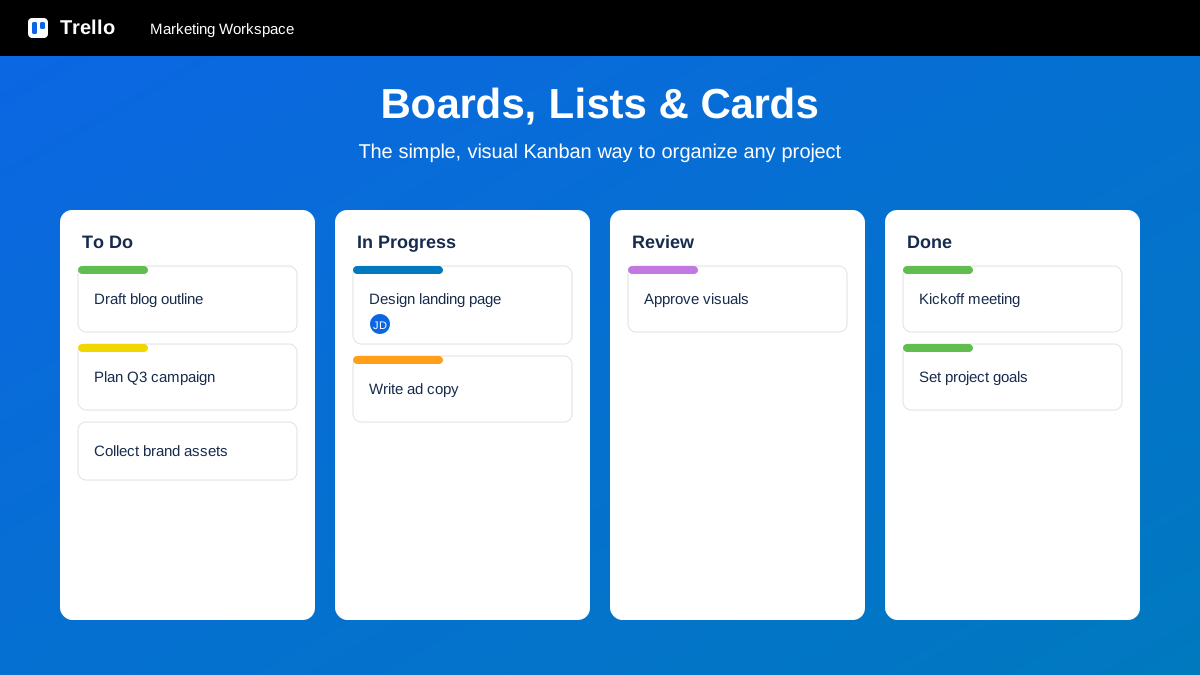
Trello is a visual project and task management tool built around a simple idea: organize your work as boards, lists, and cards. A board represents a project, lists are the stages that work moves through, and each card is a task you drag from one list to the next as it progresses. This Kanban model makes the status of everything obvious at a glance, which is why individuals and teams reach for Trello when they want structure without a steep learning curve.
Trello is owned by Atlassian, the company behind Jira and Confluence, and it fits alongside those tools as the lightweight, approachable option in the lineup. Where heavier platforms can overwhelm, Trello keeps the core experience friendly — you can set up a board in minutes and invite a team the same afternoon. Over the years it has grown well beyond a basic to-do list into a flexible system with rich card details, multiple ways to view the same data, a marketplace of integrations, and no-code automation, while keeping the drag-and-drop simplicity that made it popular in the first place.
Benefits of Using Trello
- Instantly visual: the board-and-card layout shows what is to do, in progress, and done at a single glance, so anyone can grasp project status without a meeting.
- Almost no learning curve: dragging a card between lists is intuitive enough that new teammates are productive within minutes of joining a board.
- Flexible for any workflow: the same lists-and-cards structure works for a content calendar, a sales pipeline, a bug tracker, or a personal to-do list.
- Detail where you need it: each card holds checklists, due dates, attachments, labels, and members, so a simple tile can carry all the context of a full task.
- Automation without code: Butler removes repetitive steps — moving cards, setting dates, posting reminders — using plain-language rules anyone can set up.
- Grows with you: start free for personal use, then add views, automation, and admin controls as a team scales, all inside the Atlassian ecosystem.
Key Features of Trello
-
Boards, lists, and cards
The heart of Trello is its Kanban structure. A board holds your project, lists represent the stages work passes through — such as To Do, In Progress, and Done — and each card is a single task you drag between lists as it advances. This simple, visual model scales from a personal errand list to a full team workflow, and it makes the state of every piece of work obvious the moment you open the board.
-
Rich card details
A Trello card looks simple on the board, but open it and there is real depth. You can add checklists to break a task into steps, set due dates and reminders, attach files and links, apply color labels for categories or priority, assign members, and hold a threaded comment discussion. Everything about a task — the plan, the files, and the conversation — lives on one card, so nothing gets scattered across other tools.
-
Butler no-code automation
Butler is Trello's built-in automation engine, and it needs no code. You build rules that fire on a trigger — when a card is moved to Done, mark the due date complete and archive it — plus card and board buttons for one-click actions and scheduled commands that run on a calendar. Automating routine moves, reminders, and cleanup keeps boards tidy and frees the team from repetitive admin.
-
Power-Ups and multiple views
Power-Ups are Trello's integrations and add-ons, connecting boards to tools like Slack, Google Drive, Jira, and hundreds more, or adding features such as voting and card aging. On paid plans you can also see the same cards through different lenses beyond the Board: a Calendar for deadlines, a Timeline for scheduling, a Table for a spreadsheet-style view across boards, and a Dashboard (Premium) for reporting.
-
Templates, Workspaces, and Atlassian Intelligence
Trello ships with a gallery of ready-made templates for common workflows — editorial calendars, sprint boards, project trackers — so you rarely start from a blank board. Workspaces group related boards and members together for a team or department, keeping access and organization tidy. And through Atlassian Intelligence, Trello layers in AI that can help draft card content, summarize long descriptions, and speed up everyday writing inside the tool.
Pricing of Trello
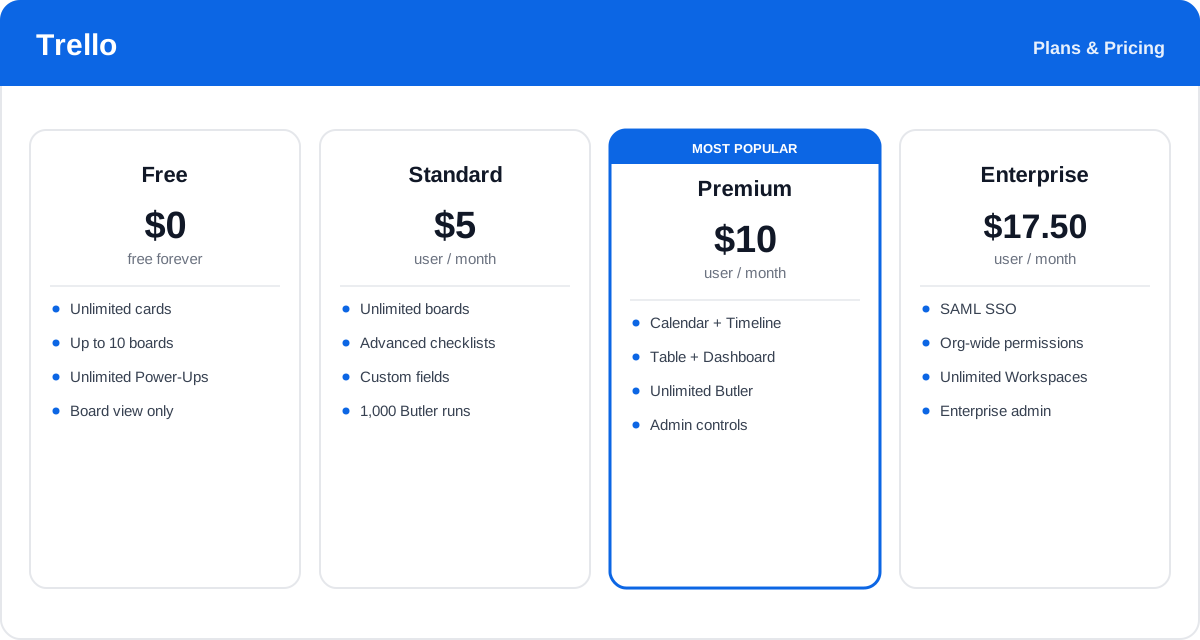
Trello is priced per user, and annual billing is cheaper than paying monthly. Plans step up from a genuinely usable free tier to paid tiers that add extra views, more automation, and enterprise-grade administration.
- Free: $0 — unlimited cards, up to 10 boards per Workspace, unlimited Power-Ups and storage (with a per-file size cap), and the Board view. A strong starting point for individuals and small teams.
- Standard: from about $5/user/month (billed annually) — adds unlimited boards, advanced checklists, custom fields, saved searches, and more Butler automation runs. The right fit for most small teams that need a bit more room.
- Premium: from about $10/user/month (billed annually) — unlocks the Calendar, Timeline, Table, and Dashboard views, unlimited Butler automation, and admin controls. The plan for teams that want to plan and report, not just track.
- Enterprise: from about $17.50/user/month (billed annually, priced on a sliding scale by seat count) — adds organization-wide permissions, SAML SSO, unlimited Workspaces, and enterprise admin and security controls for large companies.
Prices and plan details change over time and vary by region and team size — check the official Trello pricing page for current rates and exactly what each plan includes.
Real-World Use Case Analysis
Marketing and Content Teams
Editorial and campaign planning: teams run a content pipeline as lists — Ideas, Writing, Review, Published — and switch to the Calendar view to see publish dates, using labels to tag channels and Butler to move cards forward automatically as work is approved.
Small Business and Operations
Lightweight workflow tracking: small teams manage sales pipelines, hiring stages, or client onboarding on a single board, where dragging a card to the next list is enough to update everyone, with checklists ensuring no step in a repeatable process is missed.
Software and Product Teams
Bug and backlog boards: product and engineering teams use Trello for lightweight bug tracking and sprint boards, connecting it to Jira and Slack through Power-Ups so simple, visual boards stay in sync with the heavier tools the team already runs.
Pros and Cons of Trello
Advantages
- Exceptionally easy to learn — the drag-and-drop board is intuitive from the first minute.
- Clean, visual Kanban layout makes project status obvious at a glance.
- Flexible enough to model almost any workflow, from personal lists to team pipelines.
- Butler brings genuine no-code automation to even the free and Standard plans.
- Large Power-Ups marketplace connects Trello to the rest of your stack.
- Backed by Atlassian and integrates neatly with Jira and Confluence.
Disadvantages
- The Kanban-first design can feel limiting for complex projects with heavy dependencies.
- The most useful views — Calendar, Timeline, Table, Dashboard — require the Premium plan.
- Native reporting and resource planning are lighter than in dedicated project tools.
- Per-user pricing adds up as a team grows, and the free plan caps boards per Workspace.
- Managing many boards at scale can get unwieldy without careful Workspace organization.
Final Thoughts on Trello
Trello remains one of the easiest and most satisfying ways to organize work visually. Its board-list-card model is simple enough for anyone to pick up yet flexible enough to run a content calendar, a sales pipeline, or a bug tracker, and features like rich cards, Butler automation, and a deep Power-Ups marketplace add real capability without cluttering the experience. The trade-off is scope: Trello is deliberately lightweight, so teams juggling complex dependencies or heavy reporting may outgrow it or need the Premium views to fill the gaps. But for individuals and teams who want to see their work, move it, and get on with it, Trello is hard to beat — and the free plan is a genuinely useful, no-risk way to try it before paying a cent.