Typeform Review: Forms and Surveys People Actually Finish
Typeform review: the conversational form and survey builder with sleek design, Logic Jumps, quizzes, payments, an AI builder, and 300+ integrations — features and pricing.
Expert Review

What is Typeform?
Typeform is an online form and survey builder with one defining idea: instead of dumping every field onto a single crowded page, it asks one question at a time. Each question fills the screen, the next slides in after you answer, and the whole thing feels less like paperwork and more like a conversation. That "conversational" format is Typeform's signature, and it exists for a practical reason — friendlier, less intimidating forms get more people to the finish line, which means higher completion and response rates.
Beyond the format, Typeform is known for design. Forms look polished out of the box, with themes, custom fonts, colors, backgrounds, and your own branding, so a survey or lead-capture form feels like part of your product rather than a generic Google Form. It is used by marketers capturing leads, product teams gathering feedback, HR running applications, and creators building quizzes. Typeform is made by the same company behind VideoAsk, its video-based sibling. Ready to try it? Create your first typeform free →
Benefits of Using Typeform
- Higher completion rates: the one-question-at-a-time flow reduces overwhelm, so more respondents actually finish — the whole point of collecting data.
- Beautiful by default: forms look designed, not bolted together, which raises response quality and reflects well on your brand.
- No code required: a visual builder lets anyone create sophisticated, branching forms without touching a developer.
- Smarter, personalized surveys: Logic Jumps and answer recall tailor each question to the person, keeping forms short and relevant.
- More than surveys: the same builder handles quizzes, lead-gen, feedback, registrations, and even payments through Stripe.
- Connected to your stack: 300+ integrations plus an AI builder mean data flows straight into the tools you already use.
Key Features of Typeform
-
Conversational, one-question-at-a-time forms
The core experience: each question takes over the screen and the next appears only after the previous is answered. It feels like a chat rather than a wall of fields, which is what makes Typeform forms noticeably more engaging — and more likely to be completed — than a traditional single-page form.
-
Logic Jumps, personalization, and hidden fields
Logic Jumps send respondents down different paths based on their answers, so everyone sees only the questions relevant to them. Recall (piping) drops earlier answers into later questions — greeting someone by name, for example — while hidden fields quietly pass in data like email or user ID from a URL. There is also a calculator for scoring and outcomes.

-
Design, themes, branding, and rich question types
Customize fonts, colors, backgrounds, and layout, then add your logo and a custom subdomain to fully own the look. A deep set of question types covers multiple choice, rating, opinion scale, picture choice, file upload, and payment fields via Stripe — plus full quizzes with scoring and outcomes, and VideoAsk-style video questions.
-
AI form builder and 300+ integrations
Describe the form you want in plain language and Typeform's AI builder drafts it for you, ready to refine. AI features also help write and improve questions. When responses come in, 300+ integrations — Slack, HubSpot, Google Sheets, Notion, Zapier, and Make among them — push the data wherever it needs to go, no manual export required.

-
Built-in analytics and completion tracking
Typeform reports on views, starts, completion rates, and average time to complete, so you can see where people drop off and tighten those questions. Higher-tier plans add drop-off analysis by question, turning raw responses into insight about the form itself, not just the answers.
Pricing of Typeform
Typeform prices by plan, and the key limiter on every tier is monthly responses — how many form submissions you can collect each month. Annual billing is cheaper than paying monthly, and the figures below are approximate monthly-equivalent prices billed annually.
- Free: $0 — up to 10 questions per form and around 10 responses per month, with unlimited typeforms and the core question types. Good for trying the product or a low-volume form.
- Basic: around $25/month — unlimited questions, roughly 100 responses/month, Logic Jumps, and custom branding. The entry point for real use.
- Plus: around $50/month (MOST POPULAR) — about 1,000 responses/month, removes Typeform branding, adds a custom subdomain, and includes multiple seats. The sweet spot for growing teams.
- Business: around $83/month — about 10,000 responses/month plus Salesforce integration, drop-off rate analytics, and priority support.
- Enterprise: custom pricing — higher volumes, advanced security, SSO, and dedicated support for large organizations.
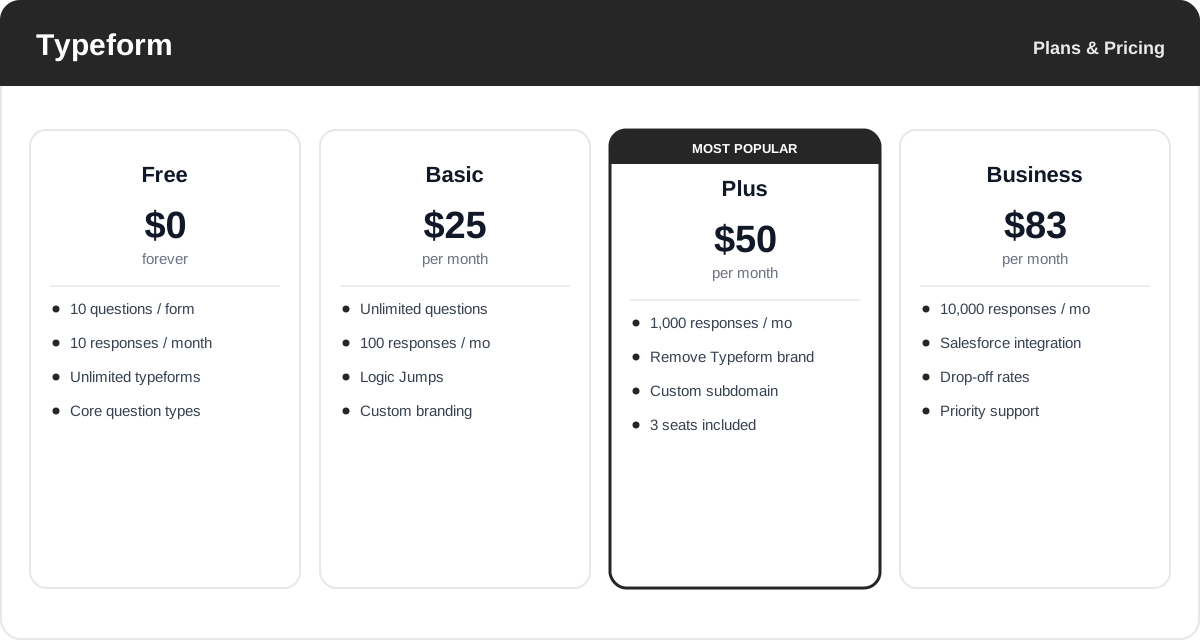
Response limits and prices change over time, and each plan caps monthly responses — check the official Typeform pricing page for current rates and exactly what each plan includes.
Real-World Use Case Analysis
Marketing and Lead Generation
Higher-converting capture: because the conversational flow feels light, marketers use Typeform for lead forms, quizzes, and interactive content that people finish — then Logic Jumps qualify leads and integrations drop them straight into HubSpot or a CRM while interest is high.
Product and Customer Feedback
Surveys people answer: product and CX teams run NPS, onboarding, and satisfaction surveys where the engaging format lifts response rates, and completion analytics reveal exactly which question is causing drop-off so the survey can be trimmed.
HR, Education, and Creators
Applications and quizzes: HR teams collect job applications, educators build scored quizzes with outcomes, and creators use payment fields to take bookings or sell directly — all from the same branded, no-code builder.
Pros and Cons of Typeform
Advantages
- The conversational, one-question-at-a-time format genuinely improves completion and engagement.
- Best-in-class design and branding make forms look professional with little effort.
- Powerful logic — Logic Jumps, recall, hidden fields, and a calculator — without any code.
- Versatile: surveys, quizzes, lead-gen, payments, and video questions in one tool.
- AI form builder and 300+ integrations speed up building and get data where it needs to go.
Disadvantages
- Response limits are strict, and costs climb quickly once your volume grows.
- The free plan is very limited — roughly 10 responses a month makes it barely more than a trial.
- One-question-at-a-time is slower for long forms where respondents prefer to see everything at once.
- Cheaper, form-heavy competitors offer more responses per dollar if design matters less to you.
Final Thoughts on Typeform
Typeform is the form builder to reach for when the experience matters as much as the data. Its conversational format and standout design make surveys, quizzes, and lead forms that people actually enjoy filling out, and the completion rates usually reflect that. Add Logic Jumps, personalization, an AI builder, and 300+ integrations, and it comfortably handles serious, real-world workflows without code. The trade-off is price: response limits are tight and the plans add up as you scale, so it is most worth it when engagement and brand polish justify the cost. If that describes your forms, start free and build one — the difference in how it feels is obvious within minutes.
Ready to try Typeform?
Visit the official website to see the latest plans, pricing, and special offers.
Get Started - Typeform* Affiliate link - we may earn a commission at no extra cost to you.