Webflow Review: The Visual Website Builder for Designers
Webflow review 2026: the visual, no-code website builder with a powerful CMS, animations, and hosting — features, site and workspace pricing, pros and cons.
Expert Review
What is Webflow?
Webflow is a visual website builder that sits between traditional no-code tools and hand-coding. Instead of dragging pre-made blocks around, you design directly on a canvas using the same box model, classes, and layout controls a front-end developer would use — and Webflow generates clean, production-ready HTML, CSS, and JavaScript underneath. The result is the design freedom of code with the speed of a visual tool, plus built-in hosting, a CMS, and ecommerce so you can launch without leaving the platform.
Founded in 2013, Webflow has become the tool of choice for designers, agencies, and marketing teams who have outgrown template builders like Wix or Squarespace but do not want to write everything from scratch. It is powerful and flexible, but that power comes with a steeper learning curve: Webflow rewards users who understand web fundamentals like the box model, flexbox, and CSS. In 2026 it also layers in AI assistance and a growing app ecosystem, cementing its place as a serious platform for professional websites.
Benefits of Using Webflow
- Design freedom without code: build virtually any layout visually, with pixel-level control that template builders cannot match.
- Clean, production code: Webflow outputs semantic HTML and CSS, so sites are fast, SEO-friendly, and standards-compliant.
- All-in-one platform: design, CMS, hosting, forms, and ecommerce live together, removing the need to stitch tools and plugins together.
- Powerful CMS: dynamic collections let you build blogs, portfolios, and directories that content editors can update without touching design.
- Rich interactions: create sophisticated scroll and hover animations visually, no JavaScript required.
- Reliable managed hosting: sites are served over a fast global CDN with SSL and automatic backups, so there is no server to maintain.
Key Features of Webflow
-
Visual Designer
The Designer is Webflow's heart: a canvas where you build responsive layouts with real CSS properties — flexbox, grid, positioning, and typography — while the tool writes the code. A style panel and reusable classes keep designs consistent, and responsive breakpoints let you fine-tune how a page looks on every screen size. It is closer to a professional design tool than a drag-and-drop template editor.
-
CMS & Collections
Webflow's CMS is built around dynamic Collections — structured content types like blog posts, projects, or products. You design a template once, and every item in the collection renders through it, so editors can add and update content without breaking the layout. Collection lists, filtering, and referencing make it possible to build content-rich sites like blogs, directories, and portfolios that stay easy to manage.
-
Interactions & Animations
Webflow's Interactions panel lets you build rich animations — scroll effects, parallax, hover states, and multi-step timelines — entirely visually. Effects that would normally require custom JavaScript are configured with triggers and actions, giving designers the polished motion of a bespoke site without a developer. It is one of the features that most sets Webflow apart from simpler builders.

-
Hosting & Ecommerce
Publishing on Webflow means managed hosting on a fast global CDN with SSL, staging, and automatic backups — no servers or plugins to maintain. Built-in ecommerce adds product collections, a cart, and checkout so you can design a fully custom online store rather than shoehorning one into a template. Everything from design to deployment happens in a single platform.

Pricing of Webflow
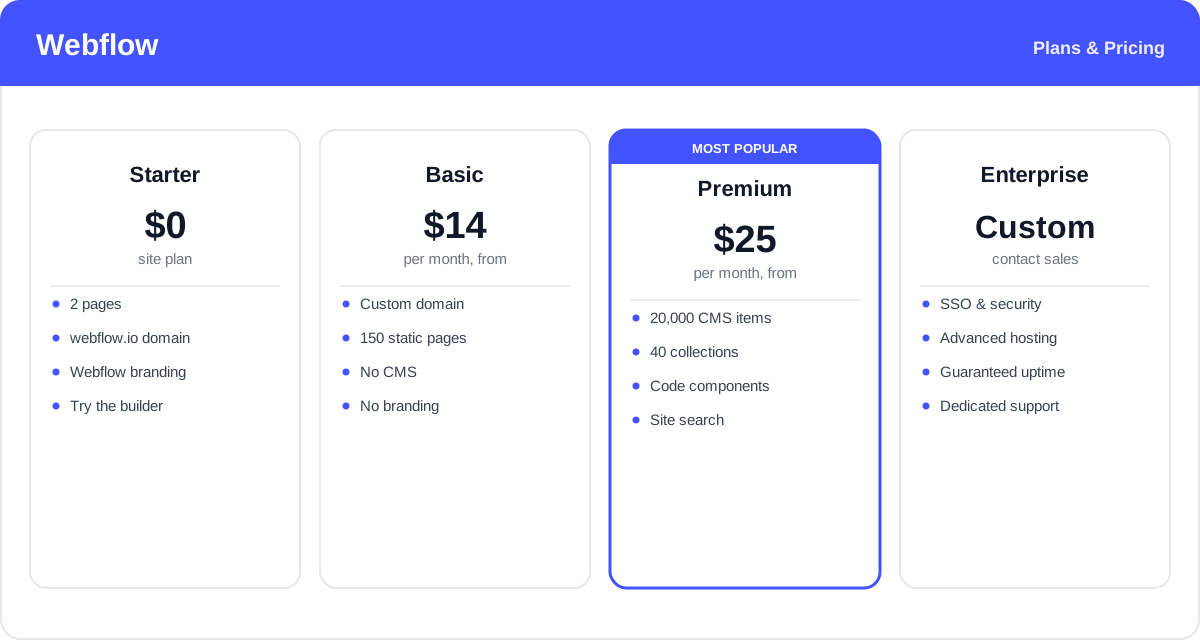
Webflow pricing works on two layers, which can be confusing at first: Site plans (what an individual website can do) and Workspace plans (who can build and collaborate). You can design for free and only pay a Site plan when you connect a custom domain and publish. In 2026 the Site plans were simplified, with a single Premium tier replacing the old CMS and Business plans:
- Starter (Site): $0 — up to 2 pages on a webflow.io subdomain with Webflow branding. Perfect for learning and prototyping.
- Basic (Site): from about $14/month (billed annually) — a custom domain and up to 150 static pages, but no CMS. Best for simple brochure or landing-page sites.
- Premium (Site): from about $25/month (billed annually) — adds the CMS with around 20,000 items and 40 collections, code components, and site search. The go-to plan for content-driven sites.
- Enterprise / Platform: custom pricing — advanced security, SSO, guaranteed uptime, and dedicated support for large organizations.
Separately, Workspace plans (a free Starter, plus paid Core and Growth tiers) govern team seats and how many unhosted sites you can build. Ecommerce sites use their own plan tier. In short: budget for a Site plan per live website, plus a Workspace plan if you work as a team.
Webflow's plan structure and prices change periodically and vary between Site, Workspace, and Ecommerce plans — check the official Webflow pricing page for current rates.
Real-World Use Case Analysis
Designers & Freelancers
Pixel-perfect client sites without a developer: designers use Webflow to turn their concepts into fully functioning, responsive websites without handing off to an engineer. The visual Designer preserves creative control, the CMS lets clients update their own content, and managed hosting means no maintenance headaches — a complete workflow from mockup to launch in one tool.
Agencies & Marketing Teams
Fast, editable marketing sites: agencies build campaign landing pages and full marketing sites quickly, then hand editing to marketers through the CMS without risking the design. Interactions add the polish clients expect, and the clean code keeps pages fast and SEO-friendly — important when sites exist to convert.
Startups & Content Sites
Content-rich sites that scale: startups use Webflow's CMS to run blogs, resource libraries, and directories that grow over time, with custom design that reflects their brand rather than a generic template. Built-in hosting and ecommerce mean a company can start with a marketing site and add a store later, all on the same platform.
Pros and Cons of Webflow
Advantages
- Unmatched design freedom for a no-code tool, with real CSS-level control.
- Outputs clean, fast, SEO-friendly code rather than bloated markup.
- Powerful CMS with dynamic collections for content-driven sites.
- Sophisticated scroll and hover animations built entirely visually.
- All-in-one platform: design, CMS, hosting, and ecommerce together.
Disadvantages
- Steeper learning curve than template builders — it helps to know web fundamentals.
- The two-layer Site and Workspace pricing is confusing and can add up.
- Ecommerce is capable but less feature-rich than Shopify for large stores.
- Costs rise once you need multiple sites, seats, or higher CMS limits.
- Some advanced functionality still requires custom code or third-party apps.
Final Thoughts on Webflow
Webflow is the strongest choice for anyone who wants professional, custom websites without hand-coding every line. Its visual Designer, clean code output, powerful CMS, and built-in hosting make it a genuine platform rather than a toy builder, and its animations give designers a level of polish that template tools simply cannot reach. The catch is complexity: the learning curve is real, and the split between Site and Workspace pricing takes some getting used to. For casual users who just need a quick brochure site, simpler tools may be enough. But for designers, agencies, and teams that value control, quality, and scalability, Webflow is well worth the investment — and you can design for free before paying to publish.