WinRAR Review 2026: What $29 Buys That 7-Zip and Windows Don't
WinRAR review 2026: the real $29 licence price and volume tiers, what the 40-day trial does after it expires, the recovery-record features 7-Zip lacks, and the patch history you have to install by hand.
Expert Review
Windows Already Opens Your RAR Files
For about twenty-five years, the question "how do I open a .rar file" had one answer, and that answer was WinRAR. It is not true any more. Since 2023, File Explorer on Windows 11 has extracted RAR, 7z and tar archives natively, with no third-party software involved. Double-click, and the folder opens.
That change quietly removed the reason most people had WinRAR on their machine. If all you ever do is open the occasional archive somebody emailed you, the review ends here: you do not need this program, and you should not pay for it.
The interesting question is what is left. WinRAR 7.23, released on 30 June 2026, is still one of the most widely installed pieces of Windows software on earth, and a real chunk of that install base has a professional reason to be there. This review is about that chunk.
The 40-Day Trial, and What a Licence Costs
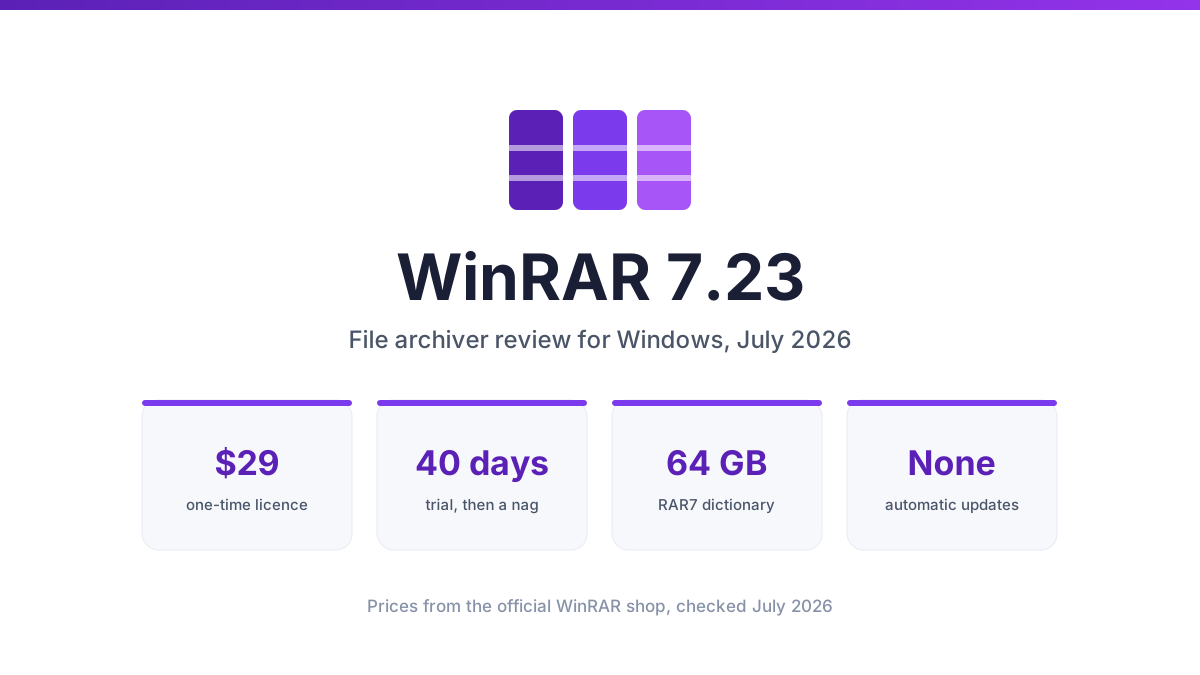
WinRAR ships as a 40-day trial. Everyone knows what happens on day 41: nothing. The trial expires, a purchase reminder appears when you launch the program, you close it, and WinRAR carries on compressing files exactly as before. No feature is disabled. No archive is watermarked. Using it unlicensed past 40 days breaks the EULA, and RARLAB has spent three decades declining to enforce that in software.
The company is entirely aware of its reputation. It announced version 7.23 with the line "Thanks to all of your recent payments, we've been able to develop a new version!"
If you do pay, a single-user licence is $29.00 excluding VAT, checked on the official WinRAR shop in July 2026, and it covers one user on one computer. Volume pricing falls steeply, which matters before anyone in your company buys nine copies one at a time.
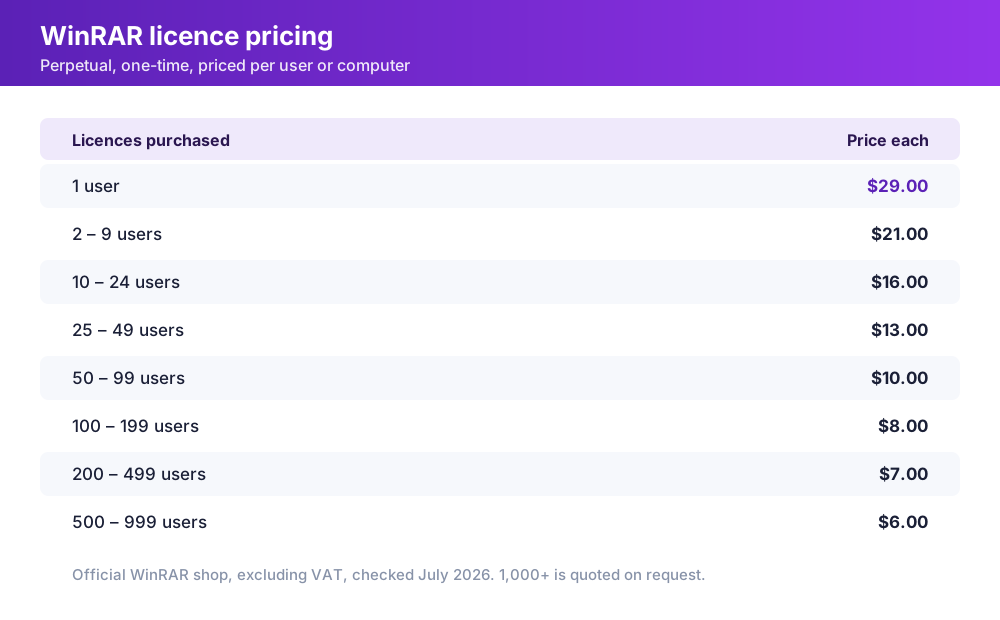
Licences are perpetual, which is genuinely unusual in 2026: WinZip now sells as a $34.95 annual subscription. There is one wrinkle in the small print that the marketing does not lead with. WinRAR's own licensing page says that "to stay up-to-date you must purchase a Support & Maintenance Package entitling you to all upgrades and updates within the 12-month period." For a single desktop buyer this rarely bites, since point releases install fine over an existing key. For a procurement team writing a five-year plan, ask the vendor to put the upgrade terms in writing before you sign.
What You Are Actually Paying For
Strip out extraction, and four features are doing the work.
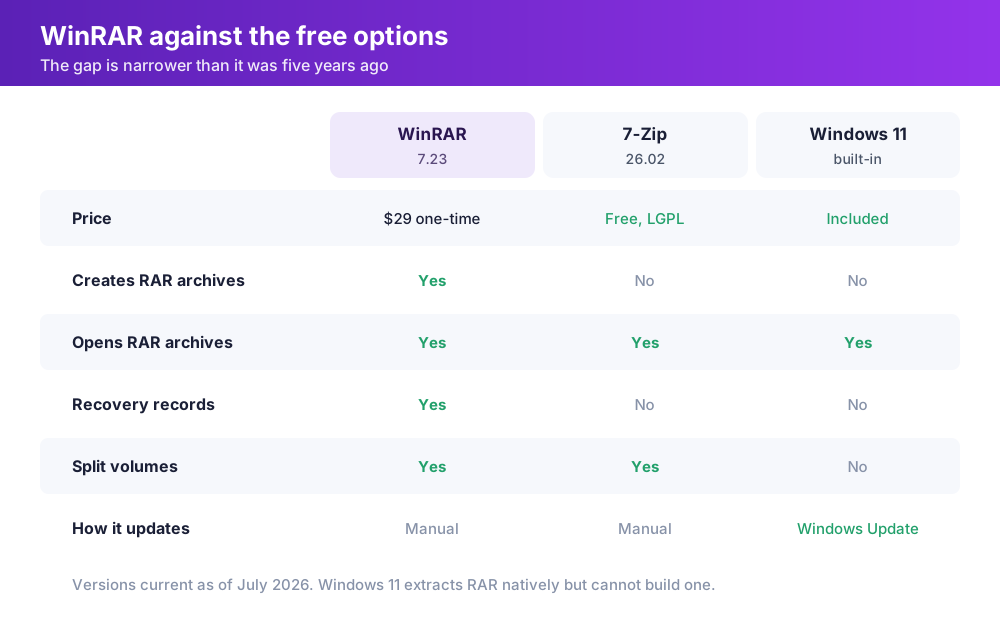
Recovery records. This is the one nothing free replicates. WinRAR can embed redundant repair data inside a RAR archive, sized as a percentage of the payload, and then rebuild the archive after corruption. If you are archiving to optical media, shipping large files over flaky links, or keeping cold storage on drives you do not fully trust, a 3% recovery record has saved backups that would otherwise be a total loss. The 7z format has no equivalent.
Split volumes that behave. Both WinRAR and 7-Zip can chop an archive into fixed-size parts. WinRAR adds recovery volumes, separate .rev files that can regenerate a missing or damaged part of the set, which matters when you are moving a 300 GB dataset across media that fails.
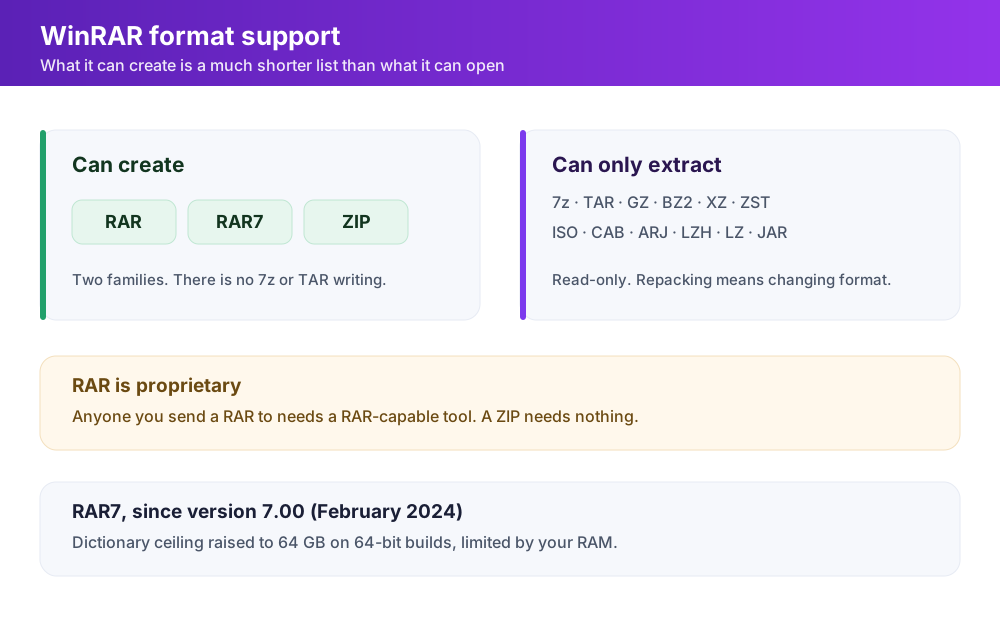
RAR7. Version 7.00, in February 2024, introduced a new archive format that raised the dictionary ceiling to 64 GB on 64-bit builds, bounded by your available RAM, and added compression algorithms alongside it. On huge, highly redundant data such as VM images or log corpora, a bigger dictionary finds long-range matches that smaller ones miss. On a folder of JPEGs it will do nothing at all. Know which you have before you pick the setting.
Encryption with hidden file names. AES-256 on both RAR and ZIP, with the option to encrypt the file names too, so an attacker holding the archive cannot even read the directory listing. ZIP encryption in most tools leaves the listing exposed.
One more feature deserves attention because almost nobody turns it on. Under Settings then Security, WinRAR 7.x can propagate Windows' Mark of the Web from a downloaded archive onto the files it extracts, either for everything or for chosen file masks. That is the flag that makes Office refuse to run macros and SmartScreen check an executable. It is off by default in the sense that the scope is narrow, and it applies only to the GUI: console RAR never propagates the mark, whatever the setting says. If you run extraction from scripts, you are not getting it.
The Security Record and the Missing Updater
Archive tools parse hostile input by definition, so bugs are expected. What makes WinRAR's record worth a section of its own is the delivery mechanism for the fixes, which is you.
The pattern is consistent. CVE-2023-38831 was used against cryptocurrency traders through booby-trapped archives before 6.23 closed it. CVE-2025-8088, a path traversal flaw that used alternate data streams to write files outside the extraction folder and into the Windows Startup directory, was found by ESET being exploited in the wild. The Russia-aligned RomCom group ran it from 18 to 21 July 2025 against finance, manufacturing, defence and logistics targets in Europe and Canada, disguised as job applications with a CV attached. ESET reported it on 24 July and version 7.13 shipped on 30 July 2025. Most recently CVE-2026-14191, a heap overflow in the code that reconstructs data from RAR5 recovery volumes and a variant of a 2023 bug, was fixed in 7.23 on 30 June 2026, along with a symbolic-link traversal on extraction.
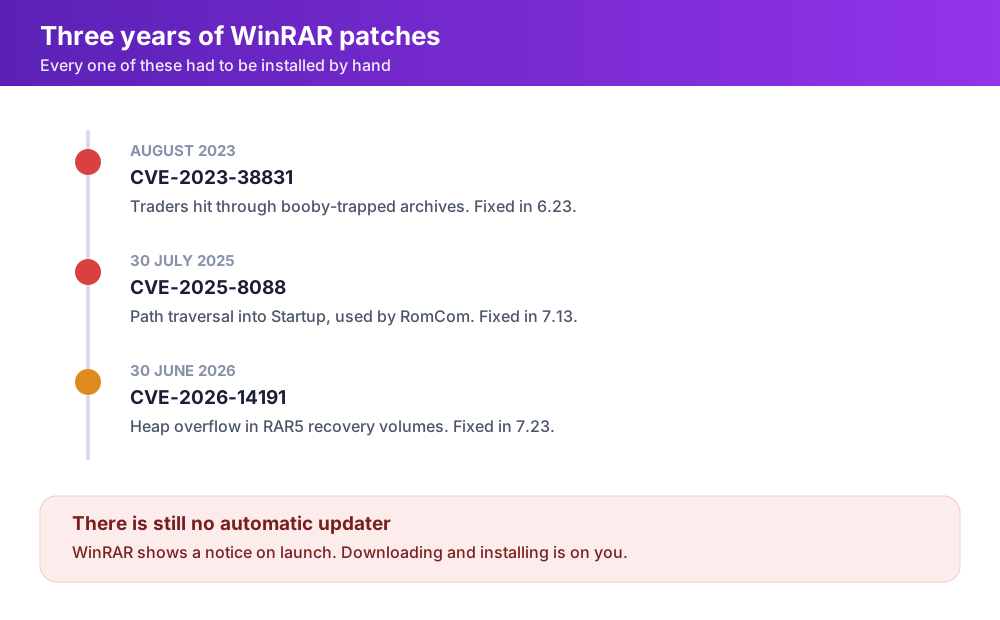
Every one of those patches had to be installed by hand. WinRAR still has no automatic updater. It shows a notice when a new version exists and then waits for you to download and run the installer yourself. RARLAB said in June 2026 that an update checker is in the pipeline, which after this history is a strange sentence to still be reading.
The practical consequence for anyone managing more than a handful of machines: WinRAR is a package your deployment tooling has to own. If it is installed and nobody has a job that pushes new builds, assume some of those machines are running a version with a public exploit. That is the single strongest argument for removing it from any desktop that does not actually need to create RAR files.
Where It Runs Out of Road
WinRAR creates exactly two archive families: RAR, including RAR7, and ZIP. It reads a long list of others, 7z and tar and gzip and ISO among them, but reading is all it does. You cannot use it to build a 7z file, and you cannot repack a tarball without converting the format.
RAR itself is proprietary. The unpacking source is published, the compressor is not, and the licence forbids using that source to reimplement RAR compression. Practically, that means anyone you send a RAR to needs a RAR-capable tool. A ZIP needs nothing at all. Sending RAR to an external client in 2026 is a small act of friction you are choosing to impose.
There is also no WinRAR for macOS or Linux. RARLAB ships command-line RAR for those platforms, and that is the whole offer. The graphical program you are buying is Windows-only, so a mixed-fleet company is licensing a Windows tool and telling everyone else to use something different.
The interface has improved, and it took a while. Native dark mode only arrived in version 7.10, in 2025. Nobody would call the result modern, but the file manager layout is fast, keyboard-driven and unchanged for years, which is precisely what its long-time users want from it.
Verdict: Who Should Buy It
Buy WinRAR if you create archives rather than open them, and if the archive has to survive something: bad media, a long transfer, a decade in cold storage. Recovery records and recovery volumes are a real capability with no free equivalent, and $29 once is nothing against one restored backup. The same goes for anyone whose workflow already runs on RAR7 with a large dictionary, or who needs AES-256 with encrypted file names.
Do not buy it to open files. Windows 11 extracts RAR on its own, and 7-Zip 26.02 is free under the LGPL, compresses 7z at least as well as RAR does in most tests, and is patched through the same manual route with a considerably shorter list of exploited-in-the-wild incidents. If you want the 7-Zip engine with a Windows 11 interface, NanaZip is the same code with a modern shell. For a fleet of office desktops, the correct move is usually to remove WinRAR entirely and let File Explorer handle extraction, which removes a package nobody was updating.
Version 7.23, June 2026. If you are running anything older than that, close this page and update first.
Ready to try WinRAR?
Visit the official website to see the latest plans, pricing, and special offers.
Get Started - WinRAR* Affiliate link - we may earn a commission at no extra cost to you.