Zapier Review: Automate Your Apps Without Writing Code
Zapier review: the no-code automation platform connecting 8,000+ apps with multi-step Zaps, AI steps, Tables, and Interfaces — features, pricing, pros and cons.
Expert Review

What is Zapier?
Zapier is a no-code automation platform that connects the apps you already use so they can work together automatically. You build a "Zap" — a simple rule that says when something happens in one app (a trigger), do something in another app (an action). When a new form is submitted, add a row to a spreadsheet; when a deal closes, post to Slack and create an invoice. No engineering, no servers, just a few clicks in a visual builder.
What makes Zapier powerful is reach: it integrates with more apps than any other automation tool, so it can glue together almost any stack a business runs on. It serves solo founders wiring up their first workflow, marketers and operations teams eliminating repetitive busywork, and larger companies automating processes across departments. In recent years Zapier has expanded beyond simple triggers into AI-powered steps, its own database (Tables), and no-code app builders (Interfaces).
Benefits of Using Zapier
- Eliminates repetitive work: tasks like copying data between apps, sending routine notifications, and updating records happen automatically in the background.
- No coding required: a visual builder means non-technical people can create powerful automations that would otherwise need a developer.
- Unmatched app coverage: with 8,000+ integrations, Zapier connects almost anything, so you are rarely stuck because a tool is not supported.
- Multi-step power: Zaps can chain many actions with filters, paths, and formatting to model genuinely complex processes, not just one-to-one links.
- Fast to set up: most automations take minutes to build and test, delivering time savings almost immediately.
- Beyond automation: built-in AI steps, Tables, and Interfaces let you add logic, store data, and create simple apps without leaving Zapier.
Key Features of Zapier
-
Zaps: triggers and actions
The core building block is the Zap: a trigger in one app that sets off one or more actions in others. Zapier polls or listens for the trigger event, then runs the workflow for you — automatically moving data, sending messages, or updating systems. It is the simple concept that everything else builds on.
-
8,000+ app integrations
Zapier's biggest advantage is its integration catalog — the largest in the automation space. From Gmail, Slack, and Google Sheets to Salesforce, HubSpot, Notion, Stripe, and thousands of niche tools, the odds are strong that every app in your stack is supported, which is what makes it a universal connector.
-
Multi-step Zaps, filters, and paths
Beyond a single trigger and action, Zaps can run many steps in sequence. Filters stop a Zap unless conditions are met, paths branch the workflow down different routes based on the data, and formatting steps clean up values along the way. Together they turn Zapier from a simple connector into a real workflow engine.
-
AI steps, Tables, and Interfaces
Zapier has grown into a broader platform. AI steps and agents let you add language-model reasoning inside a workflow — summarizing, classifying, or drafting text. Tables give you a built-in database to store and manage data, and Interfaces let you build simple forms and apps that trigger and display your automations, all without code.
-
Templates, history, and error handling
Thousands of pre-built Zap templates get common automations running in one click, while the task history logs every run so you can see exactly what happened. Built-in retries and error notifications flag failures, and autoreplay can re-run failed tasks — important once automations become business-critical.
Pricing of Zapier
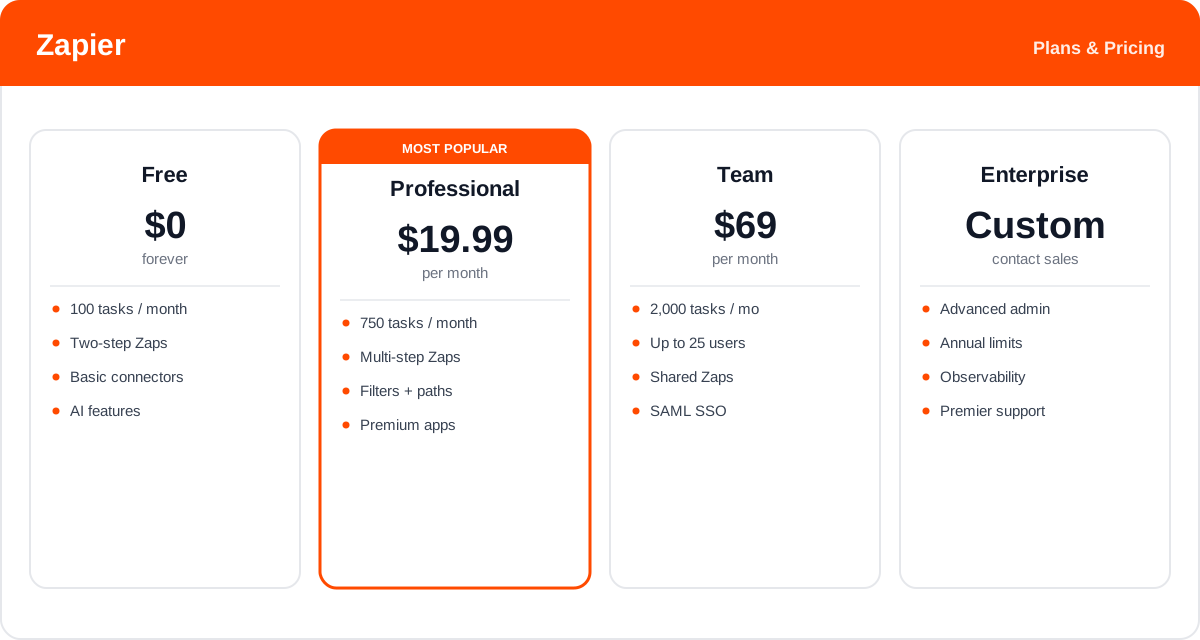
Zapier prices by "tasks" — each action a Zap successfully completes counts as one task. Plans differ mainly in monthly task volume, workflow complexity, and team features, and annual billing is significantly cheaper than paying monthly.
- Free: $0 — 100 tasks per month and basic two-step (single-action) Zaps. Good for trying Zapier and running a few light automations.
- Professional: from about $19.99/month (billed annually) for 750 tasks — unlocks multi-step Zaps, filters, paths, webhooks, and premium apps. The standard plan for individuals and small teams.
- Team: around $69/month (billed annually) for 2,000 tasks and up to 25 users — shared Zaps and connections, SAML SSO, and premier support.
- Enterprise: custom pricing — advanced admin, observability, annual limits, and dedicated support for large organizations.
Task allowances and prices change over time, and overages are billed above your plan — check the official Zapier pricing page for current rates and exactly what each plan includes.
Real-World Use Case Analysis
Sales and Marketing Teams
Lead management: when a lead fills out a form or downloads a resource, Zapier can add them to the CRM, notify a rep in Slack, and start an email sequence — all instantly, so no lead slips through the cracks and reps act while interest is high.
Operations and Finance
Back-office automation: teams sync data between tools that do not talk to each other natively — creating invoices from closed deals, logging payments to a spreadsheet, or copying records between systems — removing hours of manual data entry each week.
Founders and Small Businesses
Doing more with less: without a technical team, small businesses use Zapier to automate onboarding, notifications, and reporting, effectively getting an extra pair of hands that runs routine processes around the clock.
Pros and Cons of Zapier
Advantages
- The largest app catalog in automation, so it connects almost any stack.
- Genuinely no-code and quick to learn, putting automation in reach of non-technical users.
- Multi-step Zaps with filters and paths handle real, complex workflows.
- Growing platform with AI steps, Tables, and Interfaces beyond simple triggers.
- Thousands of templates and clear task history make it easy to start and troubleshoot.
Disadvantages
- The task-based pricing can get expensive fast as automations and volume grow.
- Multi-step Zaps burn a task per action, so complex workflows consume quota quickly.
- Deeper logic and heavy-duty automation are less flexible than dedicated iPaaS or custom code.
- Debugging a failed Zap across many steps and apps can be fiddly.
Final Thoughts on Zapier
Zapier is the default choice for no-code automation, and for good reason: nothing else connects as many apps or makes wiring them together as approachable. For anyone drowning in repetitive, copy-paste work between tools, it delivers quick, tangible time savings, and its expansion into AI steps, Tables, and Interfaces makes it more of a platform than a simple connector. The main watch-out is cost — the task-based model rewards efficient Zaps and can add up quickly at scale, so keep an eye on volume. But start on the free plan, automate one annoying workflow, and it usually pays for itself in saved hours almost immediately.