Affinity Review: Canva's Free Photoshop, Illustrator and InDesign Rival, Now on iPad
Affinity review: Canva's free Photoshop, Illustrator and InDesign alternative. What's free, what Canva Pro AI costs, .ai export limits and the new iPad app.
Expert Review

What "free" covers in November 2026
Affinity costs nothing, and that part is not marketing spin. Since Canva relaunched it in late October 2025 as a single app replacing Affinity Designer, Photo and Publisher, every vector, pixel and layout tool has been free to use, export included, with no watermark and no trial clock. Affinity's FAQ puts it plainly: individuals can use every tool in the Pixel, Vector and Layout studios "as much as they want, with no restrictions or payment needed." Checked on affinity.studio, its help centre and canva.com/pricing on 13 November 2026, nothing in the core app sits behind a paywall.
The price is an account. You cannot download the installer without signing in to Canva, which bought Serif, the Nottingham company behind Affinity, in March 2024 for a sum it never disclosed. Canva's Affinity terms (last updated March 2026) tie your right to use the app to that account. After the first activation it runs offline indefinitely - Affinity says there is no requirement to be online "even with extended offline periods" - and you can install it on as many machines as you like. Help, lessons, stock libraries and anything Canva-connected still need a connection.
What you pay for is AI. Generative Fill, background removal and the rest of the Canva AI studio need Canva Pro at US$144 a year for one person, or Business at US$250 a year per person, the annual prices on canva.com/pricing in November 2026. Canva Teams is closed to new sign-ups, so those are the two real options.
One app, three studios, one file
The old suite was three separate apps, each bought on its own. The new one drops the pretence. Vector, Pixel and Layout are now "studios", tabs across the top of a single window, and switching between them swaps the tools without closing the document. A poster can hold a vector logo, a retouched photo with live adjustment layers and flowing body text in one .af file, and the iPad app opens that same file.
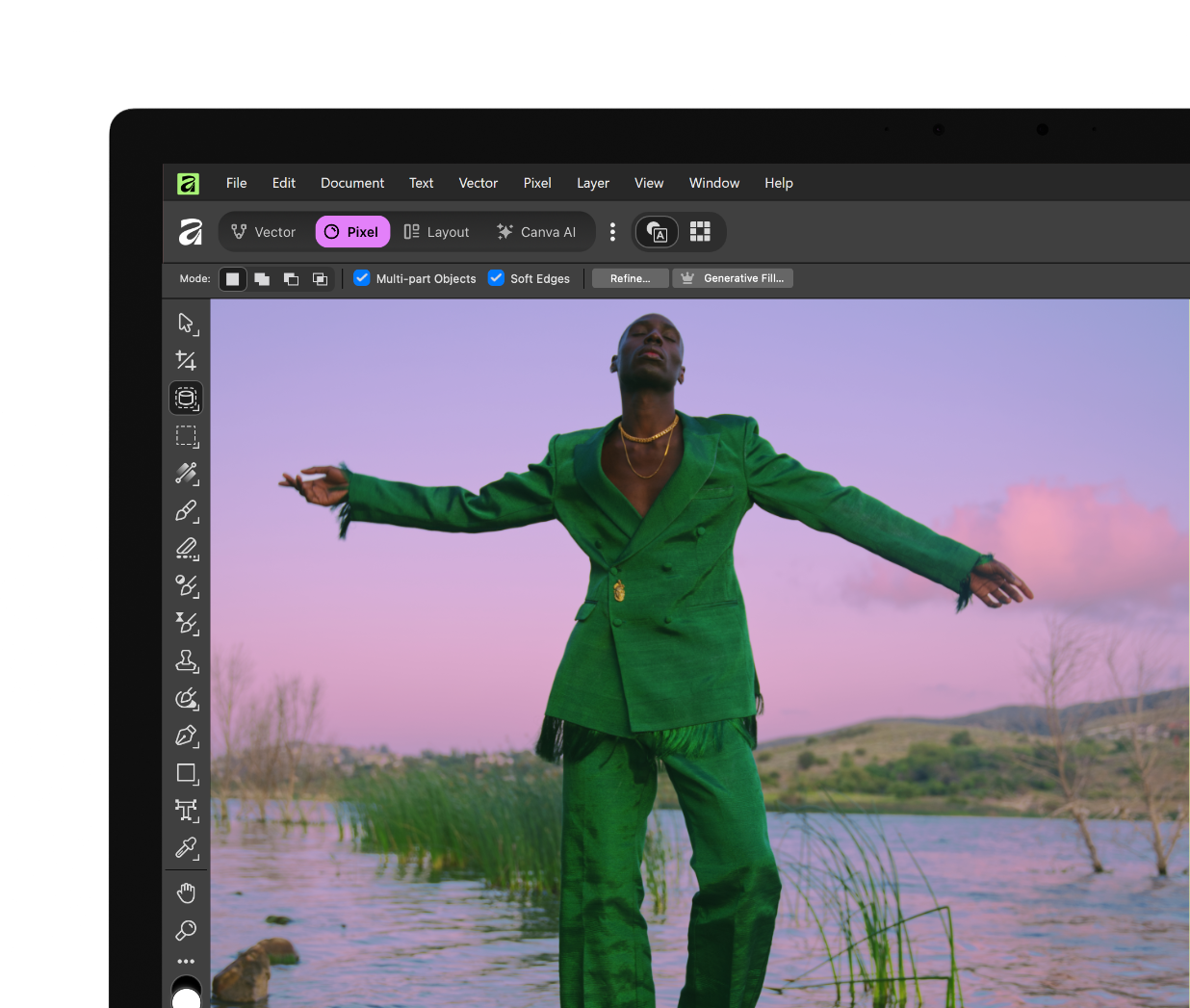
Beyond the big three sit smaller studios for slicing, retouching, typography and scripting, plus Sketch on iPad and the Canva AI studio, and any of them can be customised. Pixel is where the line between free and paid shows first. In Affinity's own Windows screenshot, the context toolbar offers "Refine..." next to "Generative Fill...", and only the second carries the crown icon that marks a premium feature.
The other change is pace. Affinity now ships a build every month - September (build 4850), October (4940) and November 2026 (5004) in the official release notes. September added a Blend Tool, scripting and more than 60 other changes, most of them free. April brought a Vector Blob Brush, Canva Brand Kit integration and an MCP server that lets Claude Desktop drive the app. That is a lot of movement for software that costs nothing.
The paid part: Canva AI inside Affinity
The AI list is long: Generative Fill, Expand and Edit; image and vector generation; background removal and subject selection; colourise, depth selection and super resolution; portrait blur and portrait lighting. The September 2026 build added Generative Upscale, Layer to 3D and scene decomposition, which splits a flat picture into editable layers. On whether a free account gets any of it, Affinity's FAQ is blunt: "No, these are only available to those with Canva premium accounts."
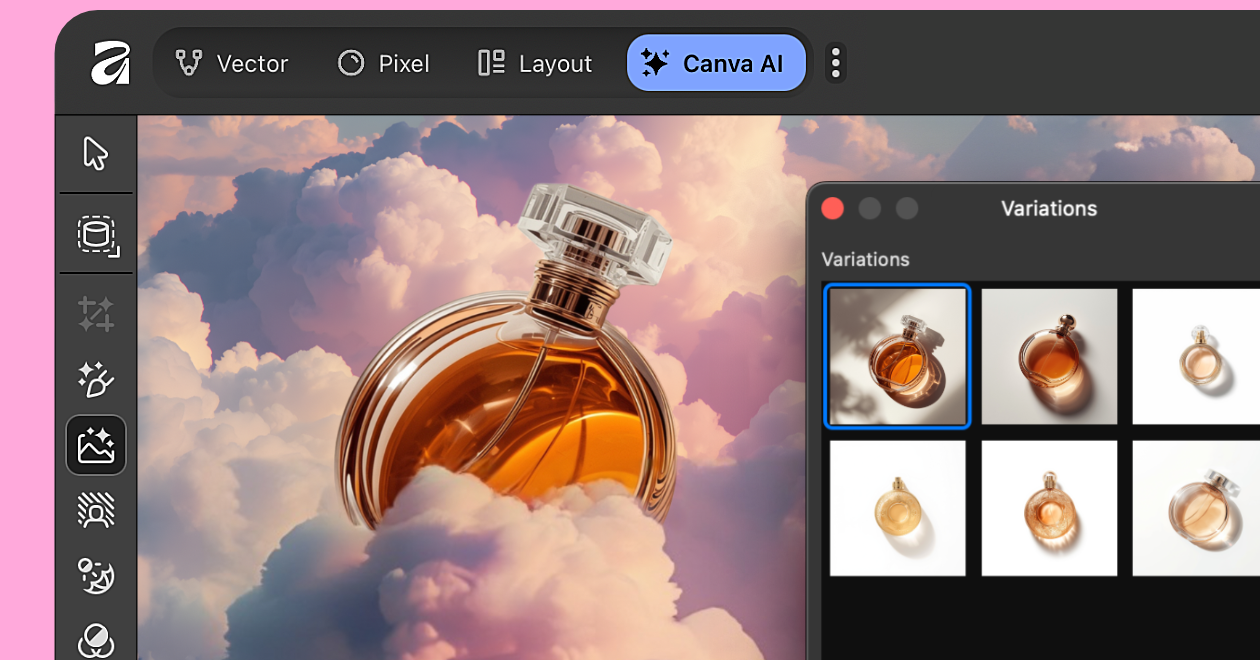
Two details are better than the paywall suggests. Affinity says content in the app is not used to train AI features, not even for model evaluation or quality assurance, and that files stay on your device where Canva has no access; only what you upload or export to Canva falls under your Canva privacy settings. And the AI studio can download some models and run them locally instead of in the cloud. Hardware gates still apply. The machine-learning tools need Apple silicon on macOS Ventura or later, and an M-series chip on iPad.
So is US$144 a year worth it? If you already pay for Canva Pro for templates and brand kits, the AI arrives at no extra cost and the question answers itself. If you don't, skip it. The free core is the reason to install Affinity, and background removal alone is not worth a subscription.
Files: easy in, harder out
Getting Adobe work into Affinity is the strong side. It imports PSD, AI, PDF, SVG and IDML, and the September 2026 release added native InDesign .INDD import, so an InDesign file no longer has to be exported to IDML first. DWG/DXF drawings, Microsoft Publisher files and GLB models open too. PSD and PDF work in both directions.
The trouble is the way back. Affinity cannot export Adobe Illustrator .ai files at all - its help page says it is "not possible to export this file type from Affinity" - and it only opens .ai files that carry an embedded PDF-compatible stream. If an agency sends you layered .ai artwork and expects layered .ai back, you will be sending PDF or SVG and hoping they take it.
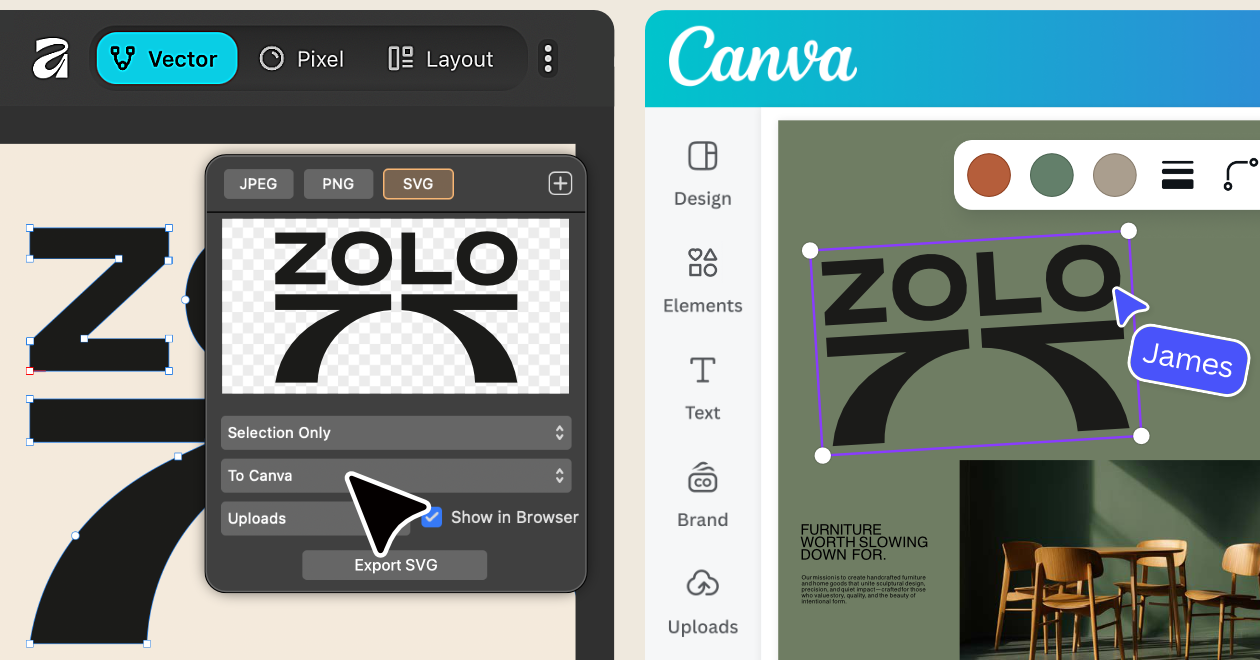
Two more doors only open one way. Documents made in the new app do not open in Affinity V1 or V2, so a studio where one designer upgrades and another stays on a V2 licence will soon hold files the second person cannot read. And Export to Canva, the integration Canva talks about most, flattens your work: the design lands in Canva as a static image whose Affinity layers you cannot edit, and Canva files cannot be opened in Affinity at all.
Affinity on iPad
The iPad version arrived on 2 November 2026, a year after Canva said it was "coming soon". It brings sketch, vector, photo and layout into the same .af file the desktop uses, and runs on iPadOS 18 or later on hardware from the 7th-generation iPad up to the M5 iPad Pro.
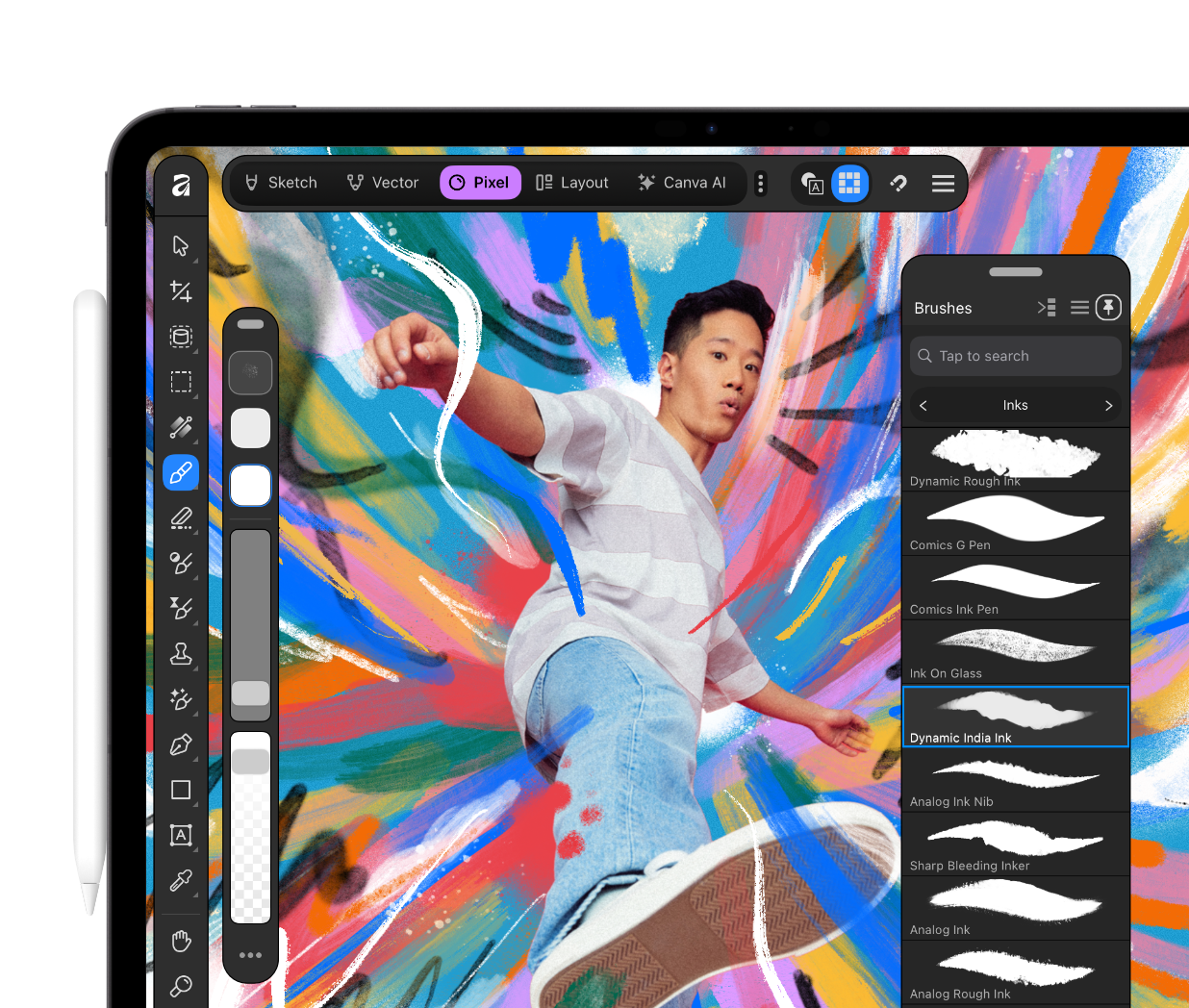
It is not the full desktop app yet. Missing at launch are the Books, Batch, Data Merge, Quick Adjustments, Info and Scope panels, macro recording and the Astrophotography Studio. Long documents and batch exports still belong on a Mac or PC. Illustration and photo touch-ups travel well.
The catches worth knowing before you switch
The account requirement is what started the backlash. When the free app launched, Creative Bloq reported a "huge debate among artists and designers", TechRadar ran an explainer on how "free forever" really works, and Digital Camera World carried Canva's founder telling photographers "there's no catch". The worry is not today's price. It is that an app whose licence lives inside someone else's account can be re-priced later.
People who remember Canva's March 2024 pledge have a point. Canva promised then to keep the perpetual licences that made Affinity popular and to offer any subscription only as an option next to them. Today V1 and V2 are no longer for sale. Existing V2 licences stay valid and Serif keeps the activation servers online, but those apps will never be updated again. The free core goes further than the pledge did; the perpetual licence is still gone.
Platform coverage is the other limit. Affinity runs on Windows 10 (May 2020 Update, build 19041) or Windows 11, including ARM64 laptops on Snapdragon X Elite, with a graphics card that supports Direct3D feature level 12.0. On the Mac it covers macOS Catalina through Tahoe, Intel or Apple silicon. A Linux version is in active development with no date attached; Android and Chromebooks are not planned at all. Support has moved too: the Affinity forums went read-only on 6 October 2025 and the community now lives on Discord, which is quick for live answers and poor for finding a fix someone posted two years ago.
Verdict: who should switch, and who should not
Switch if you pay for Adobe Creative Cloud to do occasional Photoshop, Illustrator or InDesign-style work: a freelancer laying out a few brochures a year, a student, a small business that wants more control over its graphics than templates allow. You give up AI conveniences unless you pay Canva. You get a professional vector, photo and layout tool that costs nothing, installs on every machine you own and works offline once activated.
Skip it if your work means trading native .ai files with agencies or printers, if your team collaborates through Creative Cloud libraries, or if you live on Linux, Android or a Chromebook. Adobe Creative Cloud remains the safer choice there. For collaborative interface design, Figma does what Affinity never tries to; for template-driven marketing with no design training, Canva itself is the faster route. For everyone else, Affinity is the strongest free alternative to Adobe's three core apps, and the only real cost is the Canva account you sign in with.
Ready to try Affinity?
Visit the official website to see the latest plans, pricing, and special offers.
Get Started - Affinity* Affiliate link - we may earn a commission at no extra cost to you.