Claude Review: Anthropic's AI Assistant for Serious Work
Claude review: Anthropic's AI assistant with Opus 4.8 and Sonnet 5, Artifacts, Claude Code, Projects, and Research — features, pricing plans, pros and cons.
Expert Review

What is Claude?
Claude is the AI assistant built by Anthropic, an AI safety company founded by former OpenAI researchers. Like other assistants it answers questions in natural language, but Claude has earned a particular reputation among professionals for careful, nuanced reasoning, for handling very long documents, and for writing that feels thoughtful rather than generic. It is available on the web at claude.ai, as desktop apps for Windows and macOS, and on iOS and Android.
Claude runs on Anthropic's model family. The flagship, Claude Opus 4.8, is aimed at the hardest reasoning and coding; Claude Sonnet 5 is the balanced default for everyday work; and Claude Haiku 4.5 is the fast, lightweight option. Around the models sit features that make Claude feel like a workbench — Artifacts, Projects, Claude Code, and a Research tool — which is why it has become popular with developers, writers, analysts, and teams doing serious knowledge work.
Benefits of Using Claude
- Strong, careful reasoning: Claude is well regarded for working through complex problems methodically and admitting uncertainty instead of bluffing.
- Excellent at long context: it comfortably reads and reasons over long documents, large codebases, and lengthy transcripts in a single conversation.
- Artifacts turn chat into output: Claude renders code, documents, and working apps in a side panel you can preview and iterate on.
- A serious coding tool: Claude Code brings agentic, whole-project coding to the terminal and editor, not just snippets.
- Natural, high-quality writing: its drafts tend to need less rewriting, which makes it a favorite for writing-heavy work.
- Built with safety in mind: Anthropic's focus on alignment appeals to individuals and organizations that care about reliable, well-behaved AI.
AI Features of Claude
-
The Claude Model Family
Claude gives you a range of models for different needs: Opus 4.8 for the deepest reasoning and the toughest coding, Sonnet 5 as the balanced default that powers most everyday chats, and Haiku 4.5 for fast, low-cost tasks. Paid users can switch between them to match the depth of a task, and extended thinking lets Claude reason step by step on hard problems.
-
Artifacts
Artifacts is one of Claude's standout features. When you ask for code, a document, a chart, or even a small app, Claude renders it in a dedicated side panel you can view, edit, and iterate on live — and share as a working result. It turns a conversation into a real deliverable instead of a wall of text.
-
Claude Code & Cowork
For developers, Claude Code is an agentic coding tool that works across an entire project — reading files, making changes, running commands, and fixing its own mistakes. Cowork extends that agentic approach to broader computer tasks. Together they let you hand Claude a real job and have it carry the work out, with you reviewing the results.
-
Projects, Connectors & Research
Projects keep your context, files, and instructions together so Claude stays grounded across many chats. Connectors, built on the Model Context Protocol (MCP), link Claude to your own tools and data. And the Research tool browses multiple sources to compile thorough, cited answers to bigger questions.

-
Vision & File Analysis
Claude can read images, screenshots, PDFs, spreadsheets, and other files you upload, reasoning over their contents directly in the chat — useful for everything from analyzing a report to explaining a diagram or extracting data from a document.
Pricing of Claude
Claude uses a freemium model with consumer and team tiers. The free plan runs Sonnet 5 with daily limits; paid plans raise usage, unlock Opus 4.8, and add Claude Code and Research. The heaviest individual users can scale up through the Max plans.
- Free: $0 — Claude Sonnet 5 with limited daily messages, plus web and file uploads. Good for trying it out.
- Pro: $20/month — much more usage, access to Opus 4.8, Claude Code, Projects, and the Research tool. The standard plan for regular users.
- Max: $100/month for roughly 5x Pro usage, or $200/month for up to 20x, with the highest limits and priority access for power users.
- Team & Enterprise: around $25/user/month for Team (central billing, admin controls, collaboration), with Enterprise pricing for larger organizations that need advanced security and support.
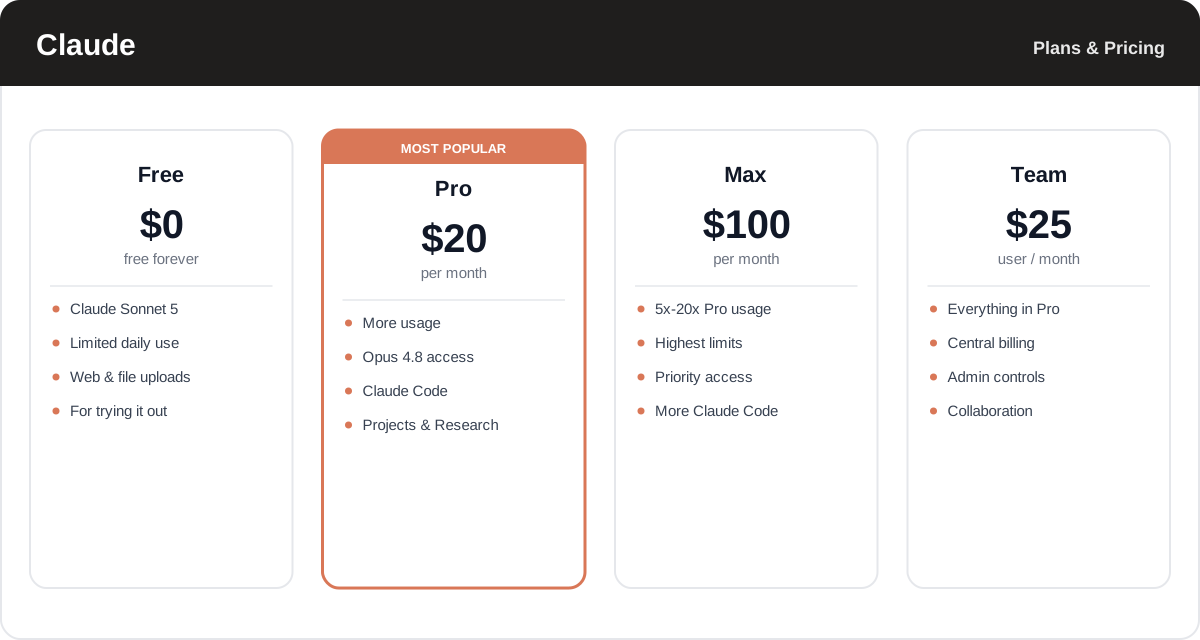
Plans, model access, and usage limits change often — check the official Claude pricing page for the latest tiers and exactly what each includes.
Real-World Use Case Analysis
-
Developers & Engineering Teams
Real coding help: engineers use Claude Code to refactor across a whole project, understand unfamiliar repositories, and fix bugs, leaning on Opus 4.8 for the hardest problems and Artifacts to preview results as they go.
-
Writers, Analysts & Researchers
Thinking on the page: Claude's careful reasoning and natural writing make it a favorite for drafting, editing, and analyzing long documents, while the Research tool compiles cited answers to deeper questions.
-
Teams & Knowledge Work
A shared, grounded assistant: teams use Projects and connectors to keep Claude anchored in their own context and tools, getting consistent help across writing, analysis, and code without exposing data unnecessarily.
Pros and Cons of Claude
-
Advantages of Using Claude
Claude's strengths include:
- Careful, nuanced reasoning and a tendency to flag uncertainty rather than bluff.
- Excellent long-context handling for big documents and codebases.
- Artifacts and Claude Code that turn conversations into real, working output.
- High-quality, natural writing that needs less rewriting.
- A safety-first approach that appeals to careful individuals and organizations.
-
Disadvantages of Using Claude
Some trade-offs to weigh:
- Its image and video generation are not focus areas — for creative media, rivals do more.
- Free-tier daily limits are modest, so heavy use quickly pushes you to a paid plan.
- The Max plans get expensive for the highest usage tiers.
- Its ecosystem of third-party integrations is smaller than ChatGPT's.
Final Thoughts on Claude
Claude is the AI assistant of choice for people who care about the quality of the thinking and the writing. Anthropic's models — Opus 4.8, Sonnet 5, and Haiku 4.5 — pair careful reasoning and strong long-context handling with genuinely useful tools like Artifacts, Claude Code, and Research, making Claude especially strong for developers, writers, and analysts doing serious work. It is less focused on creative media and its free limits are modest, but the writing quality and reasoning often make it worth the upgrade. Try it free on Sonnet 5, and step up to Pro at $20/month if it becomes part of your daily workflow.
Related comparison: See how Claude compares in ChatGPT vs Claude vs Gemini vs Perplexity vs Magai: Which AI Assistant Wins? — or browse all comparisons & best-of guides.
Ready to try Claude?
Visit the official website to see the latest plans, pricing, and special offers.
Get Started - Claude* Affiliate link - we may earn a commission at no extra cost to you.