Gemini Review: Google's AI Assistant Across Your Apps
Gemini review: Google's AI assistant with Gemini 3 models, Workspace integration, Deep Research, and a 1M-token context window — features, pricing, pros and cons.
Expert Review

What is Gemini?
Gemini is Google's AI assistant, built by Google DeepMind. It started as a standalone chatbot (the successor to Bard) and has since been woven throughout Google's products — you can call on it inside Gmail, Docs, Sheets, and Drive, on Android and in Chrome, and in Search. That deep integration is Gemini's defining trait: rather than being a separate app you visit, it is an assistant that lives where you already work. It is available at gemini.google.com, in the Gemini mobile apps, and across the Google ecosystem.
Gemini is powered by Google's frontier models. Gemini 3.1 Pro handles the most demanding, multimodal reasoning, while Gemini 3.5 Flash is tuned for fast, low-cost responses. Combined with a very large context window, native multimodality, and Google's own tools for image and video generation, Gemini is aimed at everyone from casual users and students to professionals living inside Google Workspace.
Benefits of Using Gemini
- Built into Google: Gemini works directly inside Gmail, Docs, Drive, and Sheets, so it can act on your own emails and files without copy-pasting.
- Huge context window: a context window up to a million tokens lets it ingest very long documents, whole codebases, or large sets of files at once.
- Truly multimodal: it reasons across text, images, audio, and video, and generates images and video with Google's Imagen and Veo models.
- Strong research: Deep Research browses the web and compiles thorough, cited reports on a topic.
- Great value entry point: the AI Plus tier is cheaper than most rivals, and a capable free tier is available to everyone.
- Everywhere Google is: on Android, in Chrome, and in Search, Gemini is always a tap away.
AI Features of Gemini
-
The Gemini 3 Models
Gemini gives you Google's latest models: Gemini 3.1 Pro for the hardest multimodal reasoning and coding, and Gemini 3.5 Flash for fast, efficient everyday answers. The assistant picks a suitable model for your request, and paid tiers unlock the most capable Pro model along with higher usage limits.
-
Google Workspace Integration
Gemini's biggest advantage is that it lives inside the tools you already use. It can draft and summarize emails in Gmail, write and refine documents in Docs, build formulas and analyze data in Sheets, and find things across your Drive — acting on your own content rather than a blank chat window.
-
Deep Research & 1M Context
Gemini's very large context window lets you feed it enormous inputs — long reports, whole codebases, or many files at once — and have it reason over all of it. Deep Research goes further, autonomously browsing the web across many sources and compiling a structured, cited report so you do not have to gather everything yourself.
-
Creative Tools & Gemini Live
Gemini taps Google's creative models to generate images with Imagen and video with Veo directly from a prompt. Gemini Live enables a natural, real-time spoken conversation — including the ability to share your camera or screen — turning the assistant into something you can talk to and show things to.
-
Gems, Canvas & Agents
Gems let you build custom versions of Gemini for specific tasks, Canvas gives you a workspace for drafting documents and code interactively, and on the top tiers the Gemini Spark agent can take actions on your behalf across your digital life.
Pricing of Gemini
Gemini is offered free and through Google's AI subscription tiers (billed under Google One / Google AI). The free plan is capable; paid tiers unlock the most powerful models, Deep Research, a larger context window, and generous cloud storage.
- Free: $0 — access to the Gemini app with the fast Flash model, image generation, and everyday help.
- Google AI Plus: $7.99/month — higher limits, features like Daily Brief, more Flash usage, and extra storage. A budget-friendly upgrade.
- Google AI Pro: $19.99/month — the most capable Gemini 3.1 Pro model, Deep Research, the 1M-token context window, and 2TB of storage. The mainstream paid plan.
- Google AI Ultra: $99.99/month for roughly 5x Pro usage (up to a $200/month tier for 20x), adding the Gemini Spark agent, top models, and up to 20TB of storage.
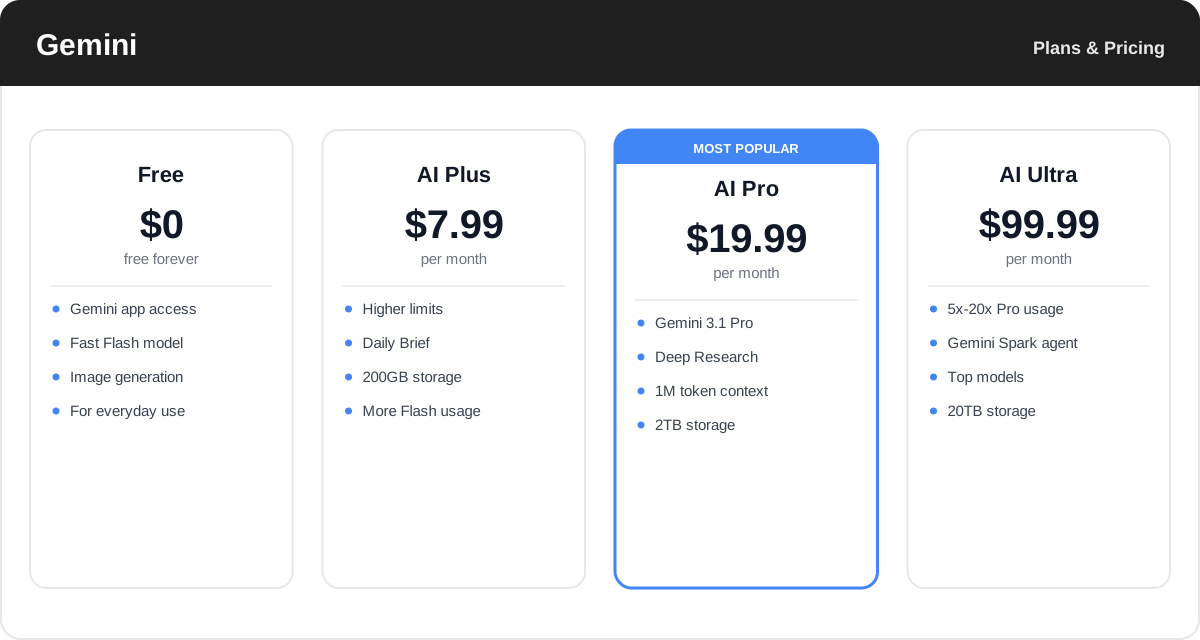
Plans, model access, and limits change often — check the official Google AI plans page for the latest tiers and exactly what each includes.
Real-World Use Case Analysis
-
Google Workspace Users
Help where you work: professionals living in Gmail, Docs, and Sheets use Gemini to draft replies, summarize threads, write documents, and build spreadsheet formulas without ever leaving the app they are already in.
-
Research & Large Documents
Reason over everything at once: the huge context window and Deep Research make Gemini strong for digesting long reports, analyzing big file sets, and producing cited overviews of a topic in one pass.
-
Everyday & Creative Users
An assistant on every device: on Android, in Chrome, and via Gemini Live, casual users get quick answers, image and video generation, and hands-free help, all at an accessible price point.
Pros and Cons of Gemini
-
Advantages of Using Gemini
Gemini's strengths include:
- Deep integration across Gmail, Docs, Drive, Android, Chrome, and Search.
- An enormous context window for very long documents and large file sets.
- Full multimodality, including image and video generation via Imagen and Veo.
- Strong Deep Research and a genuinely affordable entry tier.
- Available almost everywhere within the Google ecosystem.
-
Disadvantages of Using Gemini
Some trade-offs to weigh:
- Its biggest advantages assume you are already invested in Google's ecosystem.
- Quality can feel uneven between the fast Flash model and the Pro model.
- The top Ultra tier is expensive, and the best features are gated to paid plans.
- Some users have privacy concerns about an assistant with access to their Google data.
Final Thoughts on Gemini
Gemini is the most convenient AI assistant if your day already runs on Google. Its integration across Gmail, Docs, Drive, Android, and Search means help is always one tap away and can act on your own content, while the Gemini 3 models, a million-token context window, Deep Research, and Google's Imagen and Veo make it genuinely powerful and multimodal. The catch is that its strengths shine brightest inside the Google ecosystem, and the very best features sit on the paid tiers. But with a capable free plan and an unusually cheap AI Plus tier, Gemini is easy and low-risk to try — and for Workspace users, it may be the most useful assistant of all.
Related comparison: See how Gemini compares in ChatGPT vs Claude vs Gemini vs Perplexity vs Magai: Which AI Assistant Wins? — or browse all comparisons & best-of guides.
Ready to try Gemini?
Visit the official website to see the latest plans, pricing, and special offers.
Get Started - Gemini* Affiliate link - we may earn a commission at no extra cost to you.