Kamatera Review: Cheap Cloud VPS, If You Can Run It Yourself
Kamatera review: hands-on VPS setup, the $4 base price versus the add-ons that aren't included, 2026 data-center and uptime notes, and who should skip it.
Expert Review

Last updated 1 August 2026. Pricing, the data-center count and trial terms were re-checked against Kamatera's site that day; the review date above is the original publication.
1. What Kamatera is
Kamatera rents raw cloud infrastructure: virtual servers you configure yourself, billed by the hour or the month with no lock-in contract. It is not a managed host. There is no cPanel bundled in, no one-click WordPress that stays patched for you, and no support team quietly taking backups in the background. You get a machine and a control panel, and what you build on top is your job.
That framing matters more than any feature list, because it decides whether Kamatera is a bargain or a headache for you. Priced from about $4/month it looks cheaper than most managed hosts. It is cheaper because it does less for you.
2. Setting up a server (hands-on)
I set up a VPS on Kamatera to see how it handles a basic WordPress project. The process is not complicated, but it assumes you have done this before. The steps I followed:
- Sign up with an email and password. Kamatera required email verification and made me enable two-factor authentication before going any further.
- Complete the billing profile and enter card details. There is no exploring the dashboard or creating a server until that is done, which is worth knowing before you start the clock.
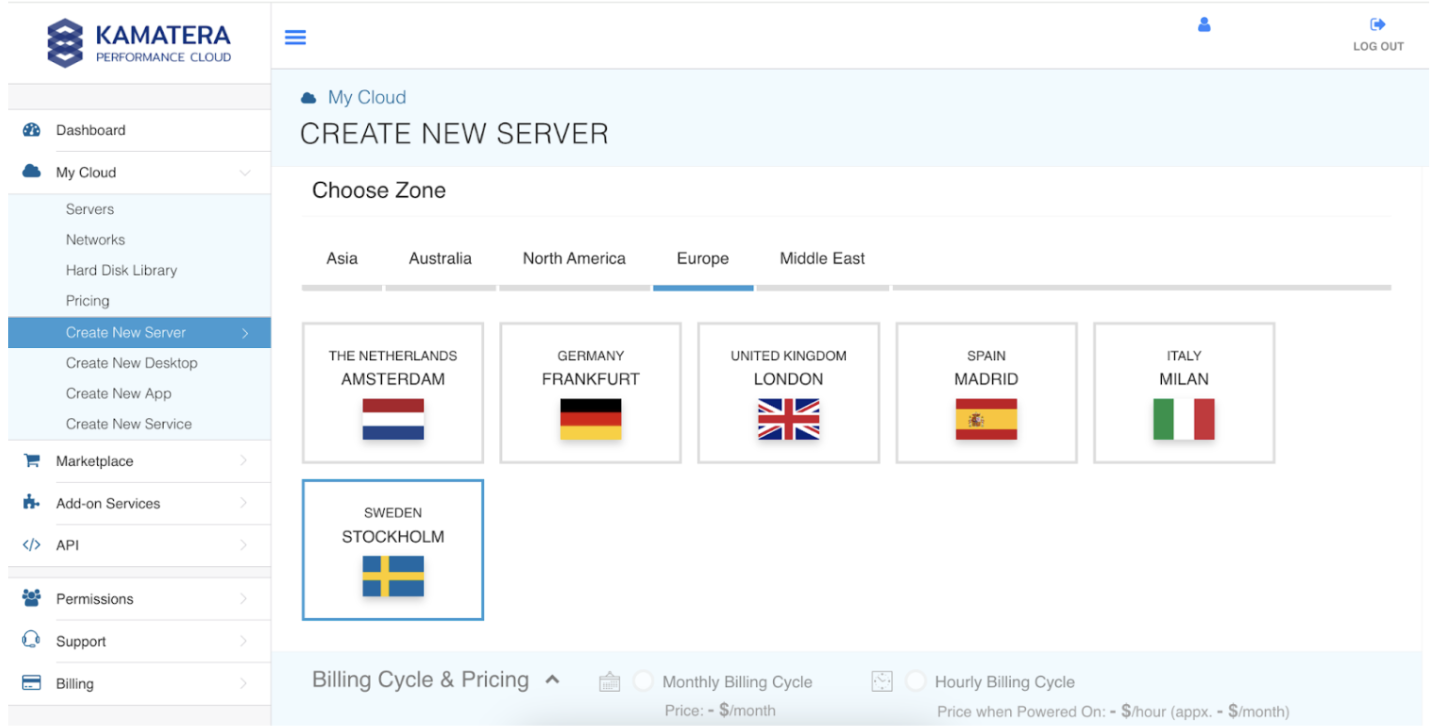
- Click Create New Server and pick a data center. I chose Stockholm.
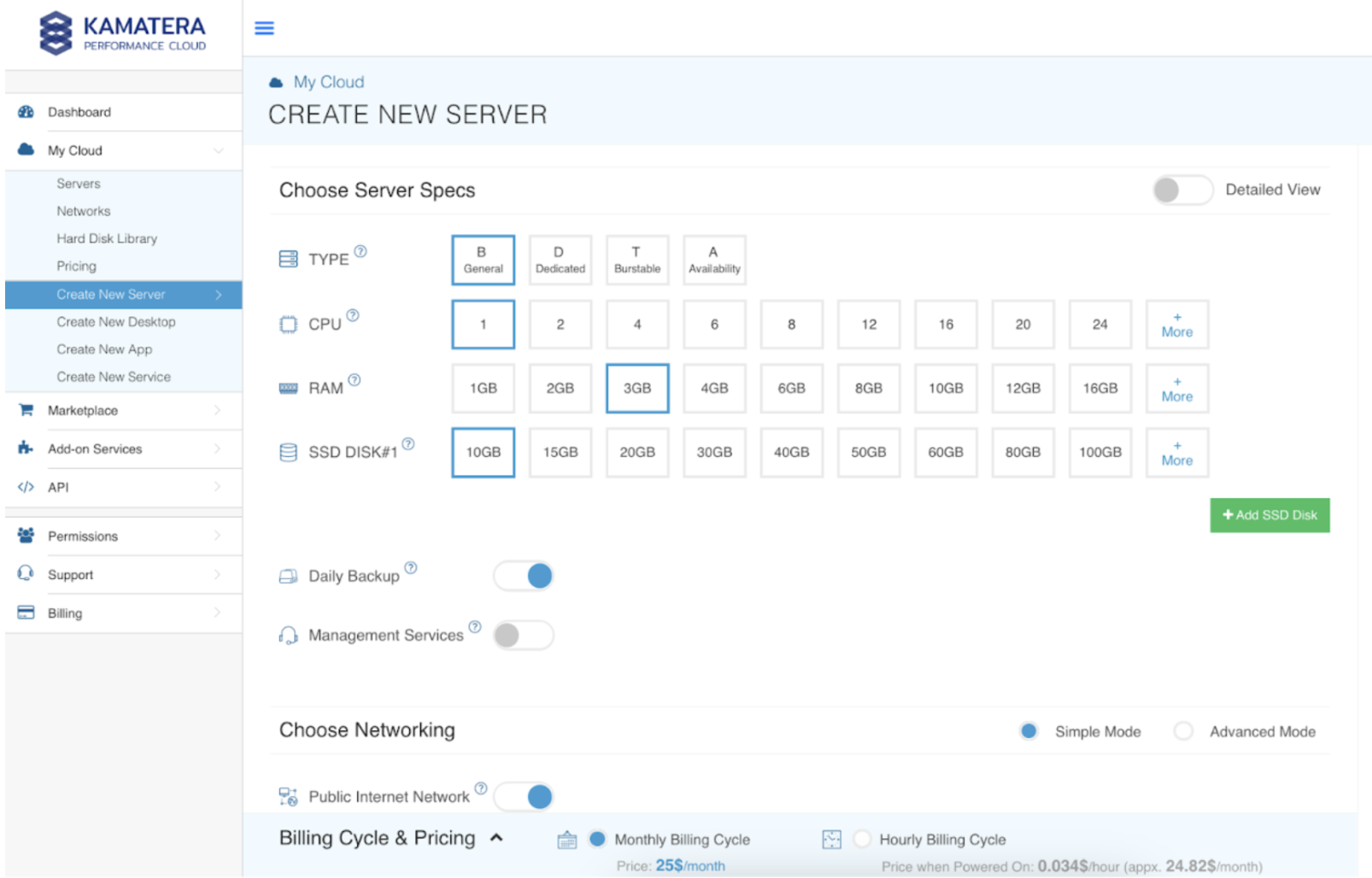
- Choose the OS and size. I picked a Linux kernel image and allocated 1 vCPU, 3 GB of RAM and 10 GB of SSD, more than enough for one small WordPress site.
- Launch, then connect over SSH and install the stack yourself. It worked smoothly and took a few minutes, but every step after "launch" was command line.
The 30-day free trial with up to $100 in credit is the right way to do a run like this. It is enough to stand up a real server and decide whether the hands-on model suits you before you pay anything.
3. Pricing, and the add-ons that aren't in the base price
The entry configuration was $4/month on 1 August 2026: 1 vCPU, 1 GB RAM, 20 GB SSD and 5,000 GB of transfer. You can scale any component independently and pay hourly, which is genuinely useful for short-lived or spiky workloads.
The number to watch is not the base price, it is the list of things that are not in it. Daily backups, a managed firewall or DDoS protection, load balancers, block storage, extra public IPs and Kamatera's managed-service option are all billed on top. A "cheap" $4 server that you actually want backed up and firewalled is not a $4 server. Budget for the real configuration, not the headline.
Current rates: kamatera.com/pricing (checked 1 August 2026).
4. Performance and data centers
Kamatera runs its own infrastructure across roughly two dozen data centers on four continents (the site markets 24 locations), including Amsterdam, London, New York, Singapore and Sydney, so you can usually put a server close to your users. In independent 2026 testing it held effectively 100% uptime against a 99.95% SLA, with average response times around 185ms. That is solid, workhorse performance rather than anything class-leading.
5. Who Kamatera is for, and who should skip it
Kamatera is a good fit for developers, agencies and technical teams who want to size a server exactly, scale it on demand and pay only for what they use, without hyperscaler pricing or contracts. If you are comfortable at a command line and want to run custom apps, VPN servers or staging environments, it earns its place.
Skip it if you want to log in and have a WordPress site that updates, backs up and secures itself. Kamatera will not do that for you, and wiring it up by hand is a poor use of your time when server administration is not your job. For that, a managed host such as Cloudways (which runs on top of providers like Kamatera and adds the management layer) or a standard cPanel host will cost more and save you far more.
Related comparisons: See how Kamatera stacks up against the competition:
- Best Cloud & VPS Hosting: DigitalOcean vs Vultr vs Cloudways vs Kamatera vs Hostwinds
- Kamatera vs Cloudways vs Hostwinds: Best Cloud Hosting for Value?
Or browse all comparisons & best-of guides.
Ready to try Kamatera?
Visit the official website to see the latest plans, pricing, and special offers.
Get Started - Kamatera* Affiliate link - we may earn a commission at no extra cost to you.