Mailbutler Review: Apple Mail Tracking, the Maia AI and the Smart-Tier Paywall
Mailbutler review: plans from $4 to $32 per user, the Maia AI paywall, Apple Mail and iPhone tracking gaps, privacy, the 5-day refund rule and alternatives.
Expert Review

Why Mailbutler is different
Most inbox add-ons pick one client and stay there. Mixmax and Mailmeteor live in Gmail, Mailtrack is a Chrome extension, Boomerang started in Gmail and spread to Outlook. Mailbutler started in 2015 as a plug-in for Apple Mail, built by two founders in Berlin, and Apple Mail is still the thing it does that almost nobody else does. Today the same subscription covers Apple Mail (installed from the Mac App Store, macOS Ventura 13 through the current release), Gmail in Chrome, Safari or Edge, and Outlook, where the new Outlook is fully supported and classic Outlook works with limitations.
The product has also changed shape this year. Smart Follow-ups arrived on March 20, 2026, rule-based Automations on June 17, and on October 15 Mailbutler shipped Smart Automations "powered by Maia", its GPT-4o assistant. The old pitch was "see who opened your email". The new one is an AI that drafts, summarizes, finds tasks and nags you about replies.
That raises the real question for this review: is the AI tier worth $11 to $14 per user per month when a free tracker covers the basics?
Pricing and what each plan adds
Four plans, all priced per user per month, checked on the pricing page on November 1, 2026 (last modified October 29). Billing is available in USD or EUR, and prices exclude VAT.

| Plan | Monthly billing | Yearly billing | Real yearly saving |
|---|---|---|---|
| Starter | $5 (EUR 4) | $4 (EUR 3) | 20% |
| Professional | $9 (EUR 8) | $7 (EUR 6) | 22% |
| Smart | $14 (EUR 12) | $11 (EUR 9) | 21% |
| Business | $32 (EUR 28) | $24 (EUR 21) | 25% |
The page advertises "up to 25% off" for yearly billing. Only Business gets there; on the three plans most people buy, the saving is 20 to 22%.
Starter gives first-open and first-click tracking, desktop and mobile notifications, and the signature builder with custom HTML and team sharing. Professional adds templates, mail merge from Apple, Google or Outlook contacts, HubSpot, Salesforce or a CSV, plus email assignments, notes, tasks, tags and the rule-based Automations. Smart is where engagement data, device and location details, per-recipient tracking and all the AI writing features begin. Business adds a custom tracking subdomain, IP blacklisting, CRM sync and BCC-to-CRM, Smart Automations, Smart Task Finder, Smart Summarize, UTM personalization and dynamic content.
One thing Mailbutler's own site cannot agree on: whether Starter is free. The pricing page's meta description promises "a free-forever Starter plan", and Mailbutler's Mailtrack comparison page repeats it, yet the Starter card on the same pricing page shows $5 monthly or $4 yearly. Treat Starter as paid until signup tells you otherwise.
The trial is the friendly part. It runs 14 days, includes every feature, AI included, and asks for no card. Seats can be added to a plan, bought on a different plan, or assigned to a whole company domain, and no seat minimum is stated. At yearly prices a 10-person team on Smart pays $1,320 a year; the same team on Business pays $2,880.
Maia, the AI assistant
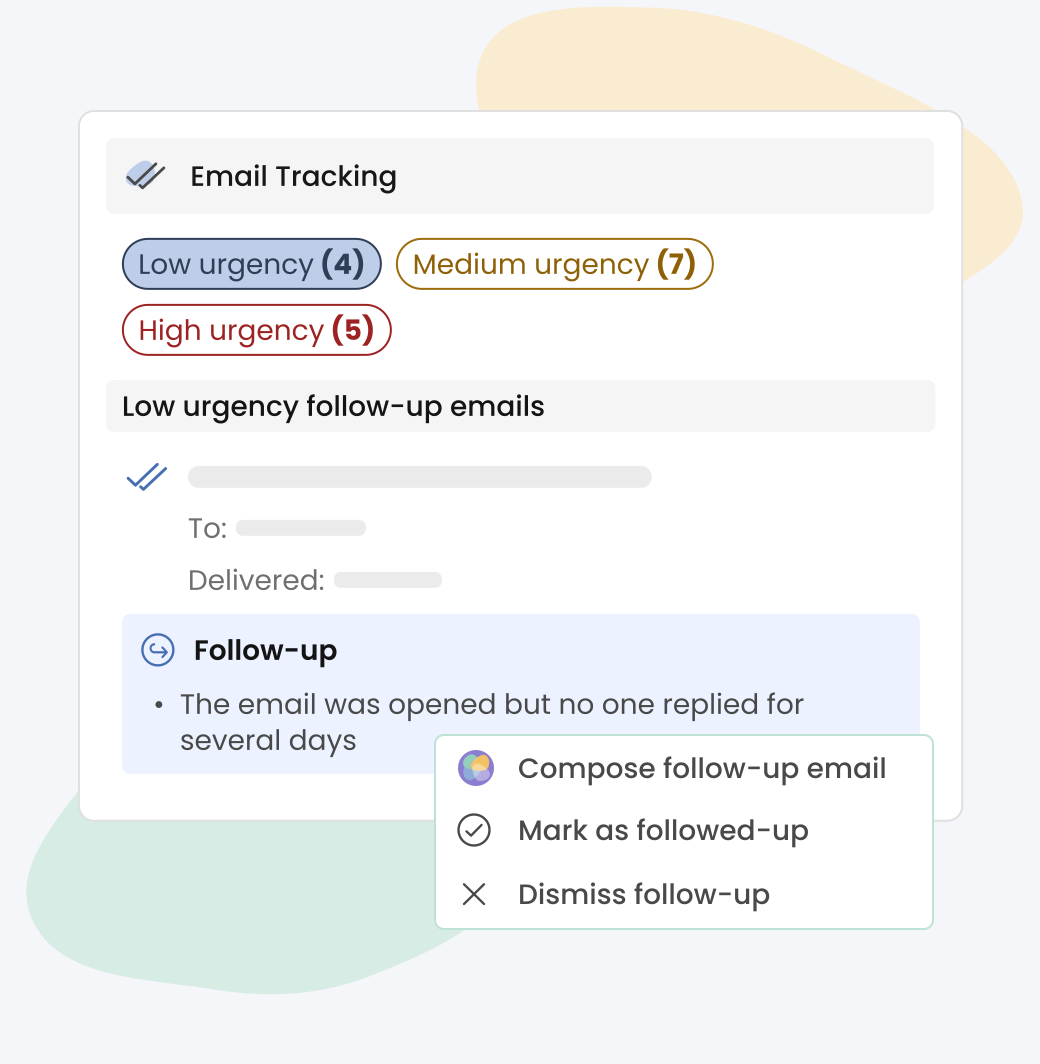
The Smart Assistant, called Maia in the help center, runs on OpenAI's GPT-4o and works in all three clients. Its menu is a fixed set of actions rather than an open chat: Compose, Improve, Fix spelling, Fix grammar, Extract to-dos, Summarize, and four reply modes (positively, neutrally, negatively, with details). Smart Follow-ups ranks threads that need a nudge by urgency - High, Medium, Low - and Smart Timing suggests when to send.
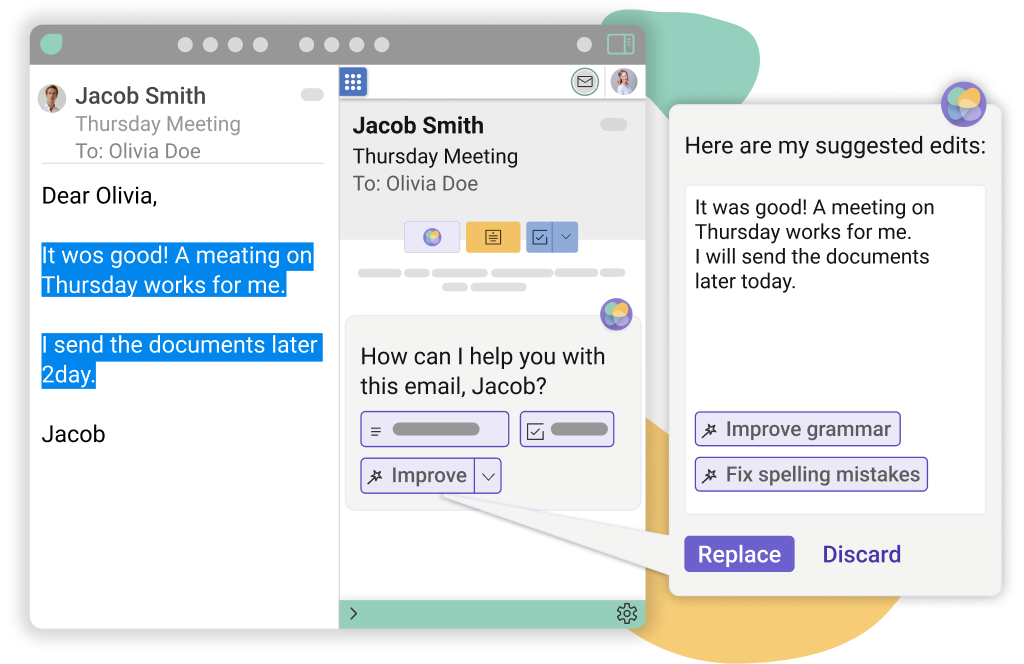
The catch is spelled out on the Smart Assistant page: you can try the AI during the trial, and "after that, you'll have to be on either our Smart or Business plan". So the jump from Professional to Smart is $4 a month per user on yearly billing for the AI writer and the richer tracking data. Smart Automations, Task Finder and Summarize sit one tier further up, on Business at $24.
What Mailbutler does not publish is any usage cap. There is no credit count or monthly request limit for Maia on any plan, and no numeric limit on tracked emails, templates or notes either. Generous if it holds, but unwritten. Smart Automations do let you set a minimum confidence per automation, which is the right control for an AI that files or acts on mail by itself.
Where tracking breaks down
Mailbutler tracks opens the usual way, with a hidden 1-pixel image carrying a unique mail ID, and tracks clicks by redirecting links through mlbtlr.com. Both are on by default, and self-tracking prevention stops your own opens from counting. The limits are where the trial earns its keep.
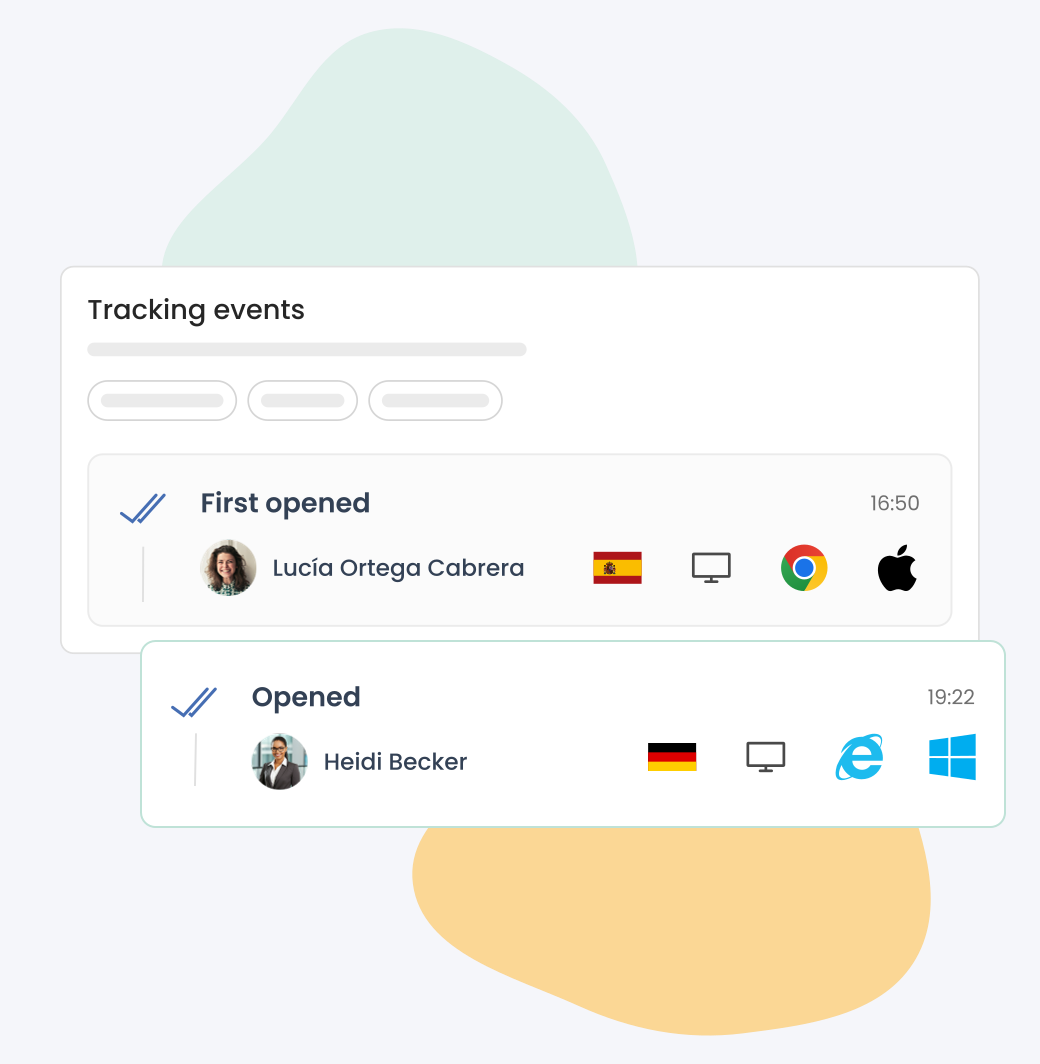
Apple's Mail Privacy Protection preloads images, so for recipients who use it, device and location details may not show, and the Business-tier IP blacklisting cannot block Gmail or MPP opens at all. In Outlook, a link only gets tracked if you insert it through the Mailbutler sidebar; paste it straight into the message and the click goes unrecorded. On iPhone and iPad, tracking works by sending your mail through Mailbutler's own SMTP server, and the help center lists support only for GMX, web.de and T-Online accounts - Gmail, Microsoft, iCloud and Yahoo "may be limited".
Send Later runs server-side, so a scheduled email goes out even with your Mac off. The help center warns, though, that scheduling more than 100 emails "may result in failed delivery". There is also a troubleshooting article for Mailbutler disappearing every time you restart your Mac, updated in September 2026. These are not edge cases. They match the most common complaint on Trustpilot, where Mailbutler scores 2.8 out of 5 from 249 reviews (checked November 1, 2026): "Email tracking is unreliable and, contrary to their claims, it does not track emails sent from my Apple account", one user wrote in April 2026.
Privacy: what leaves your inbox
The marketing and the legal pages tell slightly different stories. The Smart Assistant page says Mailbutler will "never share your data with third parties" because its servers are in the EU. The privacy policy is more precise: when you use an AI feature, the body and subject of the selected email may be sent to Microsoft's Azure OpenAI Service in the EU region. The GDPR page says personal data is redacted before it reaches the model, lists AWS for hosting without naming a region, and notes that some subprocessors sit outside the EU, including in the US, under standard contractual clauses. Anthropic appears on the subprocessor list, but only for Mailbutler's internal AI assistance, not customer mail.
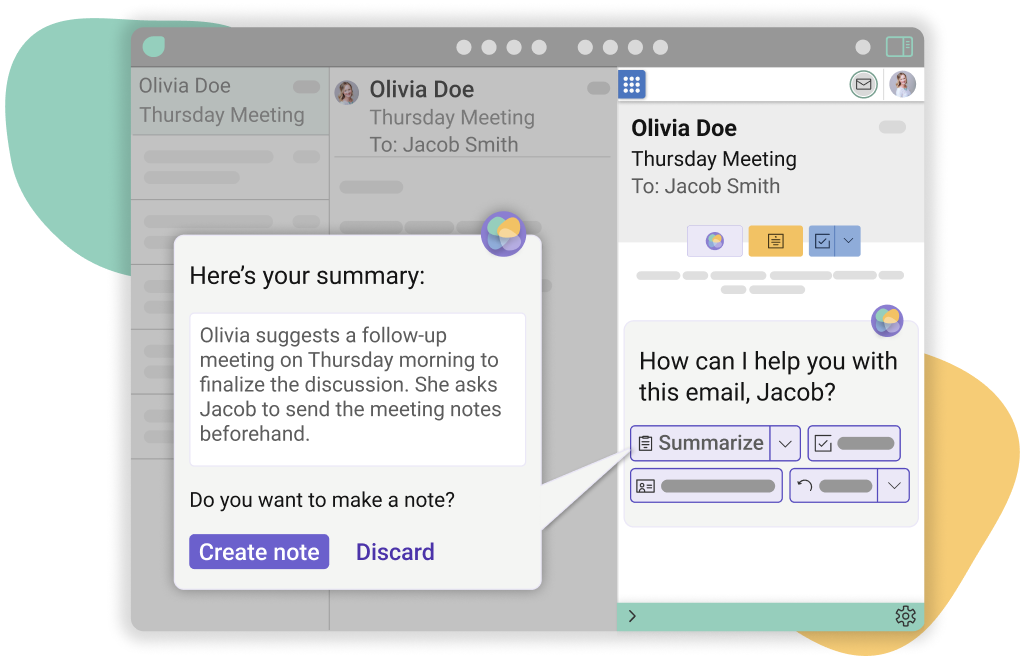
For Gmail, Mailbutler says it stores only message identifiers and never reads or stores message content on its own servers, and Google Workspace data is not used to train general AI models. No equivalent no-training statement covers Apple Mail or Outlook content sent to the AI. Mailbutler states compliance with EU and UK GDPR, offers a DPA, and links an ISO/IEC 27001:2022 certificate in its footer. For a law firm, the email-body-to-Azure clause is the line to read twice.
Refunds, cancellation and leaving
The terms say all fees are non-refundable, with one exception: a prorated refund if you ask within 5 days of subscribing or of any renewal. After that, refunds are only for unresolved technical problems, and Mailbutler may offer one or two free months instead. Cancel and the plan runs to the end of the cycle with no refund for the unused part. On a yearly plan that 5-day window matters, and Trustpilot has the predictable story: a user who forgot to cancel an annual renewal, asked a month later, and was refused.
Leaving is thin too. The only documented export is a CSV of tracking events. Notes, tasks, templates and contacts have no export path in the help center, and deleting the account erases everything permanently. If you build your team's template library in Mailbutler, copy it out by hand before you go.
Mailbutler vs Mailtrack, Boomerang and Mixmax
Mailbutler's own comparison pages give the competitor numbers. Mailtrack has a free plan with unlimited tracked emails and paid plans from EUR 2.99 per user, but no signatures and no Apple Mail. Boomerang's free plan gives 10 message credits a month and paid plans start at $4.98 per user billed yearly. If you are Gmail-only and want sequences rather than one-off follow-ups, our Mixmax review covers a deeper sales tool, and the Mailmeteor review covers cheaper Gmail mail merge. None of them runs inside Apple Mail.
Verdict: who should buy Mailbutler, and who should skip it
Buy Mailbutler if you live in Apple Mail, or a team mixes Apple Mail with Outlook and Gmail, and you want tracking, templates, signatures, notes and an AI writer in one add-on. Professional at $7 per user yearly is the honest value pick; Smart at $11 is worth it only if you will use Maia daily, since that is the whole difference.
Skip it if you are Gmail-only and just want to know who opened your email - Mailtrack's free plan does that, and Mixmax does sequences better. Skip it too if you send mostly from an iPhone with a Gmail or iCloud account, because that is exactly where tracking is officially limited. Whatever you choose, use the full 14-day trial before paying, and put the renewal date in your calendar: you get five days to change your mind.
Ready to try Mailbutler?
Visit the official website to see the latest plans, pricing, and special offers.
Get Started - Mailbutler* Affiliate link - we may earn a commission at no extra cost to you.