OnePageCRM Review: The Follow-Up CRM, Its New Max Plan and the Catches
OnePageCRM review: the Next Action method, $9.95-$29.95 per-user plans, the new Max tier, MCP for Claude and ChatGPT, US hosting and an export that skips emails.
Expert Review

The idea: every contact owes you one next step
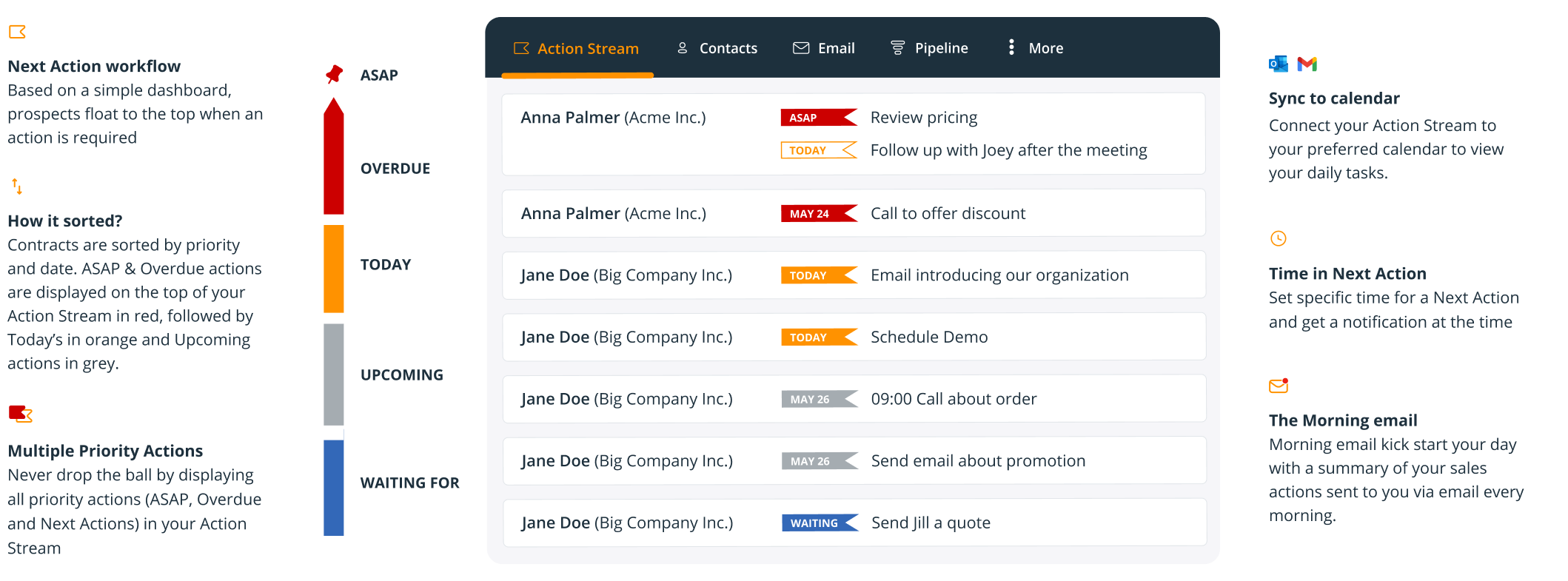
Most CRMs start with a pipeline and hang tasks off deals. OnePageCRM starts the other way round. Every contact carries exactly one Next Action - "call back about the quote", "send the contract" - with a date, and the home screen, the Action Stream, is simply your contacts sorted by when that action is due. The company calls it "the first action-focused CRM" and credits the idea to David Allen's Getting Things Done.
The ordering is fixed and colour-coded: ASAP and Overdue in red, Today in orange, future dates in grey, "Waiting for" in blue, queued actions in a dashed outline. Finish an action, set the next one, and the contact drops down the list. On the due date it climbs back to the top. That loop is the whole product. If your team loses deals because someone forgot to ring back on a Thursday, it fixes exactly that. If your problem is forecasting or territory planning, it barely touches it.
A method this opinionated asks you to work its way. "It takes time to get used to it" recurs in reviews on G2 and Capterra, and the learning curve is steepest for people arriving from a deal-first CRM such as Pipedrive, where the board is home. Here a Kanban pipeline exists on every plan, but it is the second screen, not the first.
Pricing, and what changed in 2026
Checked on the pricing page in November 2026, in USD per user per month, excluding VAT (EU buyers pay their country's rate unless they give a VAT number). Checkout also takes EUR and GBP.
| Plan | Billed annually | Billed monthly | Pipelines | Autoflows | Web forms |
|---|---|---|---|---|---|
| Professional | $9.95 | $15 | 1 | 15 | 5 |
| Business | $19.95 | $29 | 10 | 30 | 20 |
| Max | $29.95 | $45 | Unlimited | Unlimited | Unlimited |
The prices themselves have not moved since at least February 2025. The packaging has. A third tier, Max, arrived on 5 March 2026, and Business got thinner around it: it advertised unlimited web forms in February 2025 and unlimited automations as late as February 2026, and now stops at 20 forms and 30 Autoflows. The one change in the buyer's favour is that the old seat caps - 20 users on Professional, 100 on Business - are gone.
The annual discount is sold as "4 months free", and the arithmetic agrees: about 34% off on Professional and Max, 31% on Business. A five-person team on Business pays $1,197 a year upfront against $1,740 paying month to month. You can change billing interval only once, though, and refunds are narrow. Nothing comes back for unused months, except an unwanted annual renewal, which is refunded in full if you ask within 7 days of the charge. Prices can change on 30 days' notice.
There is no free plan. The trial runs 21 days with every feature and no card; when it ends, the account goes limited-access and only the Account Owner can log in. Add-ons are not a hidden cost - Web Forms, Lead Clipper and Quick Quotes are free - and contacts, deals, fields and tags are unlimited on every tier. Storage is 10, 20 or 30 GB per user, pooled across the team, with a 10 MB cap per attachment.

Email and Autoflows: where Professional falls short
The pricing page says "Every plan includes full email sync, automation, and AI". Its own comparison table, further down the same page, marks IMAP/SMTP sync as not included on Professional. Two-way sync, open tracking and scheduled sending start at Business. Professional still connects one mailbox and can log mail by Bcc, but pulls in no email history; Business retrieves two years of it and Max ten.
Sending caps are 250, 450 and 1,000 emails a day by plan, on a rolling 24-hour window, and they count every email sent from the CRM. If your mail provider's own limit is lower, that one wins. Email sequences and a second connected mailbox are Max-only, so anyone doing real outbound is shopping at $29.95 a seat, not $9.95.
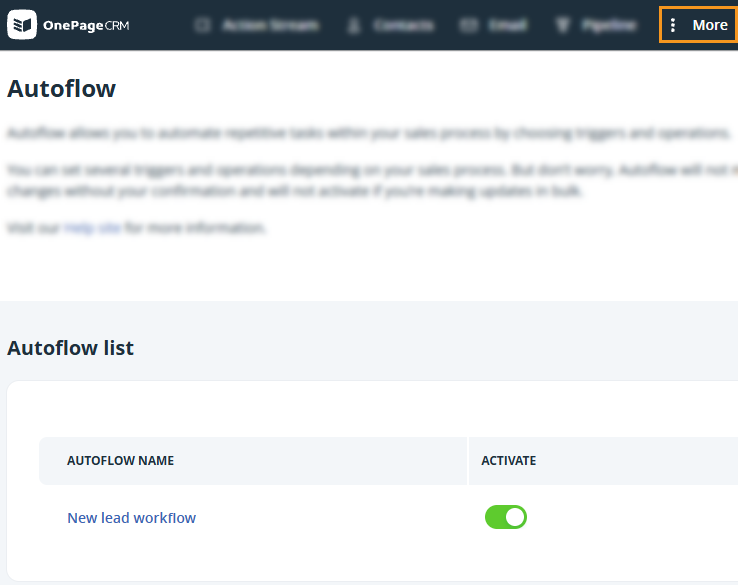
Automation needs the same reality check. Autoflows "always require your confirmation" and do not run during bulk updates, and each trigger can sit in only one Autoflow. They set up the next step for you to approve. They are not workflows that run while you sleep, which is the same gap reviewers describe when they ask for "stronger automated workflows".
Calling follows the same pattern. Click-to-call and a speed dialer are there, but the phone line comes from Aircall, RingCentral, CloudTalk or Talkdesk. There is no built-in VoIP.
AI: bring your own Claude or ChatGPT
OnePageCRM has not built its own AI email writer. Its bet, since 15 June 2026, is an MCP connector: link the CRM to Claude, ChatGPT, Claude Code, Codex or Mistral Vibe, and the assistant can read and write contacts, companies, deals, actions, notes, calls and meetings. An October update added search and filtering. It is on every plan, so "use the AI you already pay for" is literal - drafting costs nothing extra if you already pay for ChatGPT or Claude, and gets you nothing if you don't. Focused users, the restricted seat type on Business and Max, are locked out of it.

Write access is the part to think about before switching it on. An assistant that can create deals and reschedule actions can also create wrong ones across a whole pipeline in one prompt. Start with one user and mostly read-only requests. On training, the terms are clear: customer content is not used to train or improve general AI models.
The built-in AI is smaller. TL;DR summarises a contact's history, is still labelled beta with a warning that summaries "may contain inaccuracies", and stays blank until a contact has at least 5 emails, 5 notes or 10 completed actions. For field sales, the AI business card scanner (100, 500 or 1,000 scans a month) and route planner (10, 15 or 20 stops) earn their keep, and both mobile apps are free with any plan.

Where your data lives, and how you get it out
OnePageCRM is an Irish company - Novus Via Limited, registered in Galway - but your CRM data does not live in Ireland. Its help centre says the service runs on AWS servers in the US, with personal data transferred under Standard Contractual Clauses. Only attachments can be stored in a data centre of your choice. If a client contract or your data protection officer requires EU residency for customer records, that rules it out.
Leaving is possible but lossy. Contacts export to CSV or Excel, with notes and calls if you pick that option, and deals export with amounts, stages and custom fields. But "emails and attachments stored in the CRM cannot be exported". A team that has run its email through OnePageCRM for three years walks out with the contact list and the notes, and leaves the correspondence behind unless it also sits in Gmail or Outlook. Arriving has its own gap: reviewers report that relationships between records "can not be imported".
Support is identical on every tier: chat, phone and email on weekdays from 9am to 8pm Irish time (4am to 3pm ET), email only at weekends. No response time is published. Deleted contacts can be restored for 1, 30 or 60 days depending on plan, and a downgraded or expired account's data is deleted after 12 months.
What users say
The vendor shows "4.7 (265+ reviews)" without naming the site. G2 sits at around 4.7 from roughly 260 reviews and Capterra near 4.8 from about 100 - figures read from search listings, because both sites blocked direct access. Trustpilot has no reviews at all. The complaints that recur are specific: "the email system lacks the functionality I need", "the search feature is not the greatest", filtering "isn't always simple", and permissions too coarse for bigger teams. That last one is partly a plan issue, since user roles and groups are Business and Max only.
Verdict
Buy OnePageCRM if you are a founder or a sales team of roughly one to fifteen people whose main failure is the follow-up nobody made. Business at $19.95 a seat on annual billing is the plan to pick: it has the email sync Professional lacks, 10 pipelines and enough Autoflows for a small team, with nothing to add on top. The MCP connector is a real reason to choose it now if your team already works in Claude or ChatGPT.
Skip it if you need EU-hosted customer data, automation that runs without a click, built-in calling or a free tier. For one flat price and less method, Less Annoying CRM charges $15 a seat for everything. For a deal-first board with heavier automation, Pipedrive fits better, and if you want to start at $0, HubSpot and Zoho CRM both have free plans. Our CRM software roundup compares the rest.
Ready to try OnePageCRM?
Visit the official website to see the latest plans, pricing, and special offers.
Get Started - OnePageCRM* Affiliate link - we may earn a commission at no extra cost to you.