Opus Clip Review: Turn Long Videos into Viral Short Clips
Opus Clip review: ClipAnything, Virality Score, auto-reframe, animated captions, AI B-roll, and pricing — the AI tool that turns long videos into viral shorts.
Expert Review
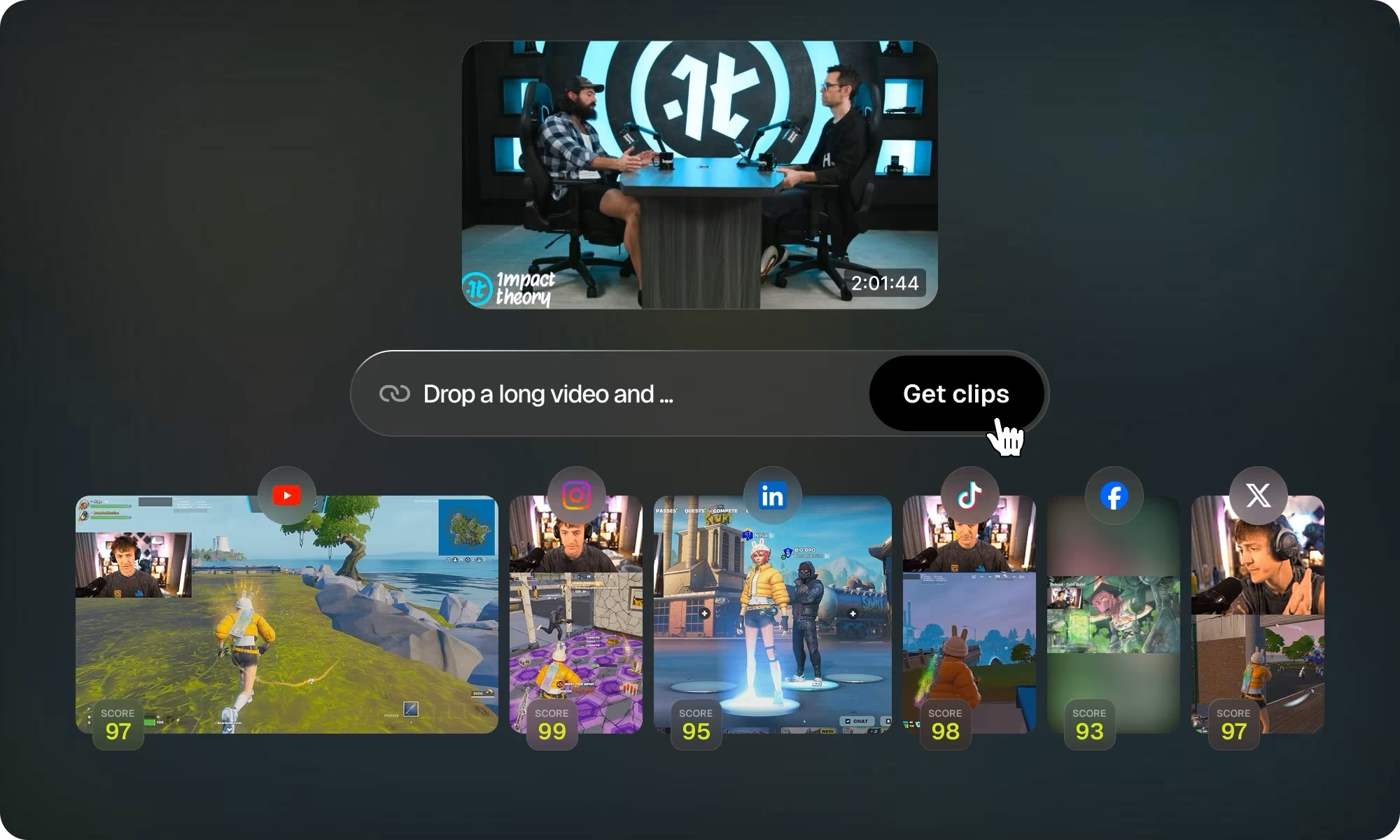
What is Opus Clip?
Opus Clip is an AI-powered short-video repurposing tool that automatically turns long-form videos — podcasts, interviews, webinars, livestreams, and YouTube uploads — into multiple ready-to-post vertical clips. Its engine analyzes the visuals, audio, and sentiment of a source video to find the most engaging moments, then reframes, captions, and scores them for viral potential.
It is built for content creators, podcasters, YouTubers, social media marketers, and agencies who want to scale short-form output for TikTok, Reels, and Shorts without manual editing. The company reports more than 10 million users, making it one of the most widely adopted tools in this category.
Benefits of Using Opus Clip
Opus Clip's value is turning one long recording into a batch of finished, publishable shorts:
- Massive time savings: One long video becomes 10+ finished shorts in roughly one click, replacing hours of manual editing.
- Data-driven selection: Each clip gets a Virality Score, so you can prioritize the highest-potential cuts instead of guessing.
- Platform-ready output: Clips are auto-reframed to vertical and captioned, so they are publishable immediately.
- Works on any genre: Not just podcasts — it handles vlogs, gaming, sports, interviews, and explainers.
- Low barrier to entry: A genuine free tier (60 minutes per month, no credit card) lets creators test the full pipeline.
- Multilingual reach: Captions and processing across 25+ languages expand a creator's addressable audience.

AI Features of Opus Clip
-
ClipAnything
The core AI clipping model turns any genre of video into viral clips in one click by understanding visual objects, sound, emotion, and context — not just the spoken words. It is what lets Opus Clip work on gaming or sports footage, not only talking-head podcasts.

-
Virality Score
Each generated clip receives a 0–100 score based on training from millions of viral videos, ranking clips by hook strength, emotional flow, perceived value, and trend alignment. It is a useful triage tool for deciding what to post first.
-
ReframeAnything (Auto Reframe)
AI object-tracking resizes 16:9 video to 9:16 or 1:1 and keeps moving subjects centered, with optional manual tracking for precision — so clips look native on mobile without hand-keyframing crops.

-
Animated Captions & Auto Emojis
Auto-generated captions with a claimed 97%+ accuracy are animated and fully editable, and the AI automatically adds emoji and keyword highlights across 20+ languages — essential when most social video is watched on mute.

-
AI B-Roll & Hook Titles
Generative B-roll inserts contextually relevant footage to fill visual gaps, while Auto Hook generates an attention-grabbing opening line for each clip designed to stop the scroll. B-roll is primarily a Pro-tier feature.

-
Brand Templates
Reusable branded templates with custom fonts, colors, logos, and intro/outro elements keep a whole batch of clips visually consistent — important for agencies managing multiple accounts.

-
Social Scheduler & Team Workspace
On the Pro tier you can schedule and auto-post clips to TikTok, YouTube Shorts, and Instagram Reels, and collaborate with teammates in a shared workspace — plus API access to automate video workflows.

Pricing of Opus Clip
Opus Clip charges by processing minutes, where 1 processing minute equals 1 minute of source video uploaded — so your spend is based on input length, not the number of clips produced. Annual billing is not shown on the public pricing page (it appears inside the account panel) and is reported to be significantly cheaper per minute:
- Free (Free Forever): $0 — 60 minutes/month, clipping by spoken words only, up to 1080p, watermarked, with exports that expire after 3 days.
- Starter: $15/month — 150 minutes/month, watermark-free, full AI clipping (visual objects, sound, emotion, genre), virality scores, text and timeline editing, filler-word removal, and basic social posting. No scheduler, team workspace, 16:9, or meaningful AI B-roll.
- Pro: $29/month (roughly half that per month billed annually) — 300 minutes/month plus everything in Starter, all aspect ratios including 16:9, the social scheduler and auto-post, team workspace, AI B-roll, bulk export, and XML export to Premiere and DaVinci.
- Business: custom pricing — enterprise collaboration and higher volumes, quoted by sales.
The main thing to watch: because credits are consumed by input length, a single long upload can burn your whole monthly quota even if only a few clips are usable.
Full, up-to-date details at: https://www.opus.pro/pricing
Real-World Use Case Analysis
-
Podcasters
Weeks of promo from one episode: Upload a 60-minute interview and Opus Clip extracts the 10–15 most quotable moments, ranks them by Virality Score, reframes them to vertical, and captions them.
Consistency: One recording becomes a steady stream of TikTok, Reels, and Shorts content without hiring an editor.
Triage: The Virality Score helps a solo podcaster decide which clips are worth posting first.

-
YouTubers
Feed the algorithm: Long-form YouTubers repurpose uploads into Shorts to drive discovery back to the main channel.
No extra filming: Every long video becomes several shorts, multiplying output from content that already exists.
Review still matters: Independent testing has found a meaningful share of auto-generated clips get discarded, so a quick human pass is still worth it.
-
Social Media Marketers & Agencies
Client consistency: Brand templates keep each client's clips on-brand, and the team workspace supports collaboration.
Scale: The Pro social scheduler lets agencies batch-produce and auto-post branded shorts across multiple accounts.
Volume play: For high-frequency posting, the automation is a clear win over manual clipping.
Pros and Cons of Opus Clip
-
Advantages of Using Opus Clip
Opus Clip offers significant benefits including:
- An extremely fast, near one-click workflow that produces a large volume of platform-ready clips from a single upload.
- Virality Score plus strong auto-captions and auto-reframe that reduce both editing time and guesswork.
- A genuinely usable free tier and broad multi-language support that lower the barrier for new creators.
-
Disadvantages of Using Opus Clip
Some potential drawbacks include:
- Credits are consumed by input length rather than output, so one long upload can spend your whole quota, and the best features are locked behind the $29 Pro tier.
- AI clip selection is not perfect — a notable share of auto-generated clips get discarded, so human review is still required, and the free tier watermarks and auto-deletes exports.
Final Thoughts on Opus Clip
Opus Clip is one of the most polished and widely used tools for turning long videos into short-form content, and its ClipAnything model and Virality Score genuinely cut down editing time and guesswork. It will not eliminate the need for a human review pass, and the per-minute credit model rewards careful uploads, but for podcasters, YouTubers, and social teams who publish long-form video, it is a fast and effective way to keep a short-form pipeline full. The free 60-minute tier makes it easy to test on a real episode before upgrading to Pro.