薰衣草评论:对每份草稿进行评分的冷电子邮件教练,以及它从您的收件箱中保留的内容
Lavender 评论,2026 年 11 月 3 日查看:AI 电子邮件教练如何评分草稿、实际定价(0 至 99 美元/席位)、隐私页面矛盾、Ora 的 500 美元代理,以及谁应该跳过它。
专家评测

Two privacy pages, two answers
Lavender's pitch is simple. Install a browser extension, write a cold email in Gmail or Outlook, and a score tells you whether anyone is likely to reply. Before trusting the score, read what Lavender says it does with the email, because its own pages give two different answers. I checked all of them on November 3, 2026.
The page at lavender.ai/privacy is blunt: "We don't store your emails. As soon as Lavender is finished analyzing and helping you with your email, it is immediately deleted." The Terms of Service agree that "Lavender does not retain copies of your emails".
The undated privacy policy at lavender.ai/privacy-policy says something else. Lavender collects "copies of your correspondences while you use the Services, including, as consented to, historic correspondences", "may store up to two years of email correspondence for historical analysis and insights", and lists "de-identified training of our machine learning and artificial intelligence models" among the uses. Data pulled through Google's APIs is carved out of that training.
Lavender's Security Q&A sides with the policy, not the marketing page. "We can use the data to train the AI models; our TOS has provisions for this," it says. The data is de-identified and scrubbed of PII first, humans can read the de-identified copy, and users can opt out. What is stored stays "until the account is completely purged" through a data request or the delete button in the dashboard, and backups roll for 30 days. No page says cancelling deletes anything. If you leave, delete your data yourself under Settings, Account.
The likely reading: the draft you are writing is analyzed and discarded, while the inbox history you connect for insights is kept. The guarding is solid on paper - SOC 2 Type II since November 2023, AI hosted on AWS, TLS in transit and AES at rest. That covers how the data is protected, not how long it lives. A team that discusses contracts over email should get the retention answer in writing before connecting an inbox.
What the coach does while you type
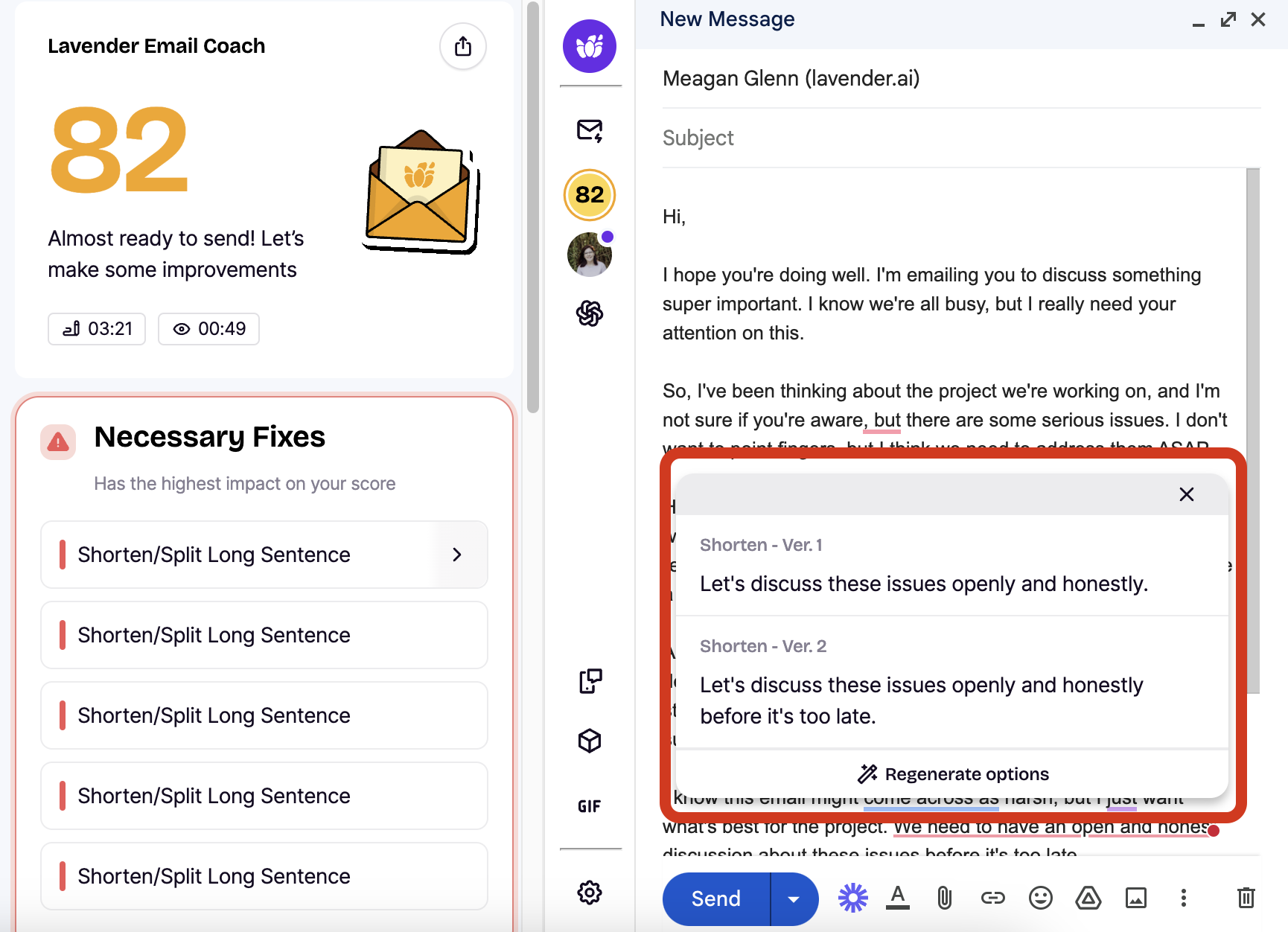
Lavender sits inside the compose window and grades the draft as you write. In Gmail it docks on the left since the 3.0 redesign; in Outlook it stays on the right. Lavender says emails scoring 90 or above get more replies. Below 90, "Necessary Fixes" appear at the top of the panel, and a long sentence comes with two or three rewrites to pick from.
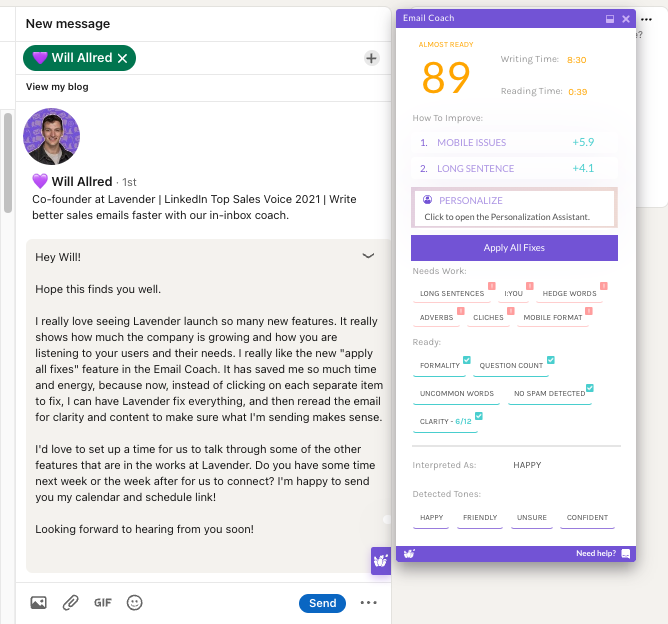
Around the score sit the tools that make it more than a grammar checker. The Personalization Assistant pulls prospect context from news, events, job history, podcasts and LinkedIn and X feeds, so an opening line can mention something real. "Start My Email" goes from an icebreaker to a full AI draft. Frameworks hand you a structure to fill. Teams that record calls can feed in Gong data. The same coach works in LinkedIn direct messages and, from Gmail, in Google Docs.
Which model writes the suggestions? Lavender names "Open AI systems" plus "self-hosted fine-tuned large language models" and stops there - no model, no version. Expect the advice to shift without notice when the model underneath does.
The evidence that the score matters is Lavender's own. Across 231,818 emails, A-graded emails got a 4.3% reply rate against 3.4%, a 27% relative lift, according to the vendor benchmark cited by Woodpecker. Customer figures such as Sendoso's "580%" reply-rate increase are Lavender's claims too, not independent tests.
It is a layer, not a sending tool. The coach does not find or verify contacts, run sequences or manage replies, so it sits on top of Gmail, Outlook, Outreach, Salesloft, Apollo or HubSpot rather than replacing any of them. The troubleshooting docs cover Chrome and Edge only; Firefox and Safari users are out. Outlook desktop works through an add-in, which Microsoft 365 Business Basic does not allow - you need Business Standard or above.
Pricing, and a free tier of five emails
Prices below are from lavender.ai/coach, checked on November 3, 2026. The old lavender.ai/pricing address now returns a 404.
| Plan | Monthly | Billed annually | What it adds |
|---|---|---|---|
| Basic | $0 | $0 | 5 email analyses and 5 personalizations a month, Gmail and Outlook 365 |
| Starter | $29/mo | $27/mo | Unlimited emails and personalization, multi-inbox, chat support - Gmail and Outlook only |
| Individual Pro | $49/mo | $45/mo | Integrations such as Outreach and Salesloft, priority support, a dedicated CSM |
| Team (2+ seats) | $99/seat | $89/seat | Coaching dashboard, aggregated analytics, human-led coaching programs |
Five analyses a month is a demo, not a plan, and Lavender's help article admits Basic is "our least popular plan due to feature limitations". The real test is the 7-day trial with everything switched on. It needs no card, and when it ends the account drops to the free plan instead of billing you.
The annual discount is thin: about 7% on Starter, 8% on Pro and 10% on Team, not the 20% some third-party reviews repeat. Ten Team seats cost $990 a month on monthly billing or $890 a month on an annual contract. Cancel at least 48 hours before renewal or the next cycle is charged, and refunds are "at the discretion of the lavender team" and never pro-rated. Monthly is the safer first purchase.
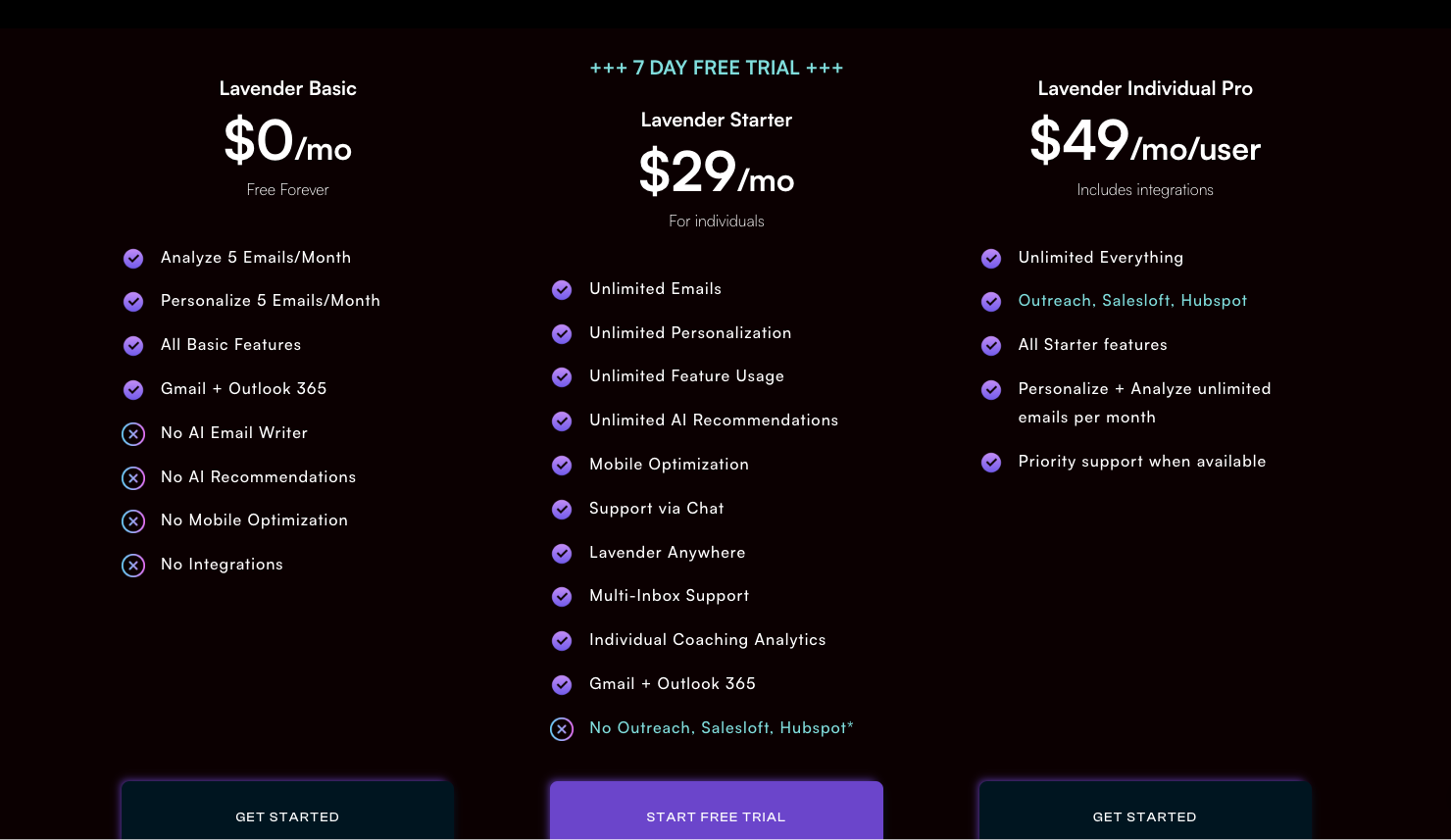
Lavender's pages disagree on price, too. An older pricing article, re-dated February 19, 2026 when the help centre moved to the blog, still lists Starter at $319 a year, Pro at $539 a year and Teams "Starting at $8,500". The HubSpot help page says that integration "is only available for Teams plans now", while the same pricing article sells Pro for HubSpot users. If HubSpot is why you would buy Pro, get confirmation from support first.
Some people pay nothing. Job seekers get free access ("no catch"), students qualify, and bootstrapped founders get 90 days.
Ora: the $500-a-month agent that sends for you
Ora is the other half of Lavender, and it does what the coach will not: it researches, writes and sends. It is not new. Lavender was already calling it "our scalable AI-powered sales augmentation agent" in March 2025, so reviews describing a 2026 launch are wrong.
Leads arrive by CSV or from Salesforce. Ora reads your inbox to learn what works - which brings the privacy question straight back - then researches the prospect, the company and the market and runs a three-touch sequence on day 1, day 4 and day 8. After the second follow-up it pauses and hands the lead to a "listening agent". Three modes set how much rope it gets. OCD makes you approve every email. LFG schedules and sends on its own, and it is the only mode where Ora sends something you never saw. SEP fills sequence fields in your CRM instead.
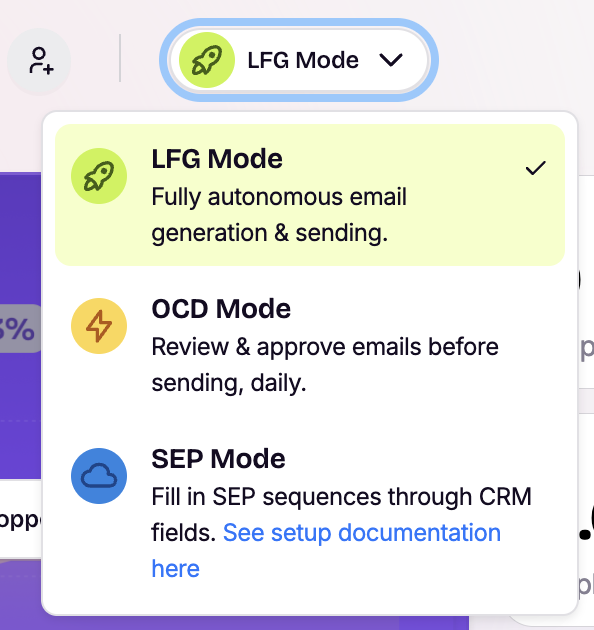
It is free to build and $500 per agent per month at launch, billed monthly with no annual commitment, for 1,000 emails a month. That works out at 50 cents an email before a single reply. A sequencer such as Instantly or lemlist sends far more for far less, but leaves the research and the writing to you. Ora only makes sense if your time per researched email costs more than half a dollar.
What users complain about
The recurring complaint is the Chrome extension itself. A G2 reviewer quoted by Woodpecker, a competitor, says "sometimes the icons are not easily clickable, disappear or don't function some of the time." The Chrome Web Store listing shows 20,000 users and 4.5 stars, but from only 36 ratings, on version 3.2.3, updated September 11, 2026. Woodpecker puts G2 at about 4.8 from 60-plus reviews.
The second complaint is quieter. Coaching plateaus. Experienced writers report the suggestions stop teaching them anything after a few weeks; one Reddit seller advised using it "as a tool, not a rule book", and another cancelled after a few months because the lessons had stuck. For a product sold on teaching, that is almost a compliment. It is also a reason not to sign an annual contract.
Visible change on the coach has slowed as well. The 3.0 redesign's screenshots date from 2024, and the headline addition since then has been Ora rather than anything inside the compose window.
Verdict: who should buy Lavender, and who should skip it
Buy Starter at $29 a month if you write cold emails by hand in Gmail or Outlook, send enough that a one-point reply-rate change is worth real money, and plan to use it for a few months to build the habits. That describes most SDRs and founder-led sales. Job seekers and early-stage founders should take the free access and stop there.
Buy Team if you manage reps. The coaching dashboard and human-led programs are the part with no cheap substitute, and they are what the per-seat price really pays for.
Skip it if you need volume: Lavender's coach sends nothing, and Instantly, Woodpecker or Saleshandy do. Skip it if you want general writing polish rather than sales coaching - Grammarly or Wordtune cover that across every app. Skip it if your security team needs one consistent retention answer, until Lavender reconciles its two privacy pages. And skip Ora unless 1,000 researched emails a month are worth $500 more to you than a sequencer plus an hour of your own research.