Right Inbox Review: Unlimited Gmail Send-Later for $7.95, but a Five-Email Free Plan
Right Inbox review: $7.95/month Professional plan checked November 2026, a 5-use free tier, Gmail-only and desktop-only limits, no refunds, and a privacy label that contradicts its policy.
Expert Review

Why Right Inbox is still worth a look
Most Gmail add-ons have raised their prices at least once since 2022. Right Inbox has not. The Professional plan was $7.95 a month on yearly billing when the pricing page was last modified in December 2022, and it was still $7.95 when we checked rightinbox.com/pricing on November 2, 2026. For that you get unlimited send-later, reminders, recurring emails, sequences and open tracking inside desktop Gmail.
That price is the whole pitch. Mixmax starts at $29 a month and Mailshake, Right Inbox's own sister company, at $29 per user. The catch is everything around the price: a free plan that has been cut to five uses of each feature, no trial of the paid tier, no refunds, no mobile app, and a Chrome Web Store privacy label that says the opposite of the company's privacy policy.
The extension dates from 2014, according to its About page. The Chrome Web Store lists the developer as VoilaNorbert LLC of Austin, Texas - the same group behind Mailshake and the email finder Voila Norbert.
Pricing: three tiers, one of them free
The pricing page has a Monthly/Yearly toggle and three columns. In the order the toggle presents them, the figures read like this:
| Plan | Billed yearly | Billed monthly | What the page says |
|---|---|---|---|
| Limited | $0 | $0 | "Solo use only", 5 uses a month per feature |
| Professional | $7.95/month | $9.95/month | "Per-user pricing", every feature unlimited |
| Team | $16.95/month | $19.95/month | "Unlimited team members" |
Prices checked on November 2, 2026. Two things the page leaves vague. It never labels which number belongs to which billing period, so the yearly/monthly split above comes from the toggle order. And the Team price sits next to "unlimited team members" without saying whether it is charged per member or once for the whole team - ask support before you buy seats for ten people.
One useful detail lives in the help centre instead: a single paid subscription can link up to three personal Gmail addresses. If you run a work inbox and two side-project inboxes, that is one $7.95 seat, not three.
The free plan shrank
The Limited plan gives you five tracked emails, five reminders, five private notes and five send-later emails a month, plus a maximum of five templates and five signatures. Recurring emails, sequences, mail merge and the CRM integration are not included at all.
It used to be bigger. In December 2023 the Voila Norbert blog - owned by the same company - described the free tier as ten reminders, ten private notes, five templates and five tracked emails a month. Reminders and notes have since been halved.
Five tracked emails is roughly one morning. That makes the free plan a demo, not a tier you live on, and it matters more than usual because there is no free trial of Professional. The only way to see recurring emails or sequences working before you pay is to read about them.
What it does inside Gmail
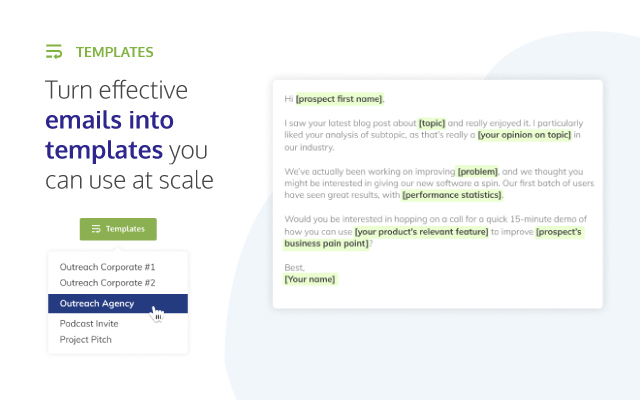
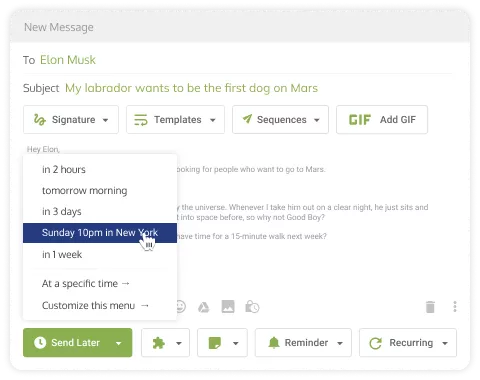
Everything appears as buttons in the Gmail compose window and toolbar. Send Later queues a message for a set time. Reminders bring a thread back to the top of the inbox in two hours, tomorrow or three days, either always or only if nobody replied. Recurring emails resend the same message on a schedule, which is what people actually buy it for: the weekly status report, the monthly invoice nudge.
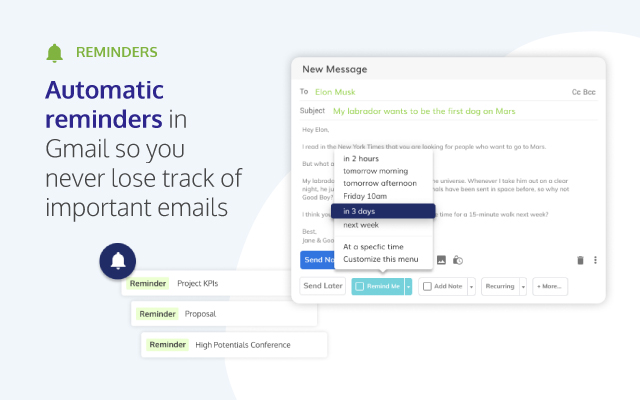
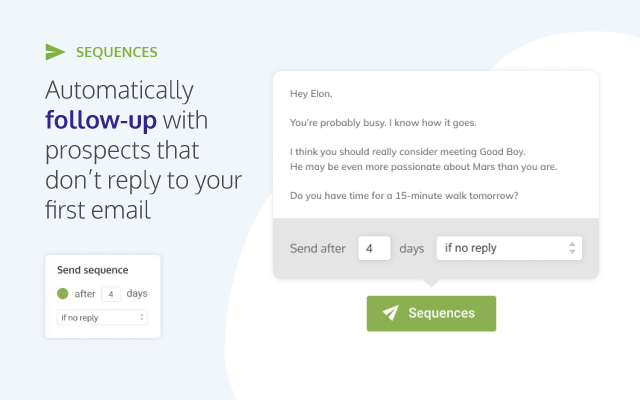
Sequences are a light follow-up tool. You set rules such as "send after 4 days if no reply", and Right Inbox fires the next step from your own Gmail account. Templates take merge fields, private notes pin a comment to a thread that only you can see, and tracking shows opens and link clicks per message.
There is a hard ceiling on scheduled sends that the marketing never mentions. Because Right Inbox sends through Gmail's SMTP, a scheduled email cannot go to 100 or more recipients across To, Cc and Bcc - the help centre's own article is titled "Why can't I schedule an email to be sent more than 99 recipients". Mail merge exists for bigger lists, but it is a Professional feature and it still sends from your Gmail quota.
The homepage also lists end-to-end email encryption, an AI email summarizer, smart link previews and Inbox Pause. None of them appear on the pricing grid and there is no public changelog, so which plan includes them is not stated anywhere we could find. Treat them as possible extras, not reasons to buy.
Where it falls short
Right Inbox is a browser extension for Gmail and Google Workspace on the desktop, full stop. It does not work with Outlook, Yahoo or Zoho. The help centre says "Mobile devices are not supported at this time", so a reminder that fires while you are on your phone just shows up as an ordinary email. Supported browsers are Chrome, Firefox and Safari; Edge is not listed. You also have to install it separately on every computer and every browser you use.
The complaints in user reviews are consistent. G2 reviewers mention send-later emails that occasionally did not go out at the scheduled time, and toolbar buttons that crowd out Gmail's search bar. The vendor's own help article admits Gmail sometimes loads in a way that keeps the extension from appearing, and the fix is to refresh the page. For a tool whose job is sending things while you are not watching, the first one matters most.
The numbers on the store page are also smaller than the marketing. The Chrome Web Store shows 100,000 users and 4.5 stars from 12.3K ratings (version 11.0.4, updated November 2, 2026). Right Inbox's Workspace Marketplace listing claims "more than 250,000 professionals" and a 4.7 average. The store figures are the ones we trust.
Privacy: the store label and the policy disagree
Right Inbox signs in through Google OAuth and never sees your Gmail password; you can revoke access from your Google account at any time. To schedule and resurface messages it needs access to your inbox, and the privacy policy commits to Google's Limited Use rules for Gmail data.
The Chrome Web Store disclosure, though, says "The developer has disclosed that it will not collect or use your data." The privacy policy says that when open and click tracking is on, Right Inbox "collects the recipient's device type and IP address", plus opens, clicks and downloads. Both cannot be true. The policy is also old - "Last updated: October 14, 2019" - and does not say where data is hosted or whether message bodies are stored.
The homepage shows a Google security assessment badge. We could not verify it independently, so we are not counting it.
Billing, refunds and cancelling
The terms (last updated May 27, 2021) are blunt: "We do not issue refunds for Subscriptions once the subscription order is placed or is renewed." Forget to cancel a yearly plan and you have paid for another year. Mailbutler, by comparison, refunds within five days of payment.
There is no cancel button described in the app. You cancel through the link in the fulfilment email from your purchase, or by emailing support and asking them to do it. Save that email the day you buy, and set a reminder - Right Inbox can do that much for you - a week before renewal.
Right Inbox vs Mailtrack, Mixmax, Mailbutler and Mailshake
If you only want to know who opened your email, do not pay for Right Inbox. Mailtrack's free plan tracks unlimited emails (first open only), against Right Inbox's five a month, and its paid tier is $6.99 per user a month.
If you need the same tools outside Gmail, Mailbutler works in Apple Mail, Gmail and Outlook and adds an AI assistant on its $11-per-user Smart plan. For proper sales sequences with analytics, Mixmax starts at $29 for 100 sequence recipients a month. For cold outreach at volume, Mailshake starts at $29 per user, and for one-off mail merges from a spreadsheet Mailmeteor is the cheaper fit.
None of those give you unlimited send-later, recurring emails and reminders for less than $8 a month. That niche is Right Inbox's alone.
Verdict
Buy Right Inbox Professional if you work in desktop Gmail all day and want recurring emails, follow-up reminders and scheduled sends for $7.95 a month on a yearly plan. It is the cheapest serious option for that, and its price has held while competitors climbed.
Skip it if you mostly read mail on your phone, use Outlook, or only want open tracking - Mailbutler covers the first two and Mailtrack's free plan covers the third. Skip it too if a no-refund yearly charge and a privacy label that contradicts the policy bother you. Start on the free plan, accept that five uses will run out within days, and pay monthly at $9.95 for the first month rather than locking in a year you cannot get back.
Ready to try Right Inbox?
Visit the official website to see the latest plans, pricing, and special offers.
Get Started - Right Inbox* Affiliate link - we may earn a commission at no extra cost to you.