Workato Review: Enterprise Automation, AI Agents and a $75 Plan It Barely Advertises
Workato review: the $75 Pro plan hidden in its docs, what Standard, Business and Enterprise limit, AIRO and Genie AI agents, user complaints, and cheaper alternatives.
Expert Review

Pricing: the $75 plan the pricing page does not show
Open Workato's pricing page and you get "Pricing built for flexibility", a demo button and no numbers at all. The numbers do exist. They sit in Workato's own documentation, on a self-service page last updated on September 15, 2026, and I checked on September 25, 2026 that they still stand.
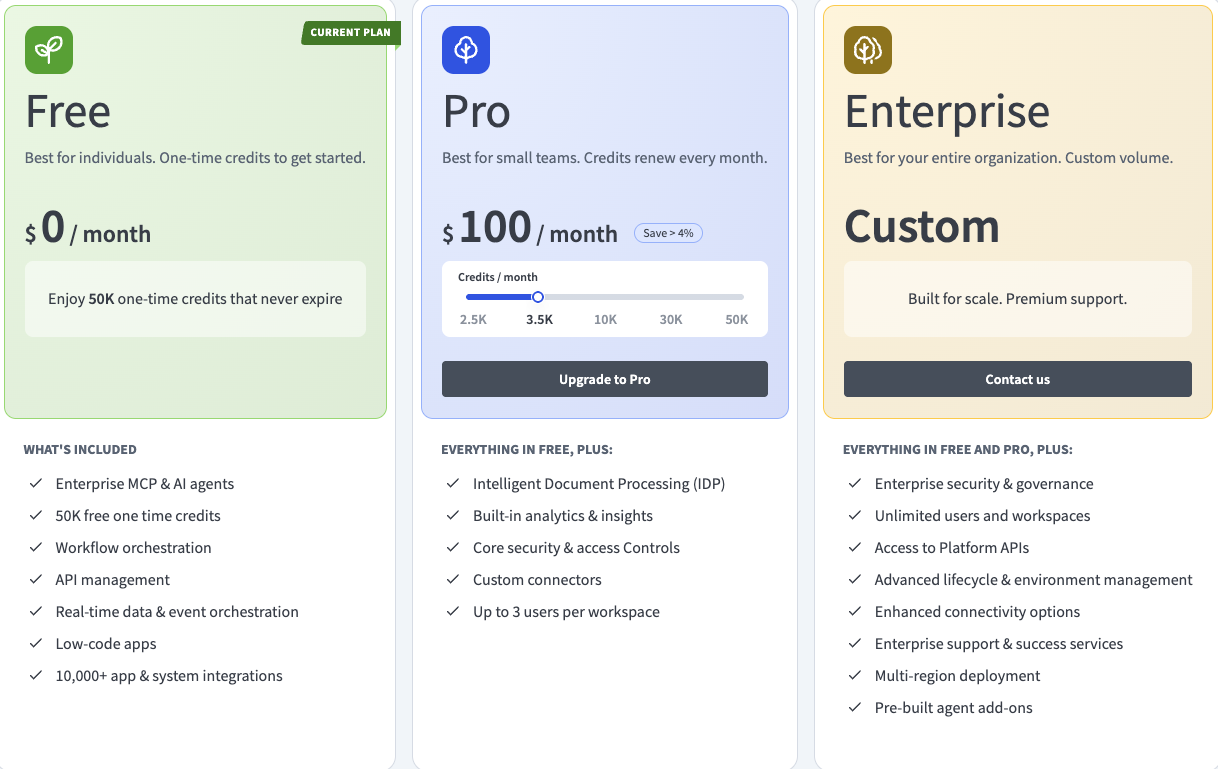
Two plans are sold by credit card, directly by Workato. Free is a one-time grant of 50,000 credits - once, not every month. Pro is a monthly allowance, and the ladder looks like this:
| Workato Pro, per month | Credits included |
|---|---|
| $75 | 2,500 |
| $100 | 3,500 |
| $275 | 10,000 |
| $780 | 30,000 |
| $1,275 | 50,000 |
Workato says both plans get "the same platform capabilities", so Pro is not a stripped-down tier. The catch is the currency. A credit is one billing unit shared by everything - recipe steps, API requests, prompts sent to an AI agent, pages of document processing - and Workato does not publish what any of those costs in credits. The docs say only that "each feature measures and applies credits differently" and send you to your contract or Customer Success. So a $75 buyer cannot tell from public material whether 2,500 credits buys 2,500 recipe steps or 250.
Compare that with Zapier, whose Professional plan states 750 tasks for $19.99/month billed annually, or n8n, whose Starter plan states 2,500 workflow executions with unlimited steps for 20 EUR/month billed annually. Both tell you the unit. Workato tells you the price of a unit it never defines.
Two smaller things before you top up. Unused Pro credits expire at the end of the billing month and do not roll over. And self-service accounts cannot choose their data region.
What the quote-only editions actually limit
Above self-service, Workato sells three editions - Standard, Business and Enterprise - with no public prices. The only outside figure comes from Vendr, which reports a median of $64,544 a year across 341 purchases, a range of $20,000 to $183,999, and average negotiated savings of 19%. Treat the first quote as an opening bid.
The docs are more candid about limits than about money. Job history is kept for 30 days on Standard and on Business, and neither lets you change it. Only Enterprise keeps 90 days, and only Enterprise lets you adjust it. If an auditor asks in May what a recipe did in March, the answer is the top edition or an export pipeline you build yourself.
The limits page (updated September 14, 2026) lists the rest: 5,000 recipes and 100 collaborators per workspace, 30 concurrent jobs per recipe unless Customer Success raises it, 1,000 steps per recipe, a 90-minute timeout on a standard job, and webhooks at 20 events per second with a 9,000-event burst. Job details over 1 MB are truncated, which is exactly when you need them - while debugging a large payload.
Some costs only appear once you are running. Usage is counted across all environments, so every test run in DEV or TEST burns the same credits as production. A rerun of a failed job is billed like the original run, although the failed actions themselves are free. The DEV/TEST/PROD environments are "available to customers on specific pricing plans", and Workato does not say which. The on-prem agent that reaches systems behind your firewall is a separate add-on, and so is extra concurrency.
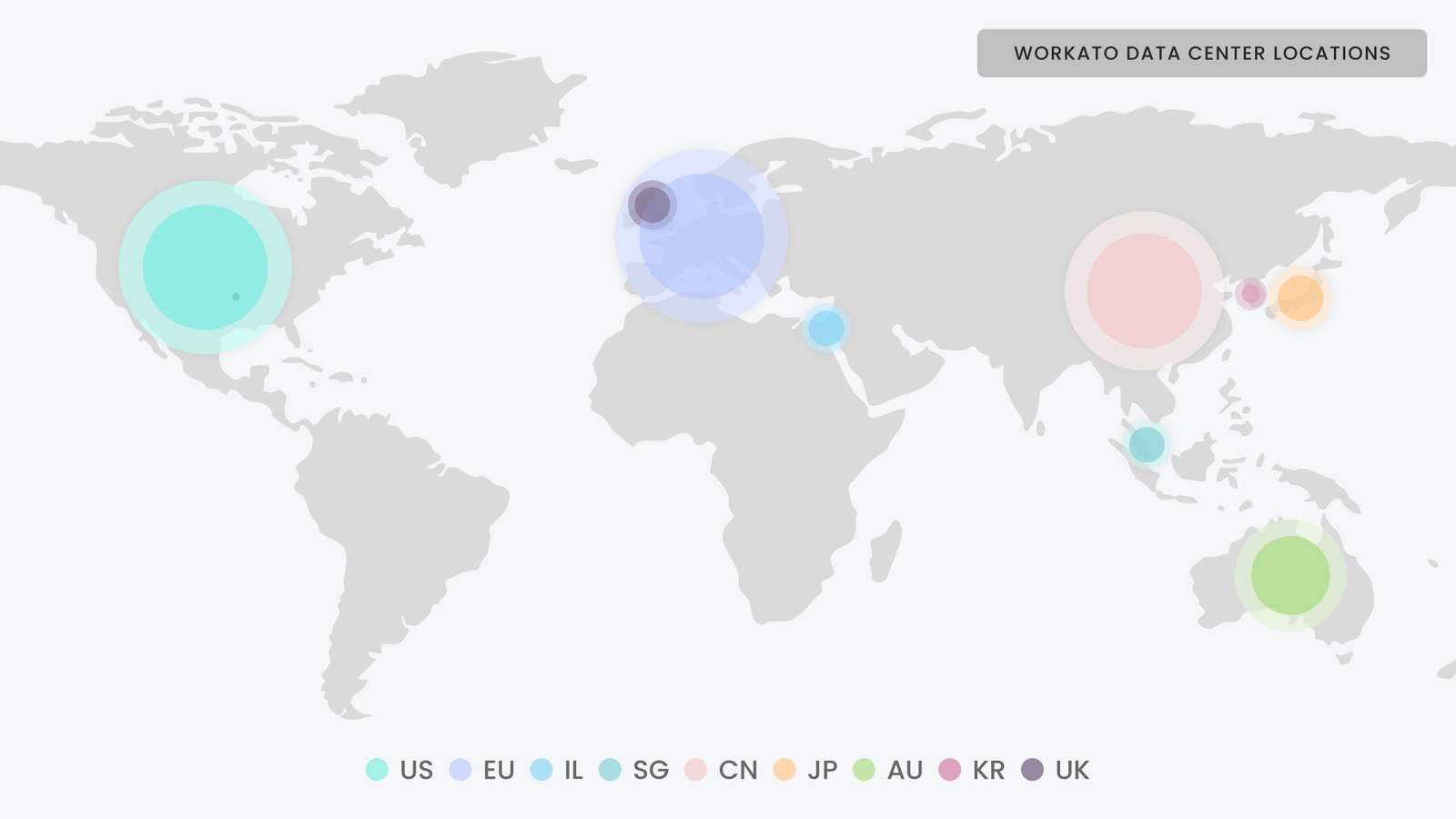
Where the price starts to make sense is hosting and compliance. Enterprise accounts can live in the US, EU, UK, Japan, Singapore, Australia, Israel, China or Korea, one region per account. The compliance list covers SOC 1 and SOC 2 Type II, SOC 3, ISO 27001, 27701 and 42001, PCI-DSS v4.0.1 Level 1, IRAP, and HIPAA with a signed BAA.
AIRO, Genies and the AI control plane
On September 23, 2026, at its WOW 2026 event, Workato launched AIRO, a "multi-agent system that turns intents into outcomes". You describe an automation, or hand it a requirements document, and it drafts a blueprint and builds the pieces. The same release added an Enterprise AI Control Plane with model, MCP, agent and API gateways, plus an AI registry and agent evals. The company now calls itself "the leading Control and Execution Platform for Enterprise AI" rather than an integration tool.
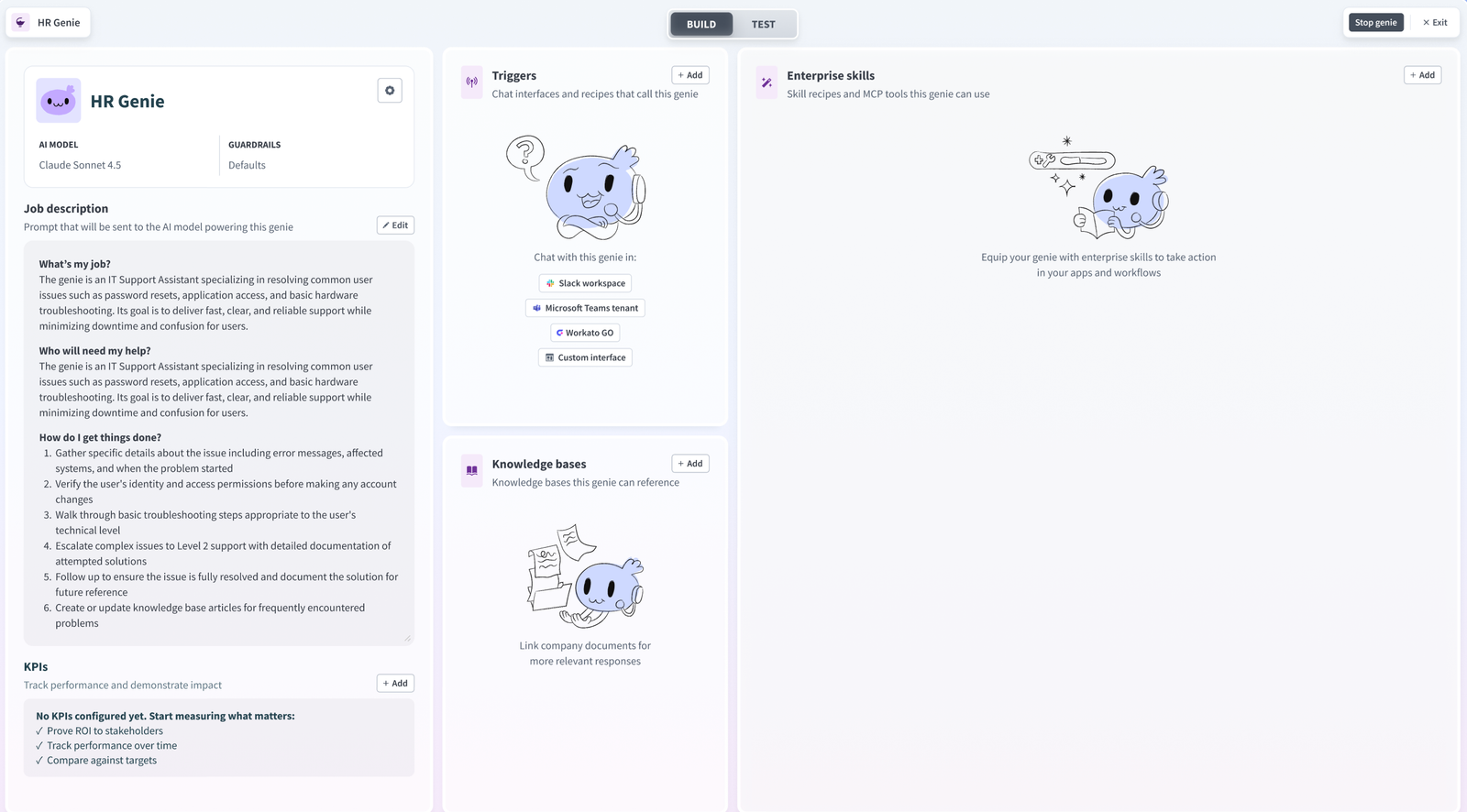
The part that already ships and matters is Genies: Workato's AI agents, built in Agent Studio and able to take MCP servers as tools. Each prompt sent to a Genie is one billable "Genie action", whatever the model and however long the prompt. The appeal for IT is control. An agent that updates Salesforce or opens a ServiceNow ticket does it through connections, permissions and logs the team already governs, not through an API key pasted into a chatbot.
What is not proven: AIRO is two days old as I write this. Nobody outside Workato has shown how it copes with a messy production account. Judge it on a trial, not on the keynote.
What users keep complaining about
Capterra rates Workato 4.6/5 from 86 reviews (read September 25, 2026). Workato itself cites 4.8/5 on Gartner Peer Insights and an eighth straight Leader placement in Gartner's 2026 Magic Quadrant for iPaaS. Good scores, but the complaints repeat.
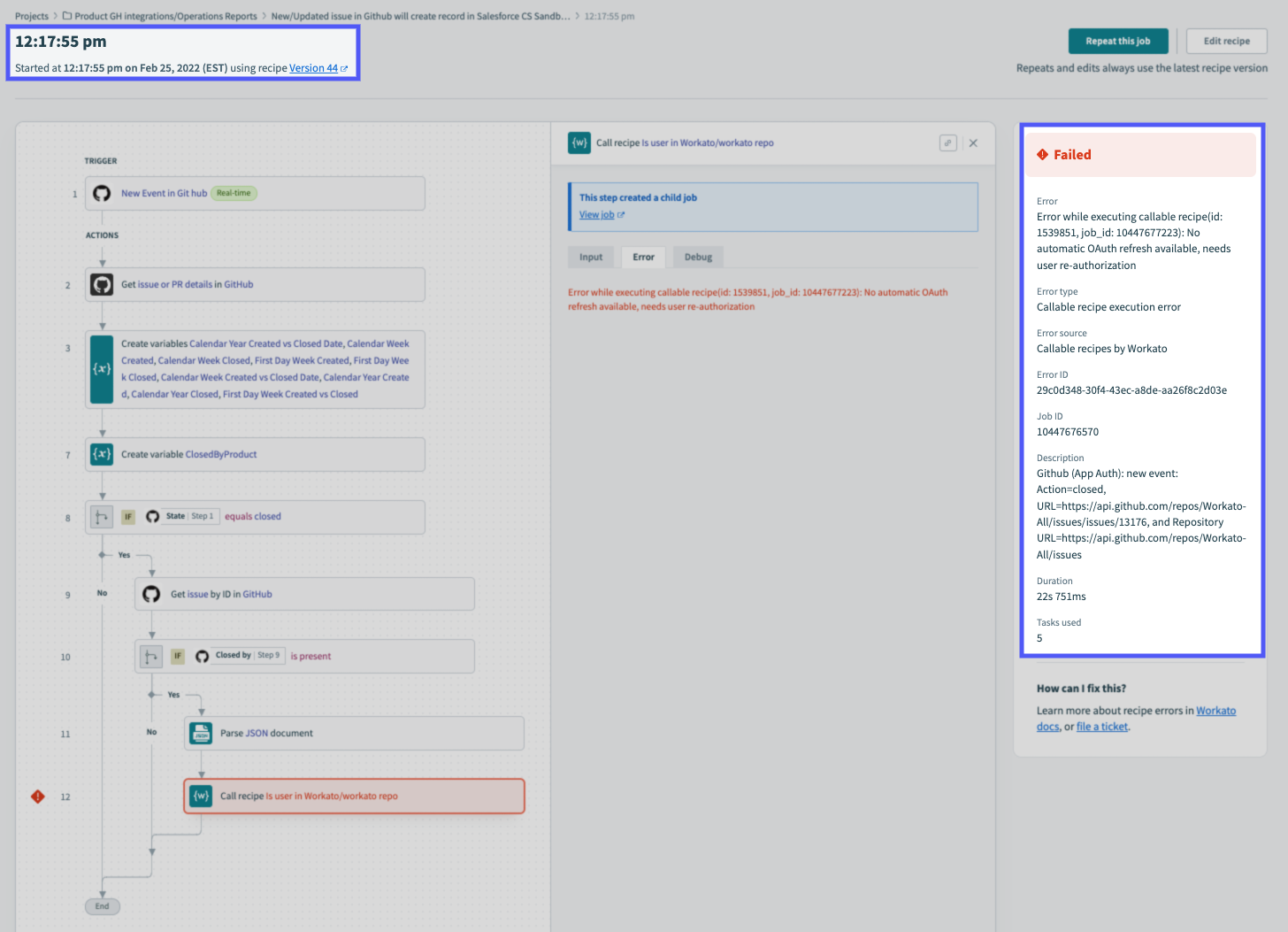
Cost comes first. "It's expensive for a small company," one Capterra reviewer wrote in April 2025; another warned that "if you have a high volume of transactions, it could potentially become costly." The learning curve is second - "Learning curve is bit steep", "more complex workflows require a learning time". Debugging is third. One reviewer "had to check nested workflows in order to find certain error points", which is what happens when a recipe calls a recipe that calls a recipe, and the error surfaces three levels down.
The connector count will not settle anything either. The same homepage says "17,000+ apps, APIs, databases, files, MCP servers" in one place and "1000+ apps" in another. Read that as roughly 1,000 pre-built connectors, with the bigger number counting everything reachable through generic API and MCP connections. Check your own apps in the connector list before you sign.
Workato vs Zapier, Make and n8n
| Tool | Cheapest paid entry (checked September 2026) | What you are billed on | Better choice when |
|---|---|---|---|
| Workato Pro | $75/month for 2,500 credits | Credits, conversion rate unpublished | IT wants governance, residency and audit history |
| Zapier | $19.99/month billed annually ($29.99 monthly) for 750 tasks | Tasks (action steps) | Non-technical teams connecting common SaaS apps |
| Make | Core from $9/month | Operations | Visual multi-step scenarios on a small budget |
| n8n | 20 EUR/month billed annually for 2,500 executions; self-hosted Community edition free | Executions, unlimited steps | Developers who want to self-host and own the data |
At the enterprise end, MuleSoft is the usual rival for API-led integration, with a Vendr-reported median of $55,150 a year, roughly $9,000 below Workato's median. For developer-first tools, see our Pipedream and Activepieces reviews, or the wider workflow automation roundup.
Verdict: who should buy Workato, and who should skip it
Buy it if you run IT or operations at a mid-size or larger company and need automation that other departments build while IT keeps control: HIPAA or PCI scope, a data-residency requirement, SOC 2 evidence, 90 days of audit history, and a plan to let AI agents act on production systems through gateways you can monitor. That is the job Workato is built and priced for, and Workato says over half the Fortune 500 run it.
Skip it if you are a small team wiring up a handful of SaaS apps. You would pay for governance you will not use, in credits you cannot convert into tasks in advance. Zapier is easier, Make is cheaper, and n8n costs nothing if you host it yourself. If you are curious anyway, spend the Free plan's 50,000 credits before you book a sales demo. It is the cheapest way to learn how fast your real recipes burn credits.
Ready to try Workato?
Visit the official website to see the latest plans, pricing, and special offers.
Get Started - Workato* Affiliate link - we may earn a commission at no extra cost to you.