Streak Review: A Real CRM Inside Gmail, But Not a Free One
Streak review: a CRM inside Gmail from $49/user/month. Free plan has no pipelines, every user is a paid seat, and AI credits vary by page. Who should buy it.
Expert Review

The free plan is not a CRM
Streak's own pricing FAQ says it plainly: "The free plan does not include CRM pipelines." Many people install Streak because it is the CRM that lives inside Gmail. Then they find out that the free version is a tracking tool, not a CRM. It gives you email and link tracking, snippets, 50 mail merge sends a day, public share links for emails and a thread splitter. You can't create a deal, a stage or a pipeline without paying.
That changes how you should judge it. Streak is not a free CRM competing with HubSpot's free tier. It is a $49-a-seat CRM, and the real question is whether keeping your pipeline inside Gmail is worth that much more than folk or Copper charge for their entry plans. For tracking alone, the free tier is fine, but Mailtrack does that job without the CRM upsell.
How it works inside Gmail
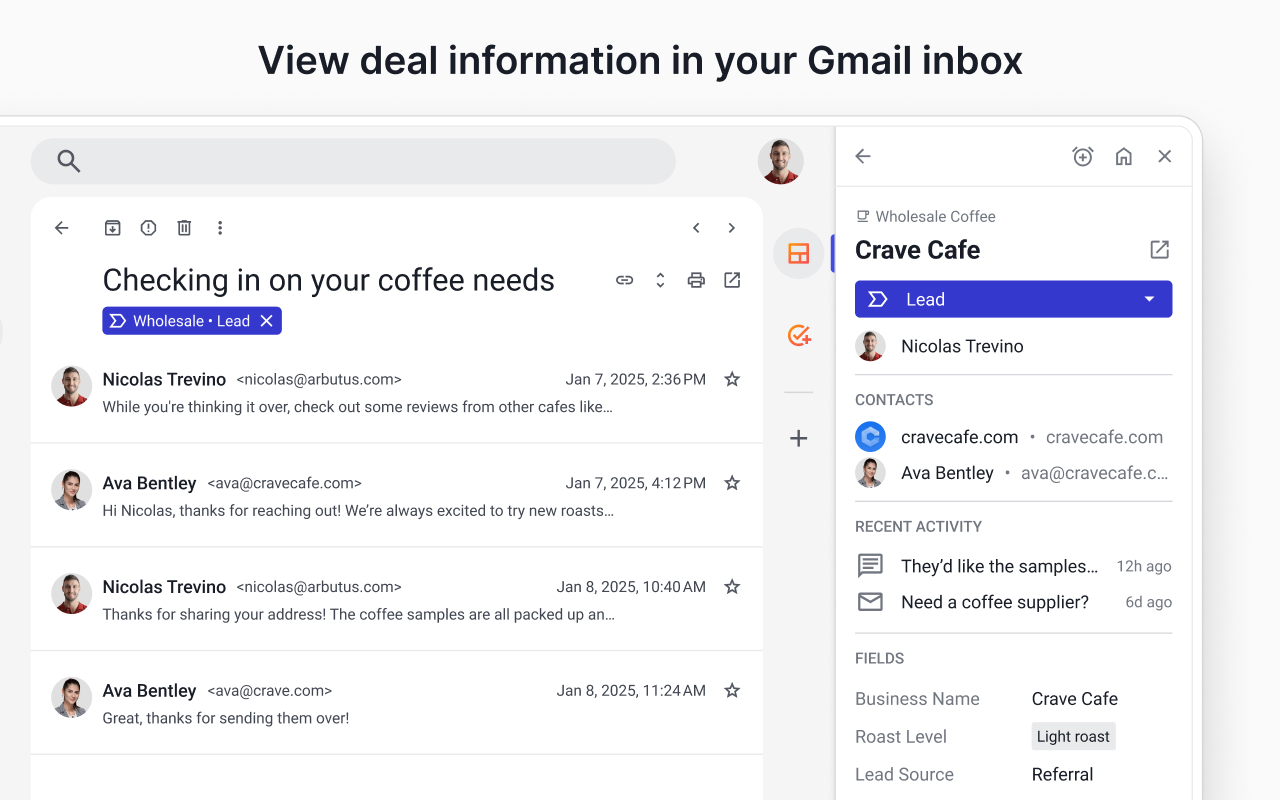
Streak adds a sidebar to Gmail with Home, Contacts, Organizations, Mail merges, Tracked emails and your pipelines. A pipeline is a spreadsheet-style table of "boxes". A box is one deal, hire or project, and it moves through stages you define. When you open an email thread, the box it belongs to appears on the right, with its stage, contacts, recent activity and custom fields. You never leave the inbox to update a deal.
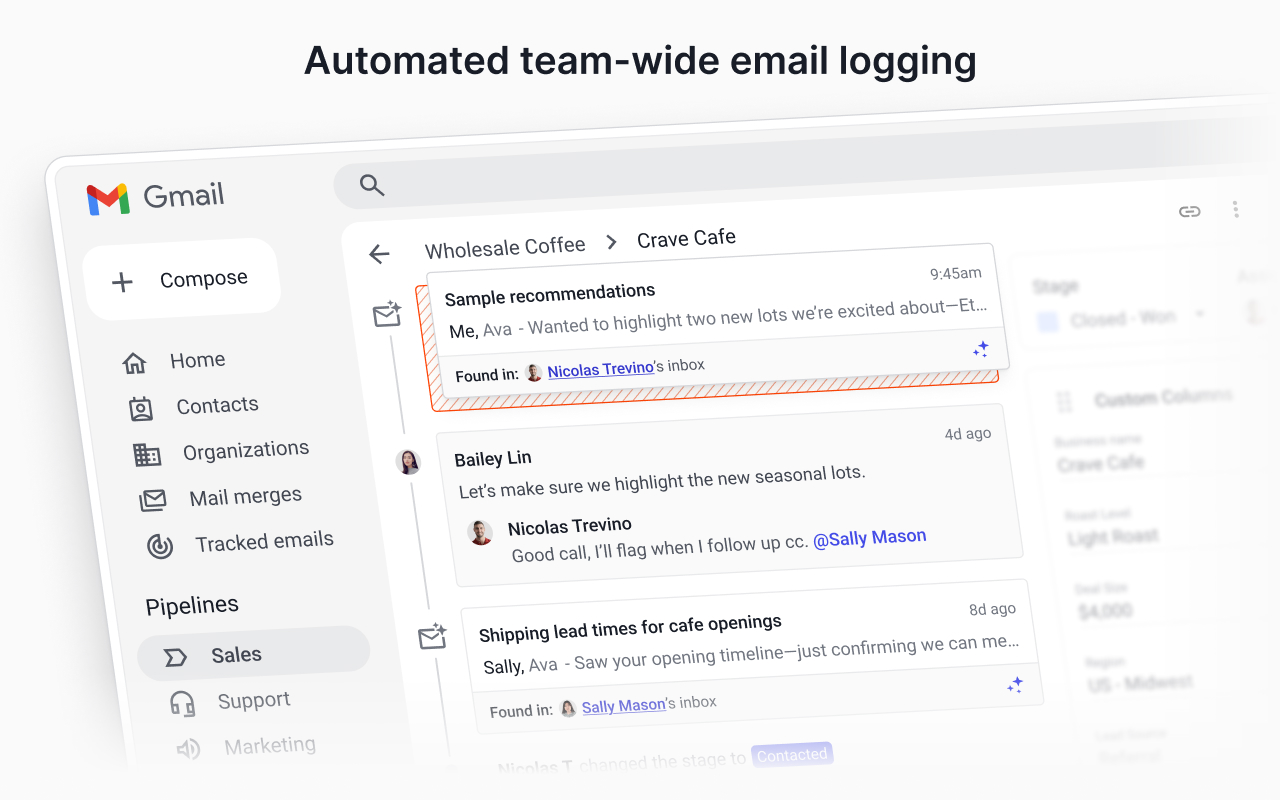
The team feature is what you're really paying for. When a shared pipeline holds a box, the emails each member exchanges with that contact are logged to it automatically, tagged with whose inbox they came from. A colleague can @mention you in a comment on the thread. For a five-person sales or partnerships team that already lives in Gmail, that replaces the "can you forward me that thread?" message. It is the strongest reason to pick Streak over a standalone CRM.
The catch is the reach. Streak runs on Chrome, Edge and Safari, plus iOS 15+ and Android 8+ apps. Firefox isn't on the install guide and there is no Outlook version at all. If even one person on the team uses Outlook, Streak is the wrong tool.
Pricing and the seat rules
These prices are per user per month, checked on the pricing page on November 2, 2026. Wayback snapshots from July 2025, December 2025 and May 2026 show the same figures, so the prices have held for over a year.
| Plan | Annual | Monthly | What it adds |
|---|---|---|---|
| Free | $0 | $0 | Tracking, snippets, 50 merge sends a day. No pipelines |
| Pro | $49 | $59 | Unlimited pipelines and records, mail merge, shared pipelines, standard reports, standard API |
| Pro+ | $69 | $89 | Automations, integrations, webhooks, advanced reports, archived users, priority support |
| Enterprise | $129 | $159 | Custom roles and permissions, data validation rules, dedicated support contact |
The pricing page doesn't make two rules obvious, but they decide the bill. First: "Everyone on a Streak team must be on the same plan." You can't put the founder on Pro+ for automations and keep everyone else on Pro. Second: there is no view-only seat. Streak says "every user on the team counts as a paid seat", so the manager who only reads the dashboard costs the same as the rep who works the pipeline. A five-person team on Pro+ billed annually pays 5 × $69 = $345 a month, or $4,140 a year. The same team on Pro pays $2,940 a year.
The trial needs watching too. It is 14 days of Pro+, not Pro, with 1,000 AI credits and no card required. With no card on file, the account drops back to the free plan at the end. Add a card during the trial, though, and Streak bills Pro+ when it ends unless you cancel. Pro+ is the $69 tier, and many teams only need the $49 one. If you want Pro, switch plans before day 14. Do it in Chrome or Edge: Streak says neither Safari nor its mobile apps support any billing actions.
AI features and the credit confusion
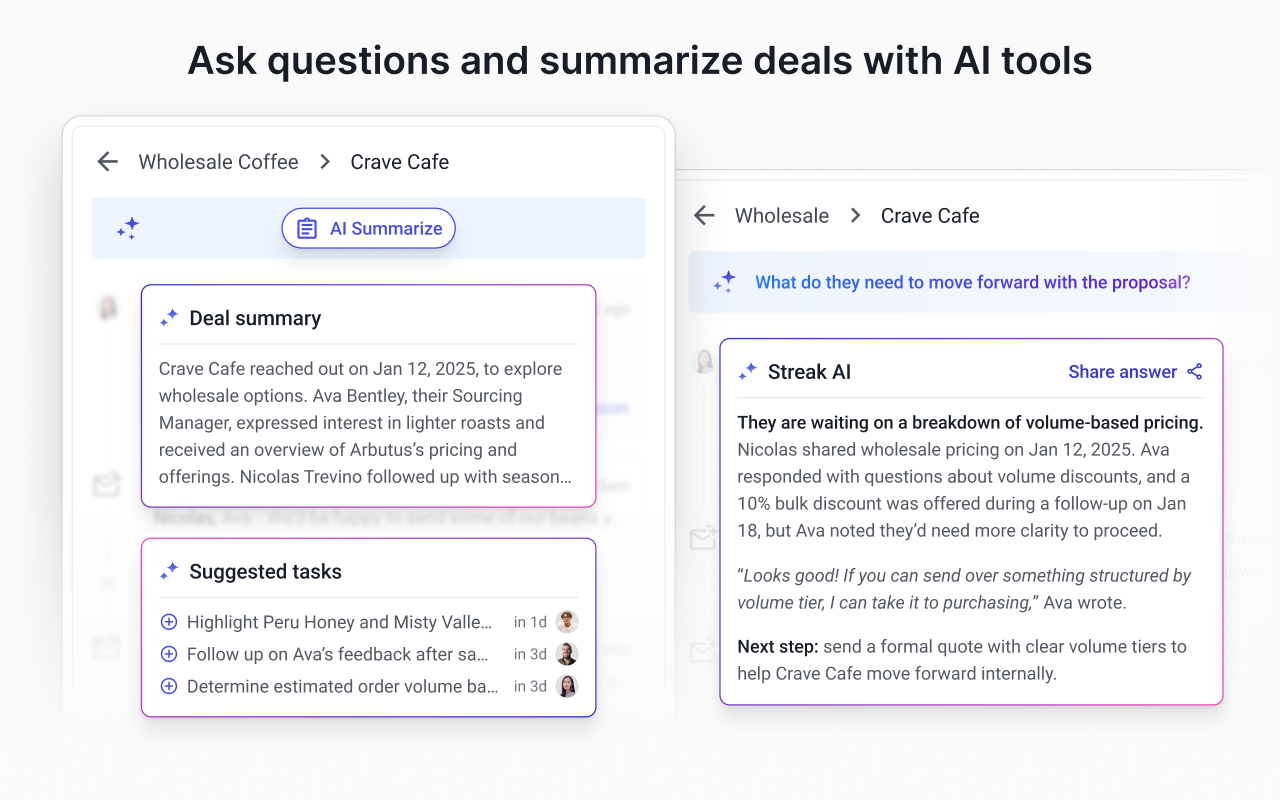
Streak's AI came out of beta on February 26, 2026. There are three main features. Deal summaries pull a box's emails, fields, tasks, notes, comments and call logs into an overview, next steps and a history of key interactions. Ask a Question answers questions about the box you're in. Autofill reads the timeline and suggests updates to your pipeline fields. Each costs credits, and Streak's own pages disagree on how many credits you get.
The pricing page says 20 credits per user per month on Pro, 150 on Pro+ and 500 on Enterprise, and that unused credits do not roll over. The February launch post said 10, 50 and 500, pooled across the team. The credits help article prints the 20/150/500 table, but its worked example says a two-user Pro+ team has 100 credits, which matches the old 50-per-user figure. The summaries, autofill and Q&A help articles also still say AI is "available on Pro+ and Enterprise plans only", even though the pricing page gives Pro 20 credits. Even the cost of web-research autofill differs: 2 credits on the pricing page, 5 credits per field in the help article.
In practice, a summary or a question costs 1 credit, so 150 credits covers a lot of reading. Autofill with web research is where credits run out quickly, at either price. Extra packs start at 1,000 credits for $100 a month. Two more limits matter day to day: summaries don't refresh on their own, and Ask a Question can't see across boxes, so "which deals stalled this month?" is not a question it can answer. Use the trial's 1,000 credits to test this. Then check what your plan's counter shows before you rely on any of the numbers above.
Mail merge: 1,500 a day, or 400
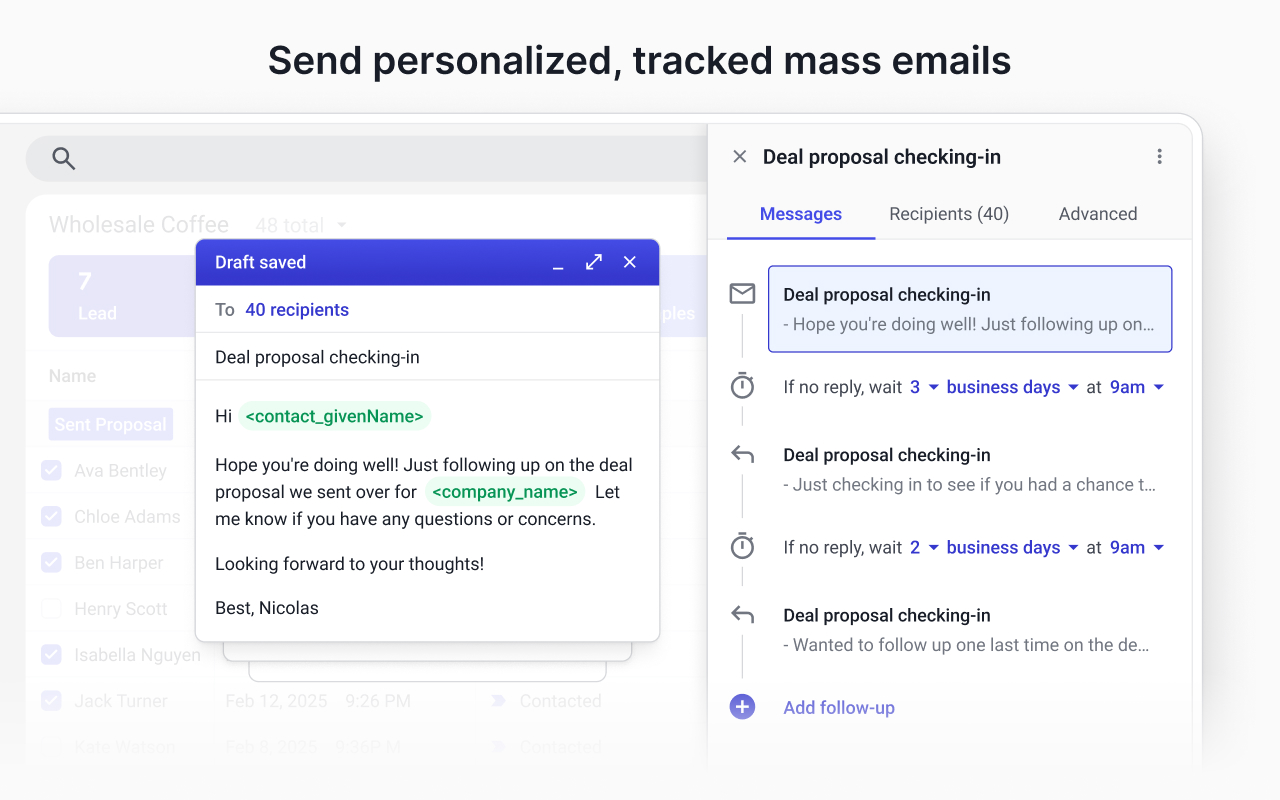
Mail merge is included on every paid plan. It supports merge fields such as <contact_givenName> and automatic follow-ups like "if no reply, wait 3 business days". The help article sets the cap at 1,500 emails per rolling 24 hours on Pro, Pro+ and Enterprise alike. Moving up to Pro+ doesn't raise it.
That 1,500 applies only to Google Workspace accounts. On a free @gmail.com address you are "limited to 400 sent emails per day due to a lower limit imposed by Google", whatever you pay Streak. Streak's quota and Gmail's own sending limits are also counted separately, so a 400-email merge on a personal account leaves no room for normal mail. If outbound volume is the main reason you're shopping, Mailmeteor does merge-first sending for less, and a dedicated sending tool is the honest answer above a few thousand a day.
Your data, and leaving with it
Streak asks for broad Google permissions: Gmail "read, compose, send, and permanently delete all your email", plus Drive, Contacts and Calendar. It says it does not delete your emails, and it goes through Google's OAuth API review every year. According to the security page, all data sits on Google Cloud in the United States, vulnerability reports go through HackerOne, and no data goes to third-party analytics firms. SOC 2, a GDPR data processing agreement and an EU data region are not mentioned on that page. That doesn't mean Streak lacks them, but a European buyer has to ask sales rather than read the answer.
Leaving is possible but takes work. A pipeline exports to a Google Sheet, either the full pipeline, selected boxes or a saved view, and can include the newsfeed, call logs, meeting notes and tasks. No direct CSV download is described. You go through Sheets and download from there, one pipeline at a time. Webhooks are only on Pro+ and Enterprise. Pro gets the standard API only, so syncing changes to another system as they happen means paying for the higher tier.
The public reviews split sharply. The Chrome Web Store listing shows 4.3 out of 5 from 6.5K ratings and 700,000 users, and version 7.122 shipped on October 31, 2026, so the extension is actively maintained. Trustpilot shows 2.5 from only 13 reviews. That sample is too small to mean much, but its complaints repeat: open tracking that users say is wrong or missing, and one account suspension the reviewer called "not a good way to run a business".
Verdict: who should buy Streak
Buy Streak if your whole team works in Gmail on Google Workspace, your deals happen over email, and a shared timeline of everyone's conversations with a client is worth $49 a seat to you. In that case Pro is enough. Only move to Pro+ when you actually need automations, integrations or webhooks, not because the trial put you there.
Skip it if you want a free CRM, because Streak no longer has one. HubSpot is free for two users with real pipelines. Skip it if you need cheap seats for a growing team: folk Standard is $24 a member billed annually, and Copper Basic is $23, though Copper caps that tier at 2,500 contacts. Skip it if anyone on the team uses Outlook or Firefox, if you need view-only seats for managers, or if you need a stated EU data region. For a pipeline-first sales team that doesn't care where its email lives, Pipedrive is the better fit. Our CRM roundup compares the wider field.
Streak is the best CRM for a team that never wants to leave Gmail. It is also an expensive one, and its AI credit numbers need checking against your own account before you rely on them.
Ready to try Streak?
Visit the official website to see the latest plans, pricing, and special offers.
Get Started - Streak* Affiliate link - we may earn a commission at no extra cost to you.